
A policy sign off sheet is not a register of who has read the policy. It is the small block that says who approved this version, when, and when somebody will look at it again. Two different records, often confused, and only one of them belongs on the front page.
Here is the block itself, row by row, and what each row has to carry.
The five rows that do the work
The print ready policy in CareStream uses five rows, and they are a reasonable template for any service:
- Registered manager.
- Approved by.
- Date approved.
- Next review.
- Signature.
Registered manager names the person accountable in the service. Approved by names whoever took the decision, which is not always the same person.
Date approved is the one people skip. Without it, nobody can tell which version is in front of them.
Next review turns the policy from a document into a cycle. A blank there is the most common finding we see in a policy review.
A date that has already passed is the second most common. It reads worse than no date at all, because it shows the cycle stopped.
Have your policies read against the regulations to see what is missing or out of date. No card needed.
Create a free accountThe signature is the smallest part and the one an inspector looks for first. A printed name under a blank line does not count, and a scanned squiggle with no date beside it tells nobody anything useful.
What sits above the block
The sign off block only makes sense under a proper heading. Put the service name and logo at the top, then the policy title.
Add the version number beside the title. Add who the policy applies to, because a policy written for one home in a group should say so.
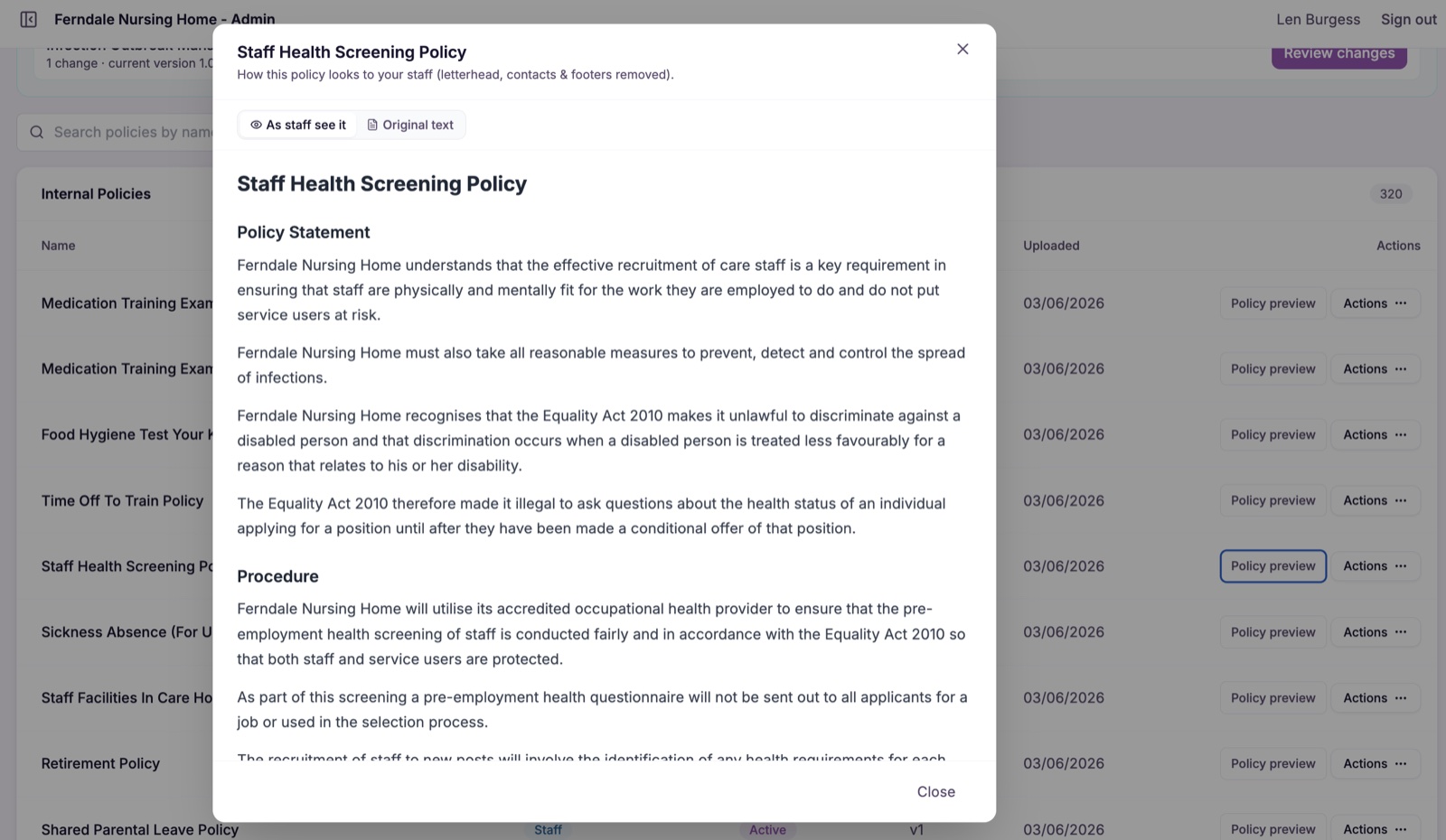
Figure: the preview shows the same policy as staff see it, with letterhead and footers stripped out, so the two versions never drift apart.
That difference matters. The printed copy carries the letterhead and the block. The version staff read on a phone does not need either.
Who signs, in a single home and in a group
One service is simple. The registered manager signs, and the provider or nominated individual signs anything that commits the organisation.
A group is where blocks go blank. A policy written at head office is approved centrally, then each home has to say it applies here.
We would use two lines for that. One for the central approval, one for the local manager who adopted it. Name the role beside the name, because people move and roles stay.
Avoid a signature from someone who never read it. A block full of names that nobody can explain is worse than an honest gap.
The footer line that saves arguments
One line in the footer does a lot of work: uncontrolled when printed.
It tells the reader that paper goes stale. It points them to the live copy. It also protects you when a folder in a cupboard turns out to hold something from two versions back.
CareStream prints that line on every print ready policy. If you build your own template, copy the habit.
Why the sheet proves nothing about staff
This is where services get caught. Policy approval is a management act. Policy acknowledgement is a staff act. The sign off block only records the first.
A separate record answers the second question. It should show the name, the version they saw, and the date.

Figure: reading together in the staff room is good practice, though it only becomes evidence when someone writes down who was there.
Small changes need a thought here too. A typo fix does not need the whole team to look again, but a change to what staff must do always does.
Be careful what you claim. A tick that says read is not the same as a signature, and neither one proves understanding. Where a policy changed practice, add a short check that asks staff what they would now do.
Records about the way the service is run have to be kept, and kept safely. That duty sits in Regulation 17 on good governance.
The same rule covers the records you keep about each person you support. One habit, two sets of paper.
Where the law does ask for a written statement
One policy is different. Most employers must prepare a written statement of general policy on health and safety, revise it as needed, and bring it to the notice of all employees.
The free policy check shows where a policy falls short of the regulations. Create a free account to begin.
Create a free accountThat duty is in section 2 of the Health and Safety at Work etc. Act 1974. The words bring it to the notice of employees are the ones to notice: writing it is not enough.
Very small employers are let off this one. An employer with fewer than five employees is excepted by the Employers' Health and Safety Policy Statements Exception Regulations.
Most registered services are well past that line, so the duty applies to you.
So the health and safety statement earns a signature and a date by law. The rest of your library earns one by good governance.
What a regulator expects to see in the policy itself
Policies are part of registration, not an afterthought. A new provider has to send a set of them, listed in the supporting documents a new provider must send.
The governance set has to show how good governance is reached. It has to show who is responsible for what, and who answers for it. A sign off block answers part of that in four lines.
After registration the same question returns in a different form. Who approved this, and when did anyone last look at it?
A template you can copy today
Take any policy on your shelf and check the front page for six things:
- The service name and the policy title.
- The version number.
- Who the policy applies to.
- The sign off block, with every row filled in.
- A next review date that has not already passed.
- The footer line about printed copies.
If three of those are missing, you have found your first job of the week. Our post on keeping version control for care policies covers the numbering, and the one on how often care policies should be reviewed covers the dates.
Benefits of CareStream for your policy sign off sheet
CareStream builds the policy sign off sheet for you. The print ready file carries your logo, the five rows above and the uncontrolled when printed footer, and it is listed for the Professional plan and above.
The approval trail sits behind it. A policy moves from draft to review, then to the care manager, then to an external reviewer where you ask for one. The status is visible at each step, and it is named on the screen.
Version history is on every plan, including the free one. Staff reading is recorded as time spent, how far they scrolled and whether they pressed mark as read, which is useful but is not a signed register.
The free policy gap check reads inside the first 5 policies you upload. The written policy shop covers the gaps you would rather not write yourself.
What to do with the next policy that lands
Fix the block before you fix the wording. Fill the five rows, add the version number, set the review date and put the footer in.
Then decide where the acknowledgement record lives, and tell staff where the live copy sits. Say it once at handover and once in writing, so nobody has to guess which copy wins. A policy nobody can place in time is a policy nobody can rely on.
Sources
- Health and Safety at Work etc. Act 1974, section 2: general duties of employers to their employees · legislation.gov.uk
- Employers' Health and Safety Policy Statements (Exception) Regulations 1975 · legislation.gov.uk
- Health and Social Care Act 2008 (Regulated Activities) Regulations 2014, regulation 17: good governance · legislation.gov.uk
- Care Quality Commission: supporting documents for new provider registration applications · cqc.org.uk
Frequently asked