Training built from your own policies, evidenced as it happens
Training in care fails on the record keeping far more often than on the teaching. This covers what each role has to complete, how face to face sessions and online modules end up on the same staff record, and what you can put in front of an inspector without preparing for it.
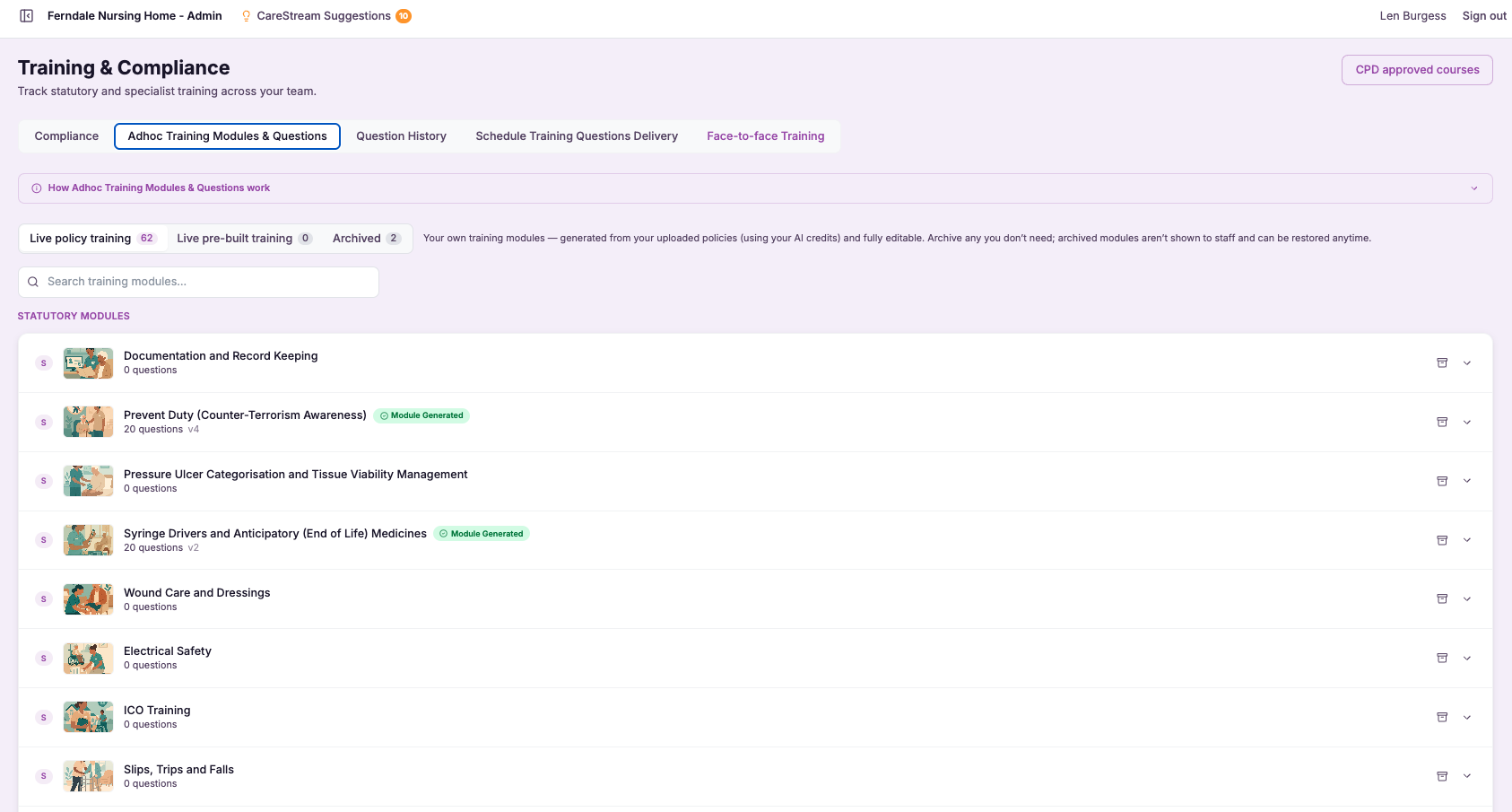
Mandatory training by role
Mandatory training by role is a way of describing what each type of role in your service is required to complete, rather than treating your whole team as one undifferentiated list. You decide which courses a carer must hold, which a nurse must hold, and which a manager must hold, and CareStream turns those definitions into the training matrix that applies to each person.
This matters because mandatory training expectations genuinely differ across roles, and CQC expects you to show that people are trained appropriately for the work they actually do. Getting the mapping right, and keeping it consistent as staff join or change roles, is exactly the kind of task that is tedious by hand and effortless when the platform applies it for you.
- You define each role's mandatory training once, and every person in that role inherits the correct requirements.
- Carers, nurses and managers are held to the training that genuinely applies to their work, not a single catch-all list.
- New starters pick up the right training expectations automatically as soon as their role is set.
- You stop over-training people on courses that do not apply to them and stop missing ones that do.
- When someone changes role, their training requirements move with them without manual reassignment.
- You can evidence to CQC that training is matched to the roles people actually perform.
How it works, step by step
Set out the mandatory training a carer, a nurse, a manager and any other role in your service must hold.
Attach the relevant courses to each role so the requirement is described once, not repeated per person.
Give each member of staff their role, and the platform knows which training they should be held against.
CareStream builds each person's required training from their role, with no manual course-by-course assigning.
When someone moves role, their training requirements update to match the new role automatically.
Update a role's requirements once and every person in that role reflects the change straight away.
- Mandatory training is defined per role, not per individual.
- Carers, nurses and managers each carry their own required course set.
- The right matrix is applied to each person automatically from their role.
- Role changes update a person's requirements without manual work.
- Evidences that training is matched to the work people actually do.
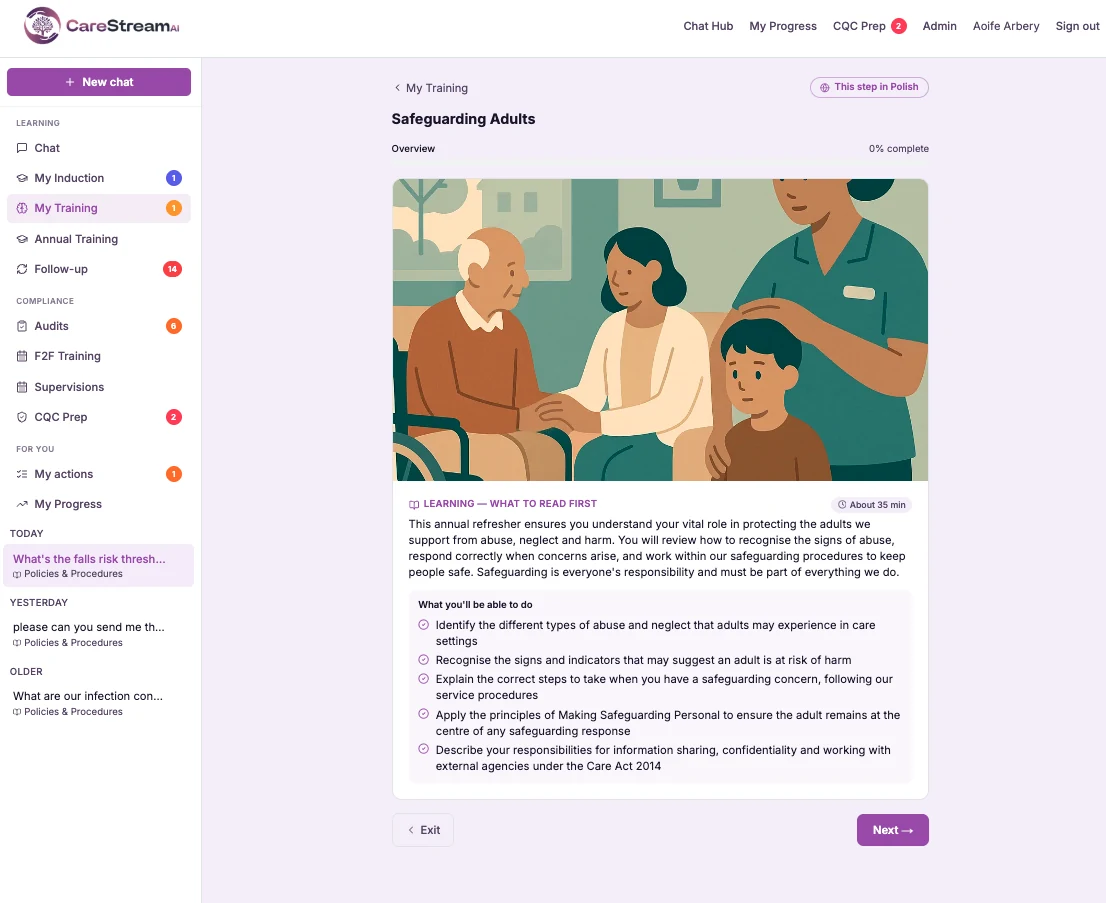
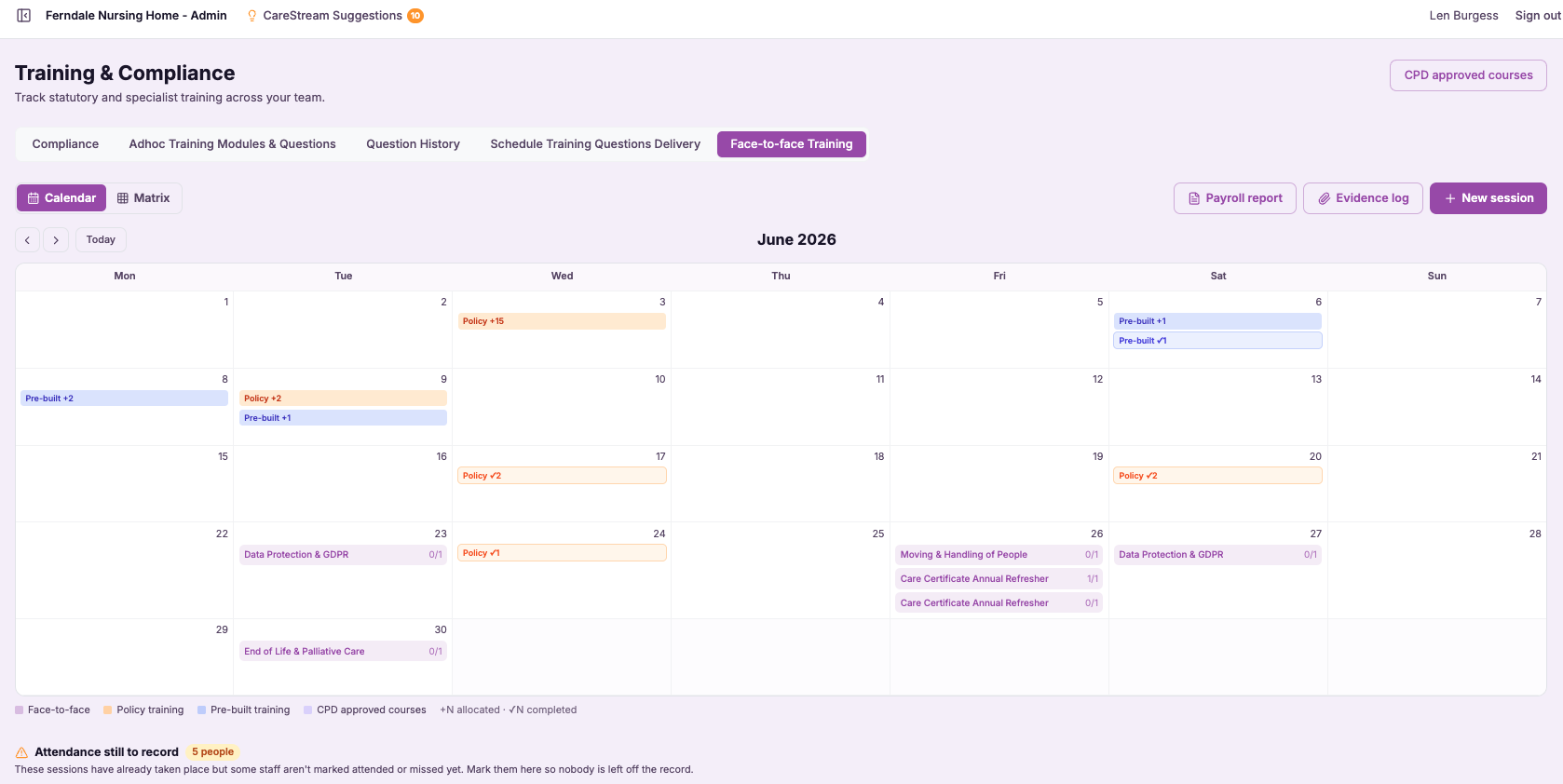
Face-to-face training and matrix
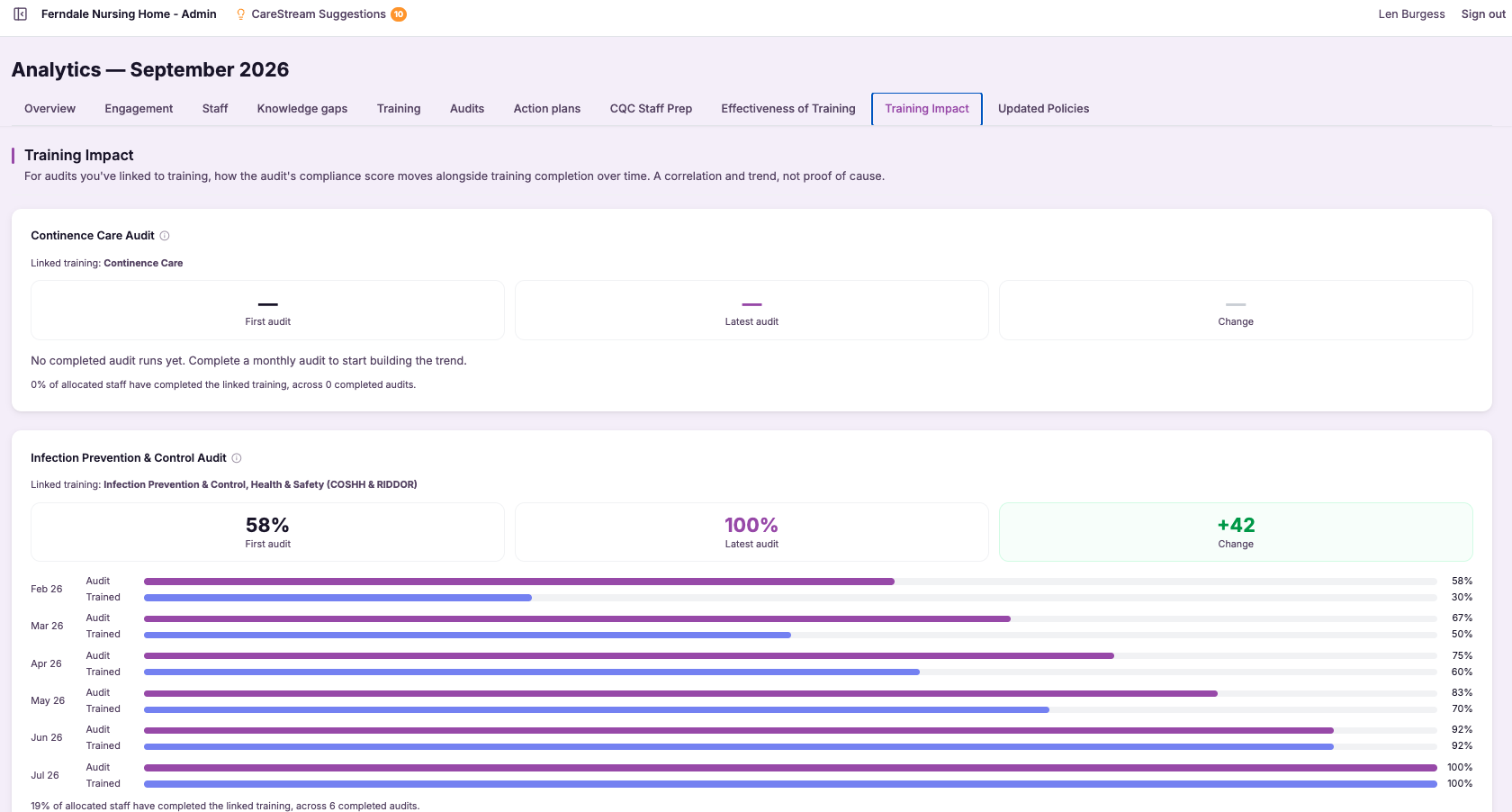
Face-to-face training support lets you record the in-person sessions your team attends, from practical skills like moving and handling to any mandatory course delivered in a room rather than on a device. You capture who attended and the evidence of that attendance, and it flows into the same training compliance matrix as your online learning.
This matters because CQC does not care whether a course was online or in person, only that people are competently trained. If your classroom training lives in a separate register, your compliance matrix is telling you only half the story. Bringing both into one view means the matrix reflects the whole of your mandatory training, not just the part that happened to be digital.
- In-person training is recorded properly instead of living on a paper sign-in sheet.
- Attendance and evidence for classroom sessions are captured against the right people.
- Face-to-face and online training appear together in one compliance matrix.
- Your training picture is complete, so nothing is missed just because it was taught in a room.
- You can evidence practical, competency-based training at inspection alongside e-learning.
- Managers stop reconciling two separate systems to work out where training really stands.
How it works, step by step
Log the in-person training that took place, so classroom courses are captured, not just informally remembered.
Record who attended, so the training lands against the correct people rather than a loose sign-in sheet.
Capture the evidence of the session and its completion, giving you a defensible record of what was delivered.
The attendance flows into the same compliance matrix as online learning, so both count together.
Classroom courses come up for renewal like any other, so practical training stays current.
At review or inspection, present online and in-person training side by side as one complete picture.
- In-person training recorded with attendance and evidence.
- Classroom courses feed the same matrix as e-learning.
- Both online and face-to-face training count towards each person's requirements.
- Practical, competency-based training is captured rather than lost on paper.
- One complete training picture instead of two disconnected systems.
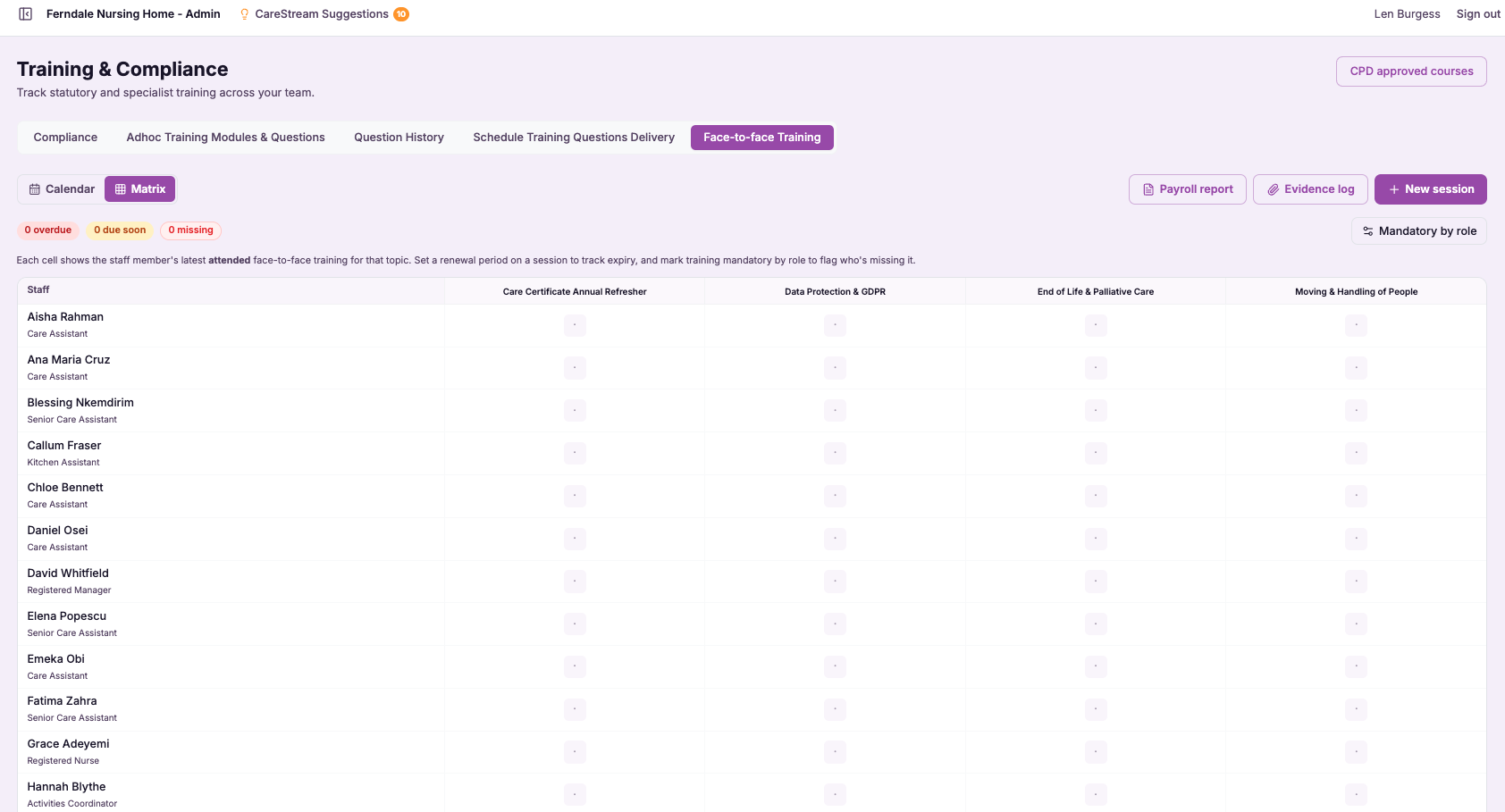
Training compliance matrix (renewals + gaps)
The training compliance matrix is a single view that places every member of staff along one axis and every required course along the other, then fills in the status for each combination. Instead of opening individual records to piece together where you stand, you see the entire service in one grid, colour and status telling you who is compliant, who is overdue and where a course is missing altogether.
This matters because training compliance is only useful if you can see it whole. Individual certificates tell you about one person and one course, but the matrix tells you about your service, which is the level CQC inspects at. It turns a scattered set of records into a clear management tool for renewals and gaps.
- You see who is trained, who is overdue and what is missing across your whole team in one view.
- Renewals coming due are visible early, so you can arrange training before anything expires.
- Gaps stand out clearly instead of hiding inside individual records or spreadsheets.
- You can prioritise your training effort where it is genuinely needed rather than guessing.
- At inspection you can show your training position for the whole service at a glance.
- Managers spend less time compiling training status and more time closing the gaps it reveals.
How it works, step by step
The matrix uses each person's required courses, so the grid reflects what people actually need to hold.
Every cell tells you whether that person is trained, overdue or missing the course entirely.
Courses approaching their renewal date are highlighted so you can act before they lapse.
Missing training stands out across the grid, so nothing important stays hidden in a record.
As staff complete courses and renewals fall due, the matrix reflects the change automatically.
Open the matrix at any point, for a supervision, a team meeting or an inspection, and read your position instantly.
- Every member of staff mapped against every required course in one grid.
- Clear status for each: trained, overdue or missing.
- Renewals coming due are highlighted before they expire.
- Gaps are surfaced at service level, not buried in individual records.
- The view stays current as training is completed and renewals fall due.
CQC evidence pack (sign-in sheets, certificates, files)
The CQC evidence pack collects the documents that prove your practice, training sign-in sheets, certificates, uploaded files and records, and organises them into a single pack you can present at inspection. Rather than these items living in separate folders and systems, they are pulled together in one place, ordered and ready to show.
This matters because at inspection, evidence is only valuable if you can produce it. A policy or a training claim carries far more weight when the certificate, the sign-in sheet or the record that supports it is right there. Bringing that evidence together removes the scramble and lets you demonstrate, quickly and confidently, that your policies and procedures in health and social care are backed by real records.
- Present your supporting evidence as one organised pack instead of scattered files.
- Find the certificate, sheet or record an inspector asks for without hunting for it.
- Show the evidence behind your training and policies quickly and confidently.
- Stop the last-minute scramble through folders when inspection arrives.
- Keep sign-in sheets, certificates and uploaded files together in one place.
- Demonstrate that your practice is backed by real, retrievable records.
How it works, step by step
CareStream gathers training sign-in sheets, certificates, uploaded files and records from across the platform.
The evidence is arranged into a single, ordered pack rather than a loose collection of documents.
Sign-in sheets, certificates and files sit alongside the practice they support, not in separate folders.
The pack is available whenever you need it, so you are not assembling evidence under pressure.
You show the pack to inspectors as a clean, complete body of supporting evidence.
As new certificates and records are added, the evidence available reflects your up-to-date position.
- Gathers sign-in sheets, certificates, uploaded files and records into one pack
- Evidence is organised rather than scattered across folders
- Ready to present at inspection without last-minute searching
- Keeps supporting evidence together with the practice it backs
- Reflects your current records as new evidence is added
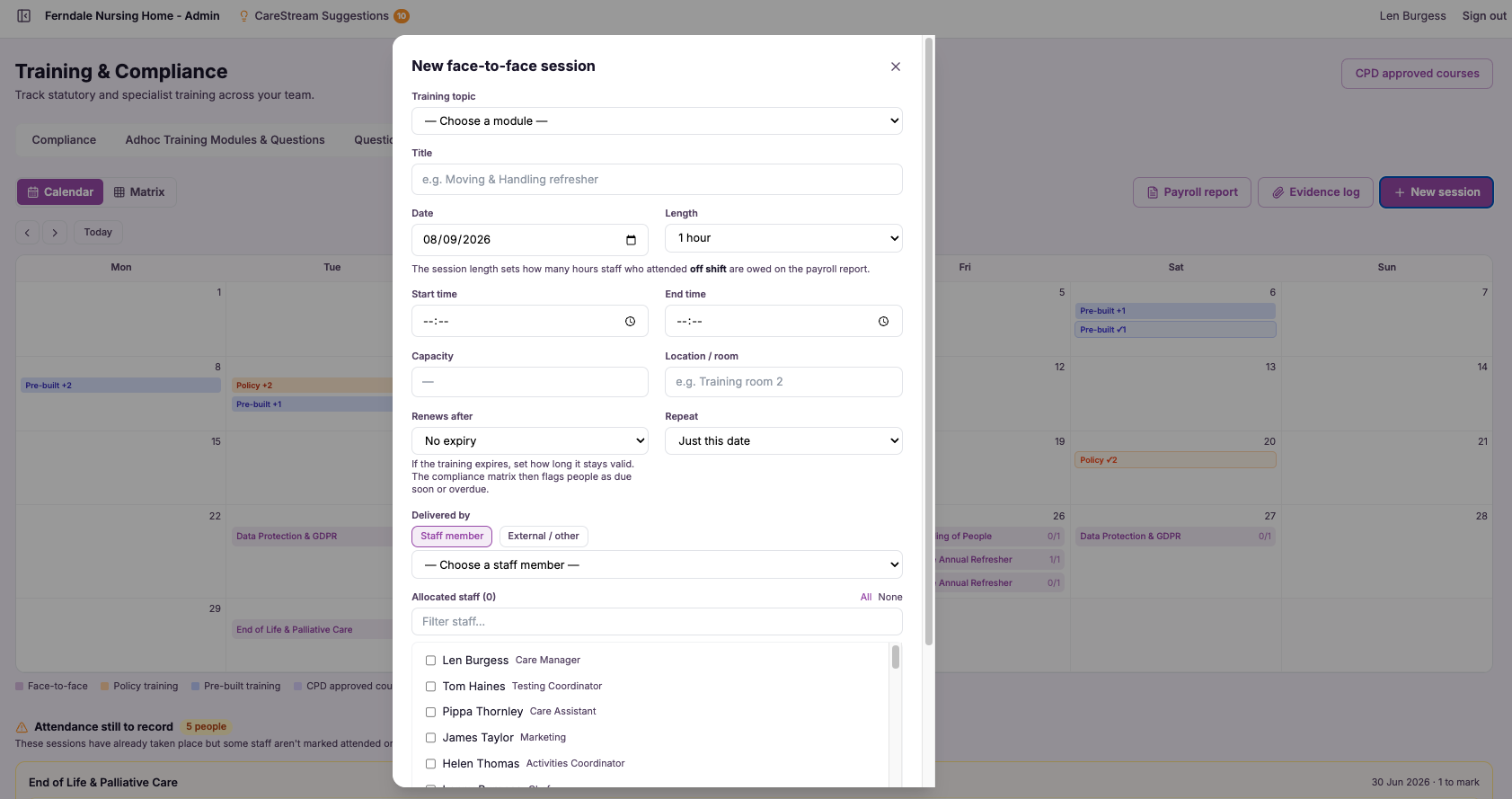
Training payroll report (PDF + CSV, £ costing)
The training payroll report takes the training your staff complete, attaches the time it took and applies a cost so you can see the hours and the money together. It then exports cleanly as a PDF for sharing or filing, or a CSV for dropping into payroll, finance or funding paperwork.
This matters because training is one of the few large costs in a care home or nursing home that usually goes unaccounted for. Managers know it is significant, but they rarely have a figure to point to. By costing training time, CareStream gives you the number, which you need for budgeting, for payroll accuracy and for evidencing workforce development spend to funders and commissioners.
- See the true cost of staff training in both hours and pounds, not just completion counts.
- Export a costed training report as a PDF for filing or sharing with owners and finance.
- Produce a CSV that drops straight into payroll and finance workflows.
- Support funding and workforce development claims with a clear, costed record.
- Build training budgets on real figures rather than rough estimates.
- Account for the hours staff spend learning so payroll and rotas stay accurate.
How it works, step by step
CareStream logs the time each member of staff spends on completed training across mandatory, annual and follow-up modules.
A pound cost is attached to that training time so hours are translated into money you can account for.
Select the date range you need, such as a month, a quarter or a funding claim window.
See training hours and cost summarised by your team so nothing is guessed or estimated.
Download a tidy PDF for filing and sharing, or a CSV to feed into payroll, finance or funding paperwork.
Keep the costed report on record to support budgets, payroll accuracy and funding claims.
- Costs training time with a pound figure attached, not just an hours count
- Exports as both PDF for sharing and CSV for payroll and finance
- Covers the training your staff complete across the period you choose
- Supports budgeting, payroll accuracy and workforce funding claims
- Built from training already recorded in CareStream, with no manual timing
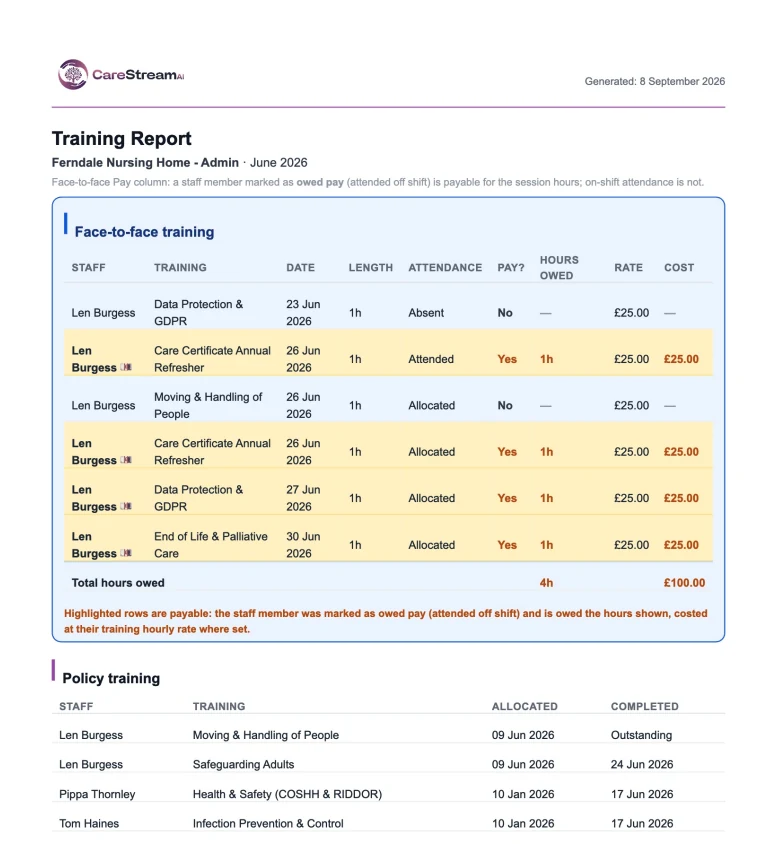
Effectiveness of training
Effectiveness of training moves your evidence beyond the completion tick to the question that really matters: did the training improve understanding and practice? It draws on assessment scores to show whether people grasped the material, and on follow-up to see whether it changed what they do, so you are measuring impact rather than just attendance.
This matters because CQC has moved firmly towards outcomes. Under the quality statements, showing that training took place is no longer enough; you are expected to show that staff are competent and that learning translates into safe, better care. Measuring effectiveness gives you the evidence for that claim, turning training from a box to tick into a demonstrable driver of quality care.
- You can show whether training improved understanding, not just that it was completed.
- Assessment scores give you a concrete measure of how well material was grasped.
- Follow-up shows whether learning actually changed practice on the floor.
- Low effectiveness signals where competence needs reinforcing before it becomes a risk.
- You evidence to CQC that your training drives real outcomes, not just compliance.
- Training investment can be judged on impact, so you strengthen what works and revisit what does not.
How it works, step by step
Treat finishing a course as the beginning of the measurement, not the end of the story.
Use assessment results to see how well each person understood the material they were taught.
Check later whether the learning held and changed what people actually do in their work.
Read scores across people and courses to see where training landed well and where it did not.
Where scores or follow-up are low, flag competence that needs reinforcing before it becomes a risk.
Present understanding and practice, not just completion, as proof that your training works.
- Measures whether training improved understanding and practice, not just completion.
- Uses assessment scores to gauge how well material was understood.
- Uses follow-up to check whether learning changed real practice.
- Highlights where competence needs reinforcing before it becomes a risk.
- Evidences that training drives outcomes, in line with CQC quality statements.
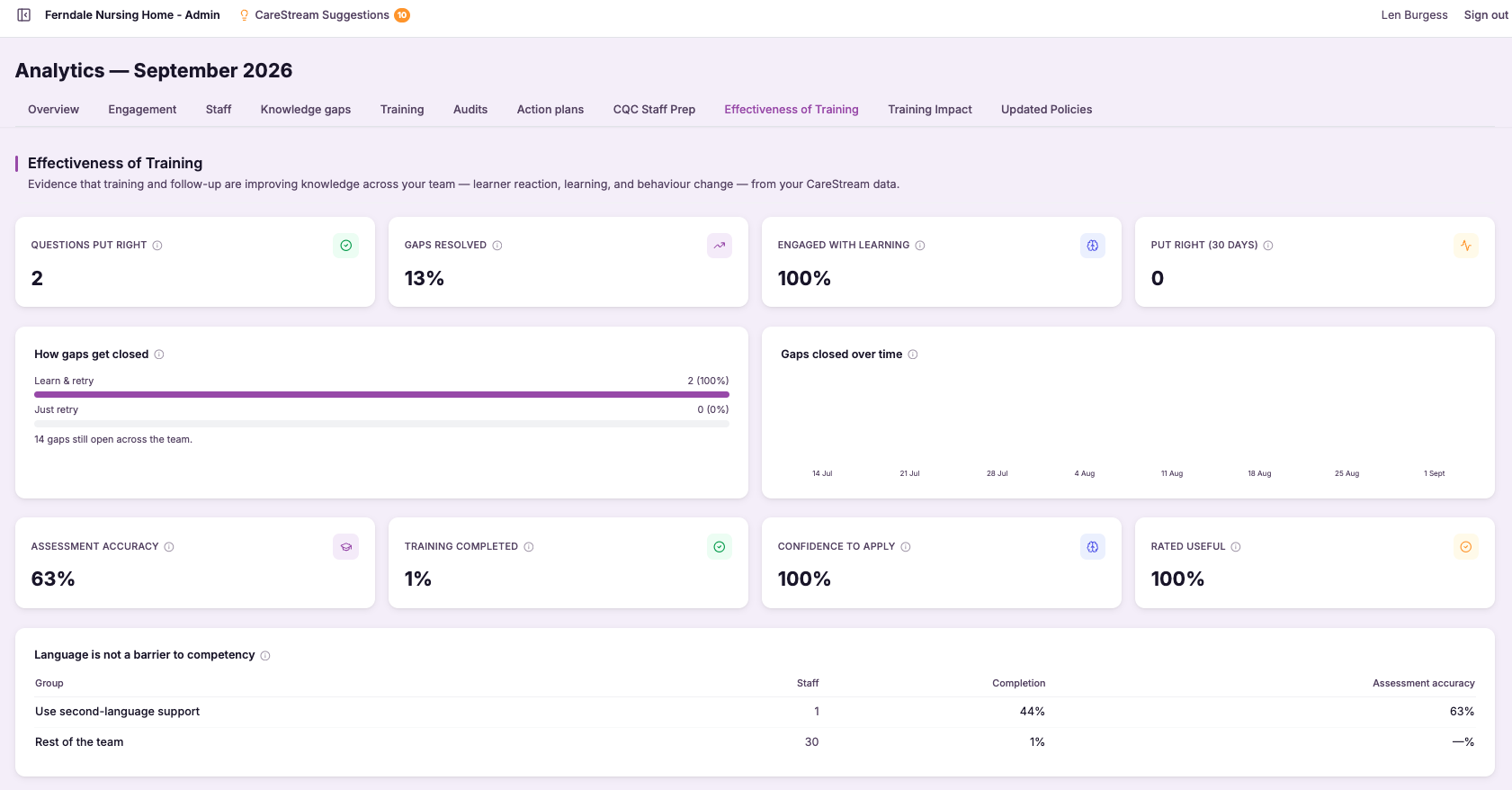
Training Impact
Training Impact is the view that ties learning to results. It sits across your completed mandatory training, annual modules and follow-ups on one side, and your audit scores and compliance measures on the other, and shows how the two move together over time. When a team completes infection prevention training and your related audit scores climb, you can see that shift, not just assume it.
This matters because training is one of the largest ongoing investments any care home or nursing home makes, and CQC expects to see that it leads to safe, effective care rather than certificates in a folder. Training Impact turns your everyday completion data into a story about improving practice, which is exactly the evidence quality leads and inspectors look for.
- See at a glance how training completion connects to rising audit scores across your service.
- Show a clear return on your training investment to owners, boards or prospective buyers.
- Spot which modules move the needle on practice and which need reinforcing.
- Give inspectors evidence that learning translates into safer, more consistent care.
- Track improvement over time rather than reading a single snapshot in isolation.
- Turn routine training records into a defensible narrative of continuous quality improvement.
How it works, step by step
CareStream gathers completed mandatory training, annual modules and follow-ups from across your team automatically.
Relevant audits and their scores are connected to the training topics they relate to, such as infection prevention or medication.
Completion and audit scores are laid out on the same timeline so movement in one against the other is easy to read.
The view highlights where rising training completion is followed by improving audit scores and stronger compliance.
Where scores stay flat despite training, you can see it and reinforce learning or revisit practice.
The impact picture can be shared with owners, boards or inspectors as proof that training drives quality care.
- Connects completed training to real audit scores and compliance measures
- Shows impact as a trend over time, not a one-off snapshot
- Uses data already captured in CareStream, with no extra data entry
- Makes the return on training visible to managers, owners and buyers
- Provides inspection-ready evidence that learning improves practice
Frequently asked
01Mandatory training by role
How does CareStream decide what training each person needs?
You define the mandatory training for each role in your service, describing what a carer must hold, what a nurse must hold, what a manager must hold, and so on. CareStream then matches each member of staff to their role and applies the corresponding training matrix to them automatically, so their required courses come from their role rather than from a manual per-person list. This means you do the thinking once, at the level of the role. Every individual in that role inherits the same, correct set of requirements, which keeps things consistent across your whole team and removes the risk of assigning the wrong courses to the wrong people.
What happens when a member of staff changes role?
When someone moves from one role to another, their training requirements update to match the new role automatically. If a carer steps up to a nurse or a senior role with different mandatory training, the platform reflects that change rather than leaving them held against the requirements of their old role. This is one of the biggest time savers, because role changes are exactly where manual training lists tend to drift out of date. By tying requirements to the role, CareStream keeps each person's expectations accurate through promotions, moves and new starters, without anyone having to reassign courses by hand.
Does this stop us over-training people?
Yes. Because training is mapped to roles, each member of staff is only held against the courses that genuinely apply to their work. You avoid the common problem of a single long list that expects everyone to complete everything, whether or not it is relevant to their role. Just as importantly, it stops the opposite problem of missing a requirement that a particular role carries. The role-based matrix gives you the right set, no more and no less, which is both fairer on staff and cleaner to evidence at inspection.
How does this help with CQC inspection?
CQC expects you to show that people are trained appropriately for the work they actually do, not simply that some training happened. By defining mandatory training per role and applying it to every person automatically, you can demonstrate a clear, consistent link between each individual's role and the training they are required to hold. That clarity makes inspection conversations much simpler. Rather than explaining an inconsistent spreadsheet, you can show that a carer, a nurse and a manager each carry the correct requirements for their role, and that new starters and role changes pick those requirements up automatically.
02Face-to-face training and matrix
Can I record training that happened in a classroom, not online?
Yes. CareStream is built to capture in-person training as well as e-learning, so practical sessions like moving and handling, or any mandatory course delivered in a room, can be recorded properly. You log the session, mark who attended and attach the evidence, so classroom training becomes a real, retrievable record rather than a paper sign-in sheet in a folder. This is important because a lot of the most safety-critical training is competency-based and best taught in person. Capturing it in the platform means those sessions carry the same weight as online courses and are just as easy to find and evidence when you need them.
Does face-to-face training show up in the same compliance matrix?
It does. Once you record an in-person session and its attendance, that training feeds into the same compliance matrix as your online learning. Classroom courses count towards each attendee's requirements, come up for renewal in the same way, and show as a gap if they are missing, exactly like e-learning. This is the whole point: your training picture is only useful if it is complete. By bringing face-to-face and online training into one matrix, CareStream ensures the view reflects everything your team has done, not just the part that happened on a device.
What evidence can I capture for in-person sessions?
You can record who attended and capture the evidence of the session and its completion, giving you a defensible record of what was actually delivered and to whom. Rather than a loose sign-in sheet that can go missing, the attendance and evidence are held against the correct people in the platform. That matters at inspection, where you may need to demonstrate not just that training was scheduled but that specific people attended and completed it. Having attendance and evidence stored alongside your online records means you can produce the full story of a practical course as easily as any other.
Why does it matter that online and classroom training are together?
CQC is interested in whether people are competently trained, not in whether a course was delivered on a screen or in a room. If your classroom training lives in a separate register from your e-learning, your compliance view is only telling half the story, and reconciling the two by hand is exactly where things get missed. Bringing both into one matrix means your training position is genuinely complete. You can see and evidence all mandatory training in a single place, including the practical competencies that are so often taught in person, without ever having to pull from a second system to fill in the gaps.
03Training compliance matrix (renewals + gaps)
What does the training compliance matrix actually show?
The matrix lines up every member of staff against every course they are required to hold, and shows the status for each combination. In a single grid you can see who is trained, who is overdue, what renewals are coming due and where a course is missing entirely, so the whole training position of your service is visible at once. This is different from looking at individual certificates or a per-person record. Those tell you about one person and one course, whereas the matrix tells you about your whole team at the level CQC actually inspects, which makes it a genuine management tool rather than just a store of documents.
How does it help me stay on top of renewals?
Courses that are approaching their renewal date are highlighted in the matrix, so you can see what is coming due before it expires. Instead of discovering that a batch of training lapsed last month, you get early sight of what needs arranging, which lets you plan sessions and renewals in good time. Because the view covers the whole team, you can also spot when several people need the same course renewed around the same time, and organise that efficiently rather than one person at a time. It turns renewals from a series of last-minute surprises into a manageable, forward-looking task.
How are gaps identified?
A gap is any required course that a member of staff has not completed, and the matrix makes these stand out across the grid rather than leaving them hidden inside individual records. Because you can read the whole service at once, missing training is obvious instead of something you only discover when you go looking for it. This is exactly the kind of thing that is hard to catch with scattered records. By surfacing gaps at the level of the whole team, the matrix lets you prioritise your training effort where it is genuinely needed and close those gaps deliberately, rather than assuming everything is covered.
Does the matrix stay up to date on its own?
Yes. The matrix draws on the training requirements and completions already held in CareStream, so as staff complete courses and as renewals fall due, the grid reflects those changes automatically. You are not maintaining a separate spreadsheet that goes stale the moment you close it. That means whenever you open the matrix, whether for a supervision, a team meeting or an inspection, the view is current. The picture you see is the true picture of your service's training position at that moment, which is precisely what you want when someone asks who is trained and who is not.
04CQC evidence pack (sign-in sheets, certificates, files)
What kinds of evidence does the pack include?
The pack gathers the supporting evidence behind your practice, including training sign-in sheets, certificates, uploaded files and records. Rather than these living in separate folders and systems, they are brought together into one organised pack that you can present at inspection. This is the evidence inspectors most often ask to see when they want proof behind a claim. Having it collected and ordered means that when the question comes, you can point to the certificate, the sign-in sheet or the record straight away instead of going to look for it.
How does this help on the day of an inspection?
It removes the scramble. Instead of hunting through folders and drives when an inspector asks for evidence, you present an organised pack that already holds your sign-in sheets, certificates and files together. That means you can respond quickly and calmly rather than under pressure. Producing evidence smoothly also makes a strong impression. When you can show the records behind your training and policies without delay, it demonstrates that your service is well organised and that its practice is genuinely backed by evidence, which is exactly the assurance inspection looks for.
Do I have to build the pack by hand each time?
No. The pack draws on the evidence CareStream already holds, gathering your sign-in sheets, certificates, uploaded files and records and organising them for you. So you are not assembling documents manually every time an inspection approaches. Because it reflects the evidence on the platform, the pack stays aligned with your records as new certificates and files are added. That keeps your supporting evidence ready and current, rather than something you have to reconstruct under pressure whenever it is needed.
How is this different from the readiness report?
The readiness report tells you where you stand across policies, training and evidence and where the gaps are, so it is about understanding your position before inspection. The evidence pack is about producing the actual supporting documents, the sign-in sheets, certificates and files, when you need to show them. The two work together. You use the readiness report to see whether your evidence is complete and to close any gaps, and you use the evidence pack to present that evidence in an organised form at inspection. One shows your readiness, the other lets you prove it.
05Training payroll report (PDF + CSV, £ costing)
How is the cost of training time calculated?
CareStream records the time each member of staff spends on completed training and applies a cost to those hours, so the report shows both the time invested and the money it represents. That gives you a pound figure you can put in front of finance, owners or funders rather than a vague sense that training is expensive. Because the time is captured as staff actually complete training, the cost is grounded in real activity rather than an after-the-fact estimate, which keeps your budgets and funding claims defensible.
What is the difference between the PDF and CSV exports?
The PDF gives you a clean, finished document that is easy to file, print or share with an owner, board or commissioner. It is the right choice when you need a tidy record that speaks for itself. The CSV is the working format. It drops straight into payroll systems, finance spreadsheets and funding paperwork so you can sort, total and combine the figures with your other data. Having both means the same costed training report serves both the presentation job and the number-crunching job.
Can I use this report to support a funding or workforce claim?
Yes. One of the main reasons providers ask for costed training is to evidence spend against workforce development funding and similar claims. The report gives you a clear record of who trained, for how long and at what cost over the period you select, which is exactly the kind of evidence those claims call for. You can generate the report for the specific claim window and export it as a PDF for your submission or a CSV to reconcile against your finance records, so the paperwork stands up to scrutiny.
Do I have to log training hours manually for this to work?
No. The whole point is to remove the manual timing that usually makes training costing painful. As your team completes training within CareStream, the time is captured automatically, so the report can cost it without anyone stopping to record hours by hand. This keeps the figures accurate and saves your managers from reconstructing training time after the event, which is where estimates and errors normally creep into budgets and claims.
06Effectiveness of training
What is the difference between completion and effectiveness?
Completion tells you a course was finished. Effectiveness tells you whether it actually improved understanding and practice. A member of staff can complete a module and still not have grasped it, or grasp it in the moment and change nothing in how they work, and a completion tick would look identical in every case. CareStream measures the part completion misses. Using assessment scores it shows how well the material was understood, and through follow-up it checks whether the learning held and changed practice. That lets you evidence that your training works, rather than only that it was done.
How does CareStream measure whether training worked?
It looks at training in two stages. First, assessment scores give a concrete measure of how well each person understood the material, so you can see where a course landed well and where understanding was thin. Second, follow-up checks whether that understanding actually translated into practice over time, rather than fading once the course was finished. Together these give you a picture of impact for individuals and across your team. Where scores or follow-up are low, you have an early signal that competence needs reinforcing, so you can act before a gap becomes a risk rather than discovering it after something goes wrong.
Why does CQC care about training effectiveness?
CQC has moved firmly towards outcomes, and the quality statements expect you to show that staff are competent and that learning translates into safe, better care. Under that model, evidence that training merely took place is no longer enough; inspectors want to see that it made a difference to understanding and practice. Measuring effectiveness gives you exactly that evidence. Instead of presenting a wall of completion ticks, you can show assessment scores and follow-up that demonstrate your training genuinely improves competence, which speaks directly to the quality statements around effective care and a well-trained workforce.
What do I do when effectiveness is low?
Low assessment scores or weak follow-up are a signal, not a verdict. They tell you where understanding did not land or where practice has not changed, which is precisely where competence needs reinforcing. That might mean revisiting the training, delivering it differently, or supporting particular individuals more closely before the gap becomes a risk. The value is that you find out early, while you can still act, rather than discovering a competence gap when something goes wrong. Over time, measuring effectiveness also lets you judge which training genuinely works, so you can strengthen what is landing well and revisit what is not, and put your training effort where it makes a real difference.
07Training Impact
How does Training Impact link training to audit scores?
CareStream already holds your completed training and your audit results in one place, so it can line the two up on a shared timeline. Where a training topic maps to a related audit, for example infection prevention training and your infection prevention and control audit, the platform shows how completion and audit scores move together over time. This means you do not have to build spreadsheets or cross-reference records by hand. The connection is drawn from data you are already generating as staff train and as audits are run, so the impact picture keeps building in the background.
Is this useful if I only run a single care home?
Yes. A single home benefits just as much because Training Impact gives a registered manager a clear, evidence-backed view of whether the training their team completes is translating into better practice on the floor. It turns routine completion data into something you can act on and stand behind. It is also valuable when you want to demonstrate quality care to owners, commissioners or an inspector visiting one service, because you can show that learning leads to measurable improvement rather than simply pointing at certificates.
Can I use Training Impact as evidence for a CQC inspection?
That is exactly what it is designed for. CQC wants to see that training is effective, meaning it leads to safe and consistent care, not just that people completed modules. Training Impact gives you a defensible narrative that shows learning followed by improving audit scores and stronger compliance over time. You can share this impact picture as part of your evidence around effective and well-led care, helping to show inspectors that your approach to mandatory and annual training genuinely improves practice across the service.
Do I have to enter any extra data to make this work?
No. Training Impact is built on information CareStream is already capturing, your completed mandatory training, annual modules, follow-ups and audit runs, so there is no additional data entry for your team. As people train and as you run audits, the impact view keeps itself current. That is deliberate, because care teams are stretched and any tool that adds admin tends to get abandoned. By working quietly from existing records, Training Impact stays accurate without asking busy staff to do more.
Explore more features
More of what the CareStream compliance platform does for UK care providers.
See it on your own policies.
Upload what you already have and see what CareStream finds, inside a fortnight.





