See what your policy set does not cover, before an inspector does
You can read every policy you hold and still not know which one you never wrote. Gap detection reads the whole library against what a service like yours is expected to hold, and reports what is absent, thin, contradictory or overtaken by a change in the law.
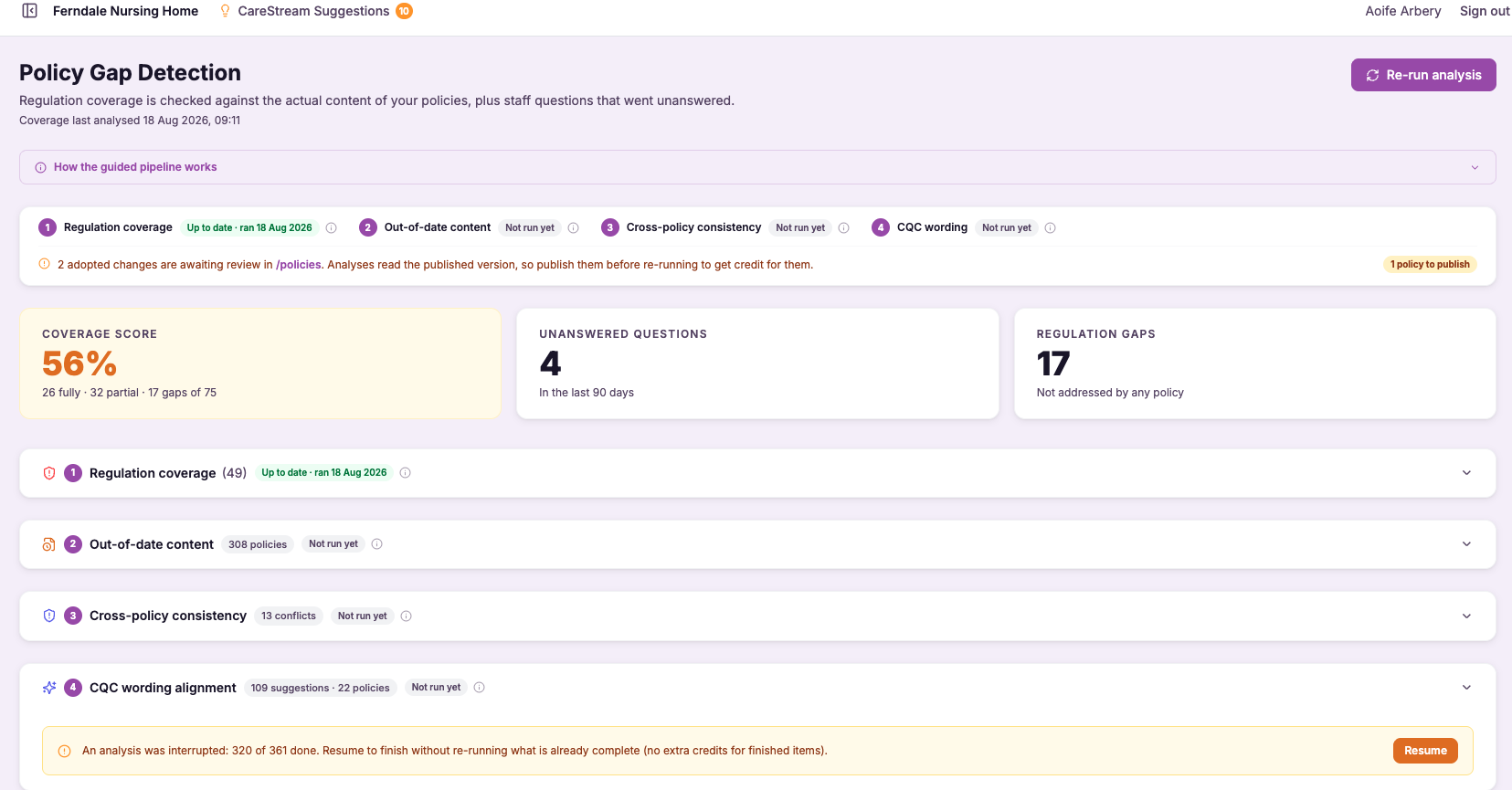
Regulation coverage analysis (reads inside your policies)
A document titled "Safeguarding Adults" tells you nothing about whether it names the local authority route, covers whistleblowing, or explains what staff do in the first hour of a concern. Title-based checklists cannot see any of that. CareStream's regulation coverage analysis reads the actual wording inside each uploaded policy and works out which regulatory topics are addressed, which are only touched on, and which are missing altogether.
This matters because inspectors judge you on content and practice, not on the length of your policy library. By analysing the substance of your policies and procedures in health and social care against the regulations that apply to your setting, CareStream shows you the true state of your coverage, giving you an accurate, evidence-based picture instead of a comforting but hollow tick list.
- You see, at a glance, which CQC regulations your policies genuinely cover and which they only appear to.
- Hidden gaps buried inside otherwise sensible documents surface before an inspector ever finds them.
- You stop relying on document titles and start trusting what your policies actually say.
- Time spent hunting through folders to check whether a topic is covered largely disappears.
- Your coverage is mapped to the regulations that apply to your specific service type, not a generic set.
- You walk into supervisions, board meetings and inspections knowing precisely where your policies stand.
How it works, step by step
You add your existing care home or nursing home policies in their current form, with no reformatting required before analysis can begin.
CareStream reads the complete text inside each policy rather than scanning the title or headings alone.
The analysis works out which regulatory subjects each document genuinely covers and to what depth.
Identified content is mapped against the CQC regulations and requirements that apply to your particular service.
You receive a clear picture of what is fully covered, thinly covered, or missing across your policy set.
You prioritise the real gaps first, knowing the assessment is based on content and not on document names.
- Reads the full text inside each uploaded policy, not just titles or headings
- Maps genuine content against CQC regulations relevant to your service type
- Distinguishes full coverage from thin coverage and from outright gaps
- Works on your existing documents with no reformatting needed
- Gives an evidence-based coverage view instead of a title checklist
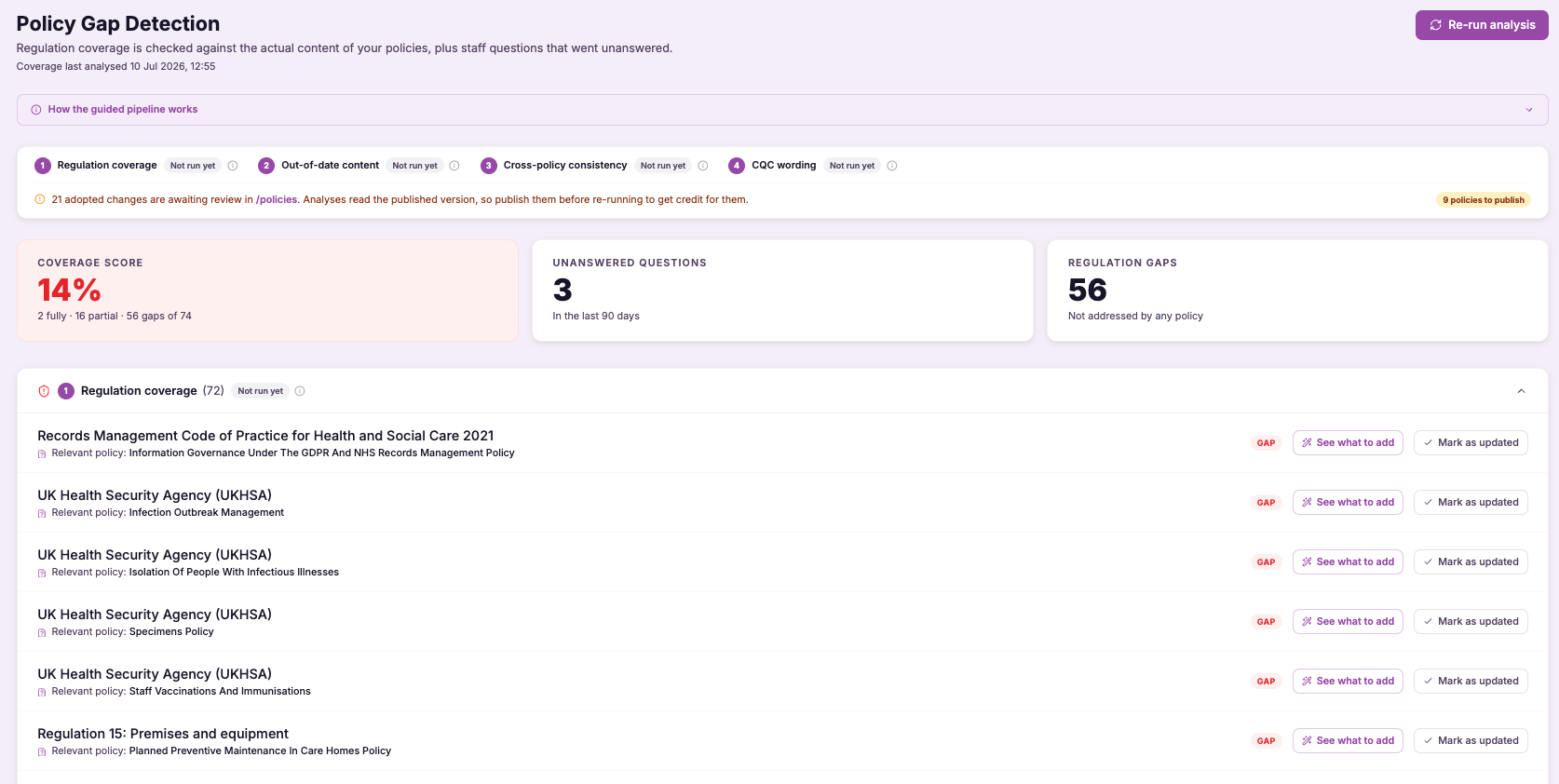
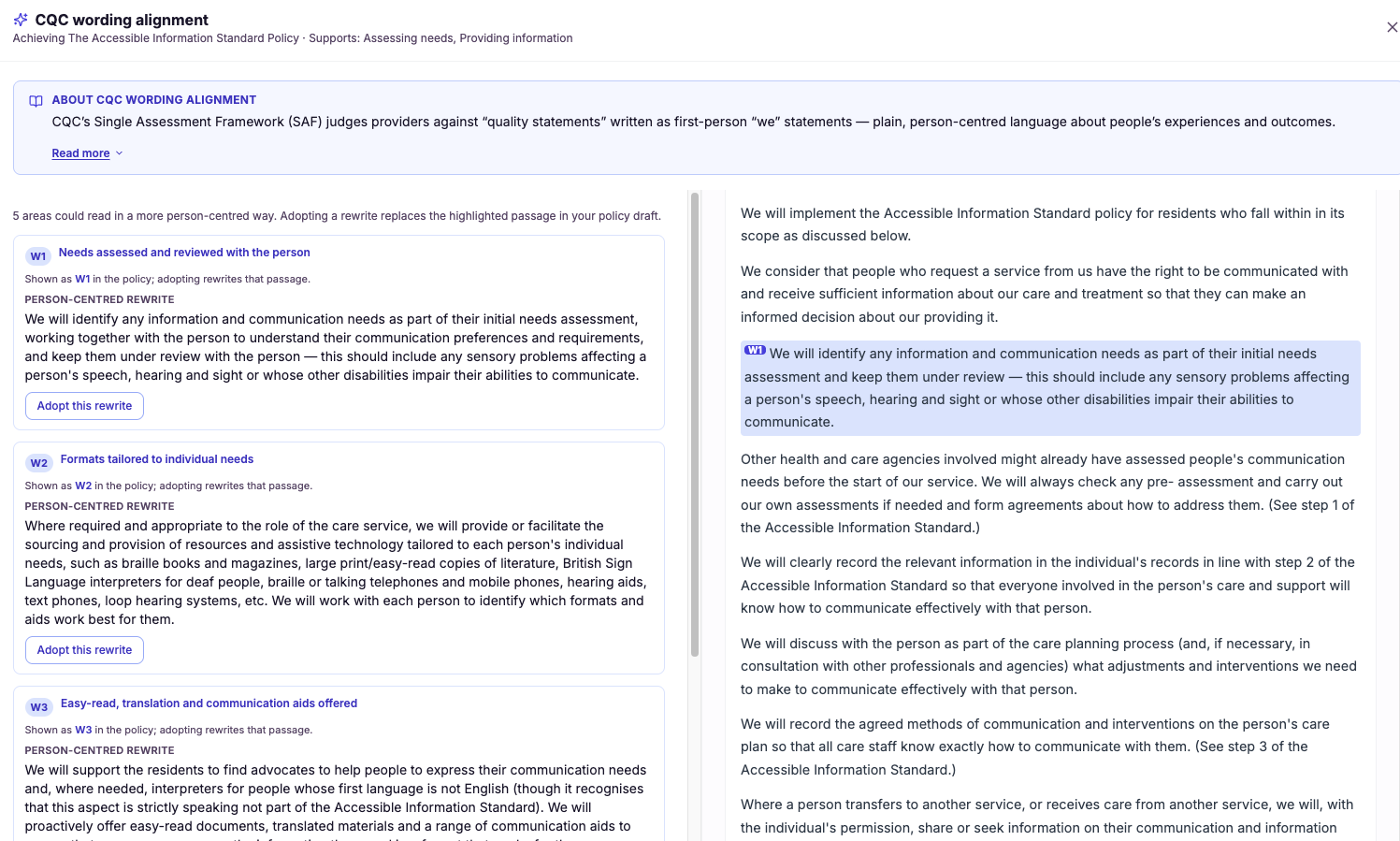
What-to-add remediation with example wording
Generic advice like "strengthen your safeguarding policy" leaves you exactly where you started, because you still have to decide what to write. CareStream's remediation goes further: for each gap it names the specific point that is missing and supplies example wording you can use, phrased the way care policies and procedures are actually written.
This matters because the wording is where good intentions usually break down. A registered manager may fully understand a gap yet still lose hours crafting a paragraph that reads properly and covers the requirement. By handing you care-appropriate example text for every gap, CareStream removes the hardest step and lets you focus on reviewing and approving rather than authoring from scratch.
- Every gap comes with example wording, so you never face a blank paragraph again.
- Suggested text is written in care-appropriate language, ready to review and adopt.
- Fixing a policy shrinks from an afternoon of drafting to a quick, confident edit.
- Managers without a policy-writing background can remediate gaps with assurance.
- Your policies and procedures improve faster because the words are already there.
- You keep full control, choosing to accept, adapt or reject each suggested addition.
How it works, step by step
The analysis pinpoints a specific shortfall inside one of your uploaded policies.
CareStream determines exactly what content is needed to close that particular gap.
It drafts ready-to-use text in care-appropriate language that addresses the missing point.
The proposed wording is shown to you clearly against the gap it resolves.
You accept the wording as written or tweak it to suit your service before adopting it.
The approved text goes straight into the policy, turning the gap into completed content.
- Provides ready-to-use example wording for every gap, not just a description of it
- Text is written in the language care policies and procedures actually use
- Managers review and adapt suggestions rather than authoring from a blank page
- Turns identified gaps into completed policy content in far less time
- You stay in control of what is accepted, edited or left out
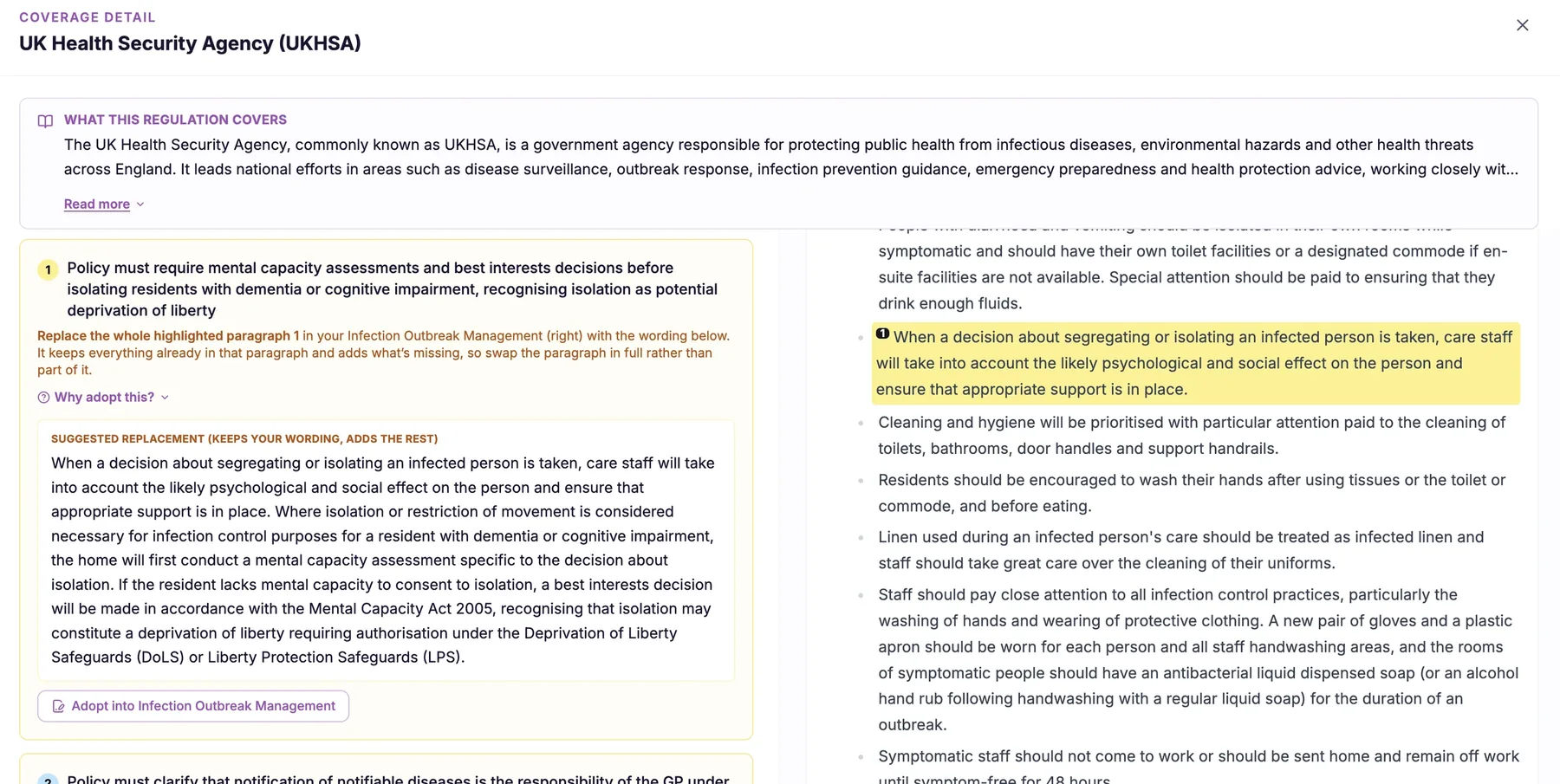
Where-to-add (target policy) guidance
It is surprisingly easy to fix a gap in the wrong place. A manager reads a recommendation, opens whichever policy feels closest, and adds the text there, only for an inspector to look in the document where it should have lived and still find nothing. The gap persists and, meanwhile, an unrelated policy grows longer and less coherent.
CareStream's target policy guidance solves this by naming the specific policy each recommendation applies to, and the section within that policy where the content belongs. This matters because a well-organised set of policies and procedures is not just about having the right words somewhere; it is about those words being in the document an inspector, or a member of staff, would actually turn to.
- Every recommendation names the exact policy it applies to, so you never guess where a fix goes.
- You are pointed to the specific section within that policy, not just the document as a whole.
- Content lands where an inspector or member of staff would actually look for it.
- Unrelated policies stop swelling with additions that were never meant for them.
- Your policy set stays coherent and well-organised as you remediate over time.
- Fixes are made once, in the right place, rather than corrected later when the gap resurfaces.
How it works, step by step
The analysis produces a specific change to close a gap in your coverage.
CareStream identifies which of your policies is responsible for that subject.
It pinpoints the section within that policy where the new content belongs.
The target policy and section are tied to the recommendation so they travel together.
The recommendation tells you exactly which document and section to update.
You add the content once, in the correct policy, keeping your library coherent.
- Names the exact target policy for every recommendation, not just the general area
- Points to the specific section within that policy where the content belongs
- Prevents fixes being bolted on to the wrong document
- Keeps your policy set organised and coherent as you remediate
- Ensures content lives where inspectors and staff would actually look for it
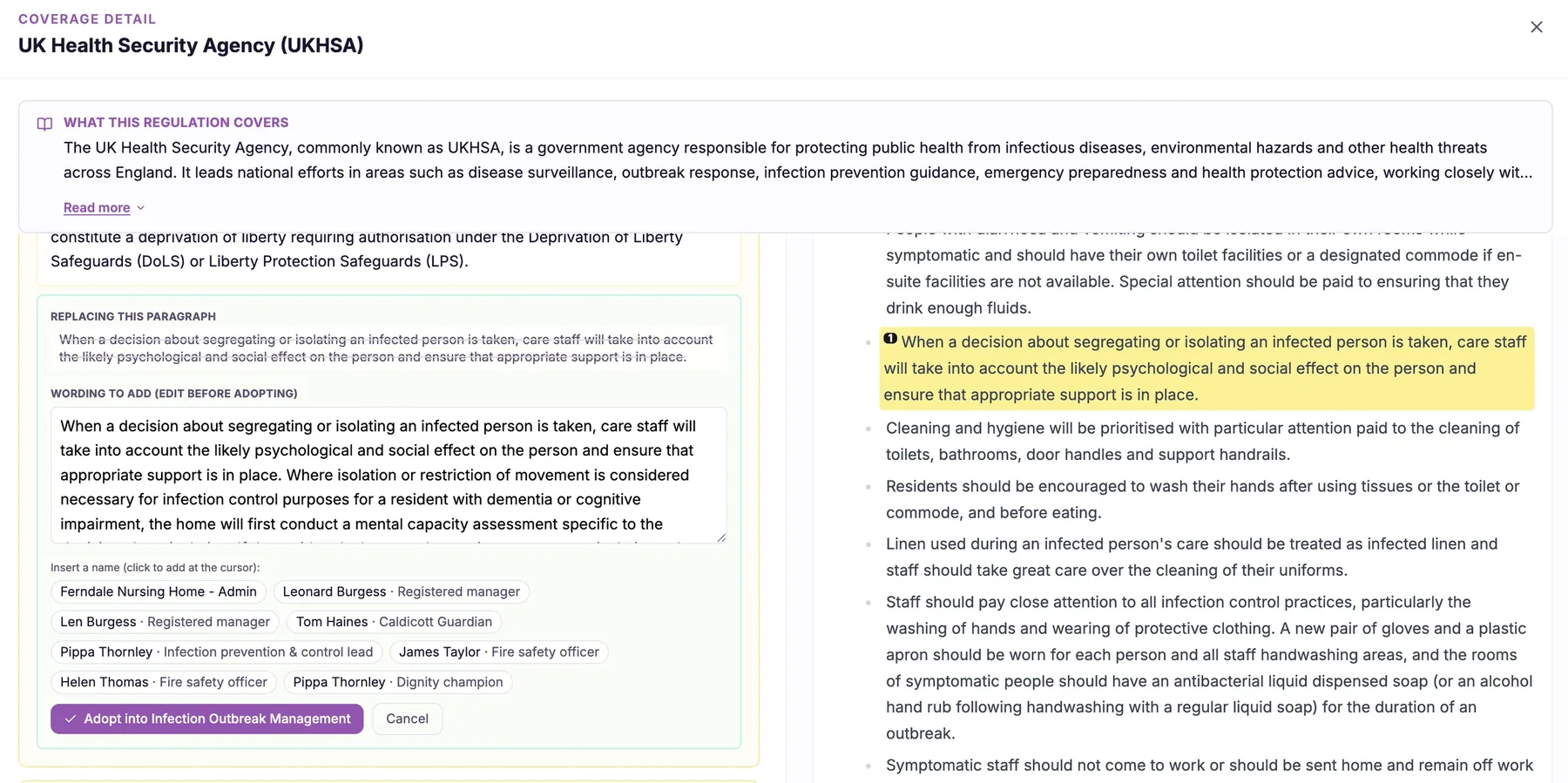
Legal basis + source citation on each recommendation
It is one thing to be told a policy needs a particular addition; it is another to know which regulation or standard requires it. Without that link, you are asked to take the advice on faith, and faith does not hold up well in a board meeting or an inspection when you are asked to justify a decision.
CareStream attaches the underlying legal or regulatory basis to each recommendation, naming the specific regulation, standard or statutory guidance behind it. This matters because it turns every suggested change into a defensible decision. You are not guessing, and you are not relying on an unattributed opinion; you can point to exactly why the change is warranted and stand behind it with confidence.
- Every recommendation names the specific regulation, standard or guidance it rests on.
- You can explain to a board or trustee exactly why each policy change was made.
- Managers act on recommendations with confidence because the reasoning is traceable.
- You have ready evidence when an inspector asks why a policy was updated.
- Suggestions carry authority rather than reading as unattributed opinion.
- Compliance decisions become defensible, not just plausible.
How it works, step by step
Each gap is identified against a specific regulation, standard or item of statutory guidance.
CareStream produces the suggested change needed to meet that requirement.
The specific legal or regulatory source behind the change is cited on the recommendation itself.
You see the suggested change and its underlying basis side by side, not in separate places.
You adopt the change knowing precisely which requirement it satisfies.
The cited basis is ready to show a board, trustee or inspector who asks why.
- Cites the specific regulation, standard or statutory guidance behind each recommendation
- Turns suggested changes into traceable, defensible decisions
- Gives managers ready evidence for boards, trustees and inspectors
- The reasoning is presented alongside the change, not hidden away
- Nothing is recommended without a stated basis attached
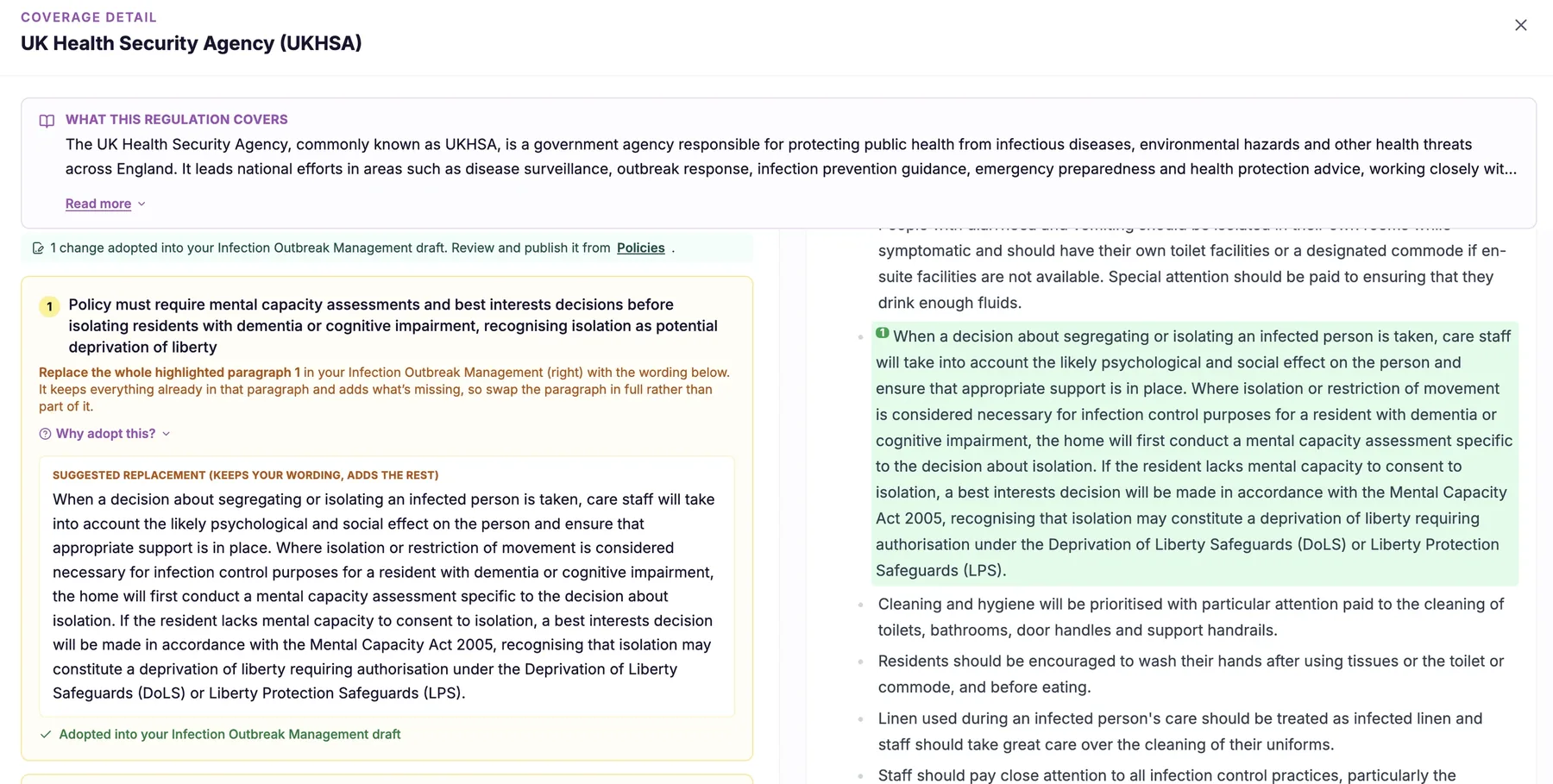
Applicability by care setting + service profile
Generic compliance guidance treats all care providers as if they were the same, which they are not. A nursing home carries clinical responsibilities a residential home does not. A domiciliary agency operates in people's own homes, which reshapes many requirements. Supported living has its own emphasis, and the groups you support, whether older people, people with learning disabilities, or others, further change what is relevant.
Applicability by care setting builds an understanding of your specific service profile and uses it to decide which regulations and requirements actually apply to you. That means your policies and your inspection preparation are shaped around your real service, so you are not chasing requirements meant for a different kind of provider, and you are not missing the ones that genuinely matter for yours.
- You are assessed against the requirements that genuinely apply to your care setting, not a one-size-fits-all list.
- Residential, nursing, domiciliary and supported living services each see what is relevant to them.
- The service user groups you support shape which requirements are treated as applicable.
- You stop spending effort on requirements that were never meant for your type of service.
- You are less likely to miss a requirement that genuinely applies because of your specific profile.
- Your compliance work becomes focused and proportionate rather than generic and overwhelming.
How it works, step by step
CareStream records your care setting, such as residential, nursing, domiciliary or supported living, and the groups you support.
It relates the wider body of regulation and guidance to the different types of care setting and service.
It works out which requirements genuinely apply to your profile and which belong to other providers.
Your policy checks and readiness assessments are framed around the requirements that actually apply to you.
The service user groups you support adjust the applicable requirements so the picture fits your service.
If your setting or service profile changes, the applicable requirements adjust to match.
- Tailors applicable requirements to your care setting and service profile
- Distinguishes residential, nursing, domiciliary and supported living
- Factors in the service user groups you support
- Avoids both irrelevant requirements and missed relevant ones
- Adjusts if your setting or service profile changes
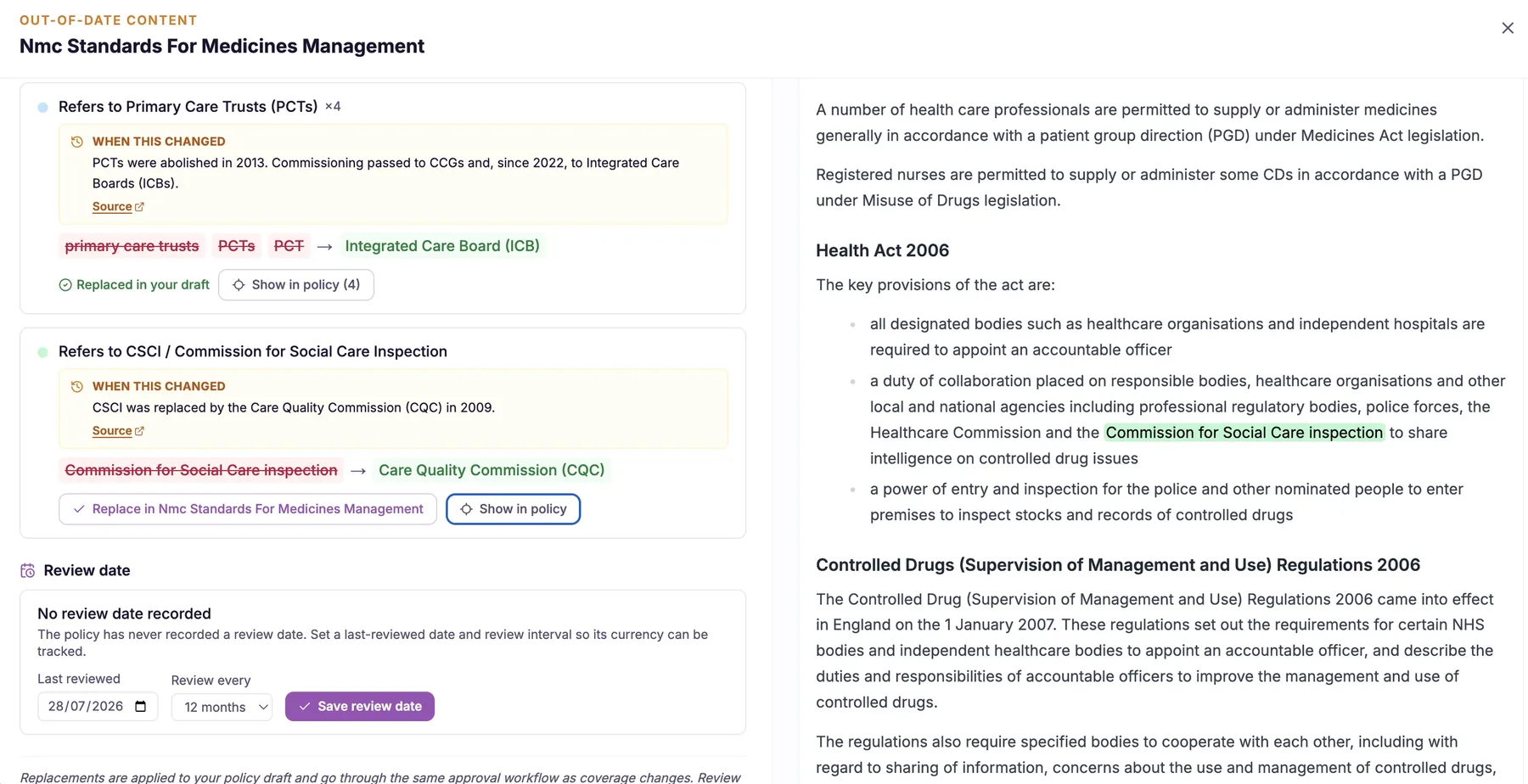
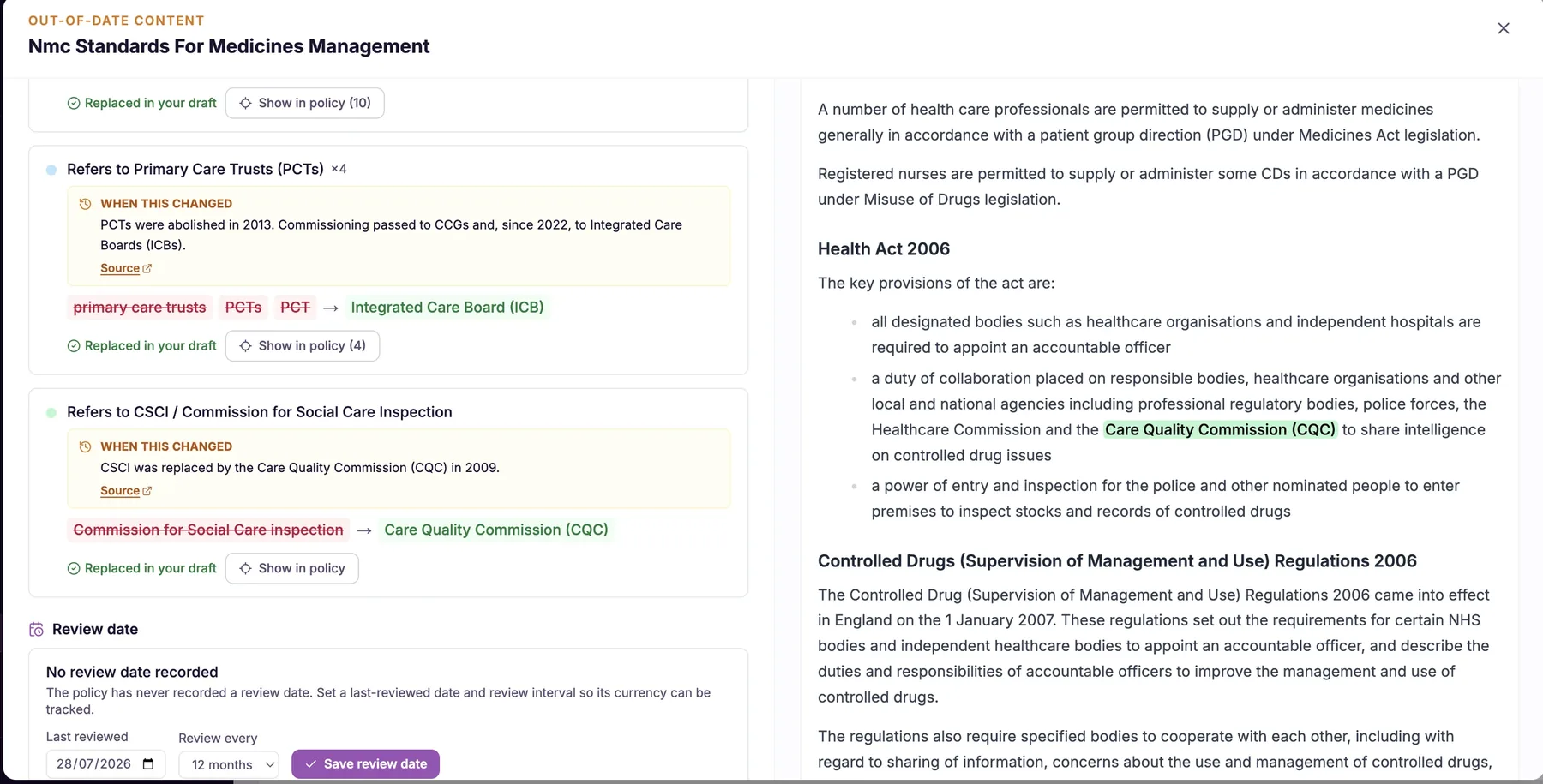
Out-of-date content detection (superseded law, placeholders)
The most damaging thing in a policy is often not what is wrong in principle, but what is out of date in practice. A reference to legislation that has since been replaced, a placeholder that still reads [insert name], a job title that no longer exists in your structure, or a review date that passed months ago all send the same message to an inspector: this document is not being kept alive.
Out-of-date content detection reads your care home policies and nursing home policies specifically hunting for that decay. It identifies superseded law and old guidance, unfilled template placeholders, outdated role titles and stale review dates, then lists them so you can put them right. It is the difference between a policy set that looks maintained and one that looks abandoned.
- You catch references to superseded law and old guidance before they undermine a live policy.
- Unfilled placeholders like [insert name] are found and fixed instead of surfacing in front of an inspector.
- Outdated role titles are flagged so your policies match your actual staffing structure.
- Stale review dates are surfaced so your documents look maintained, not abandoned.
- You get one clear list of ageing content rather than having to re-read every page yourself.
- Your policy set consistently reflects current law, current roles and current dates.
How it works, step by step
CareStream reads across your full library, checking each document for signs of ageing content.
It flags references to legislation and guidance that have been superseded or replaced.
It detects unfilled template placeholders such as [insert name] that were never completed.
It highlights outdated or inconsistent role titles that no longer reflect your structure.
It surfaces review dates that have passed, so documents overdue for review stand out.
Everything is presented in one clear list so you can work through the fixes efficiently.
- Detects references to superseded law and outdated guidance
- Finds unfilled placeholders left over from templates
- Flags old role titles and expired review dates
- Presents findings as one actionable list, not a vague warning
- Keeps live documents current, consistent and inspection ready
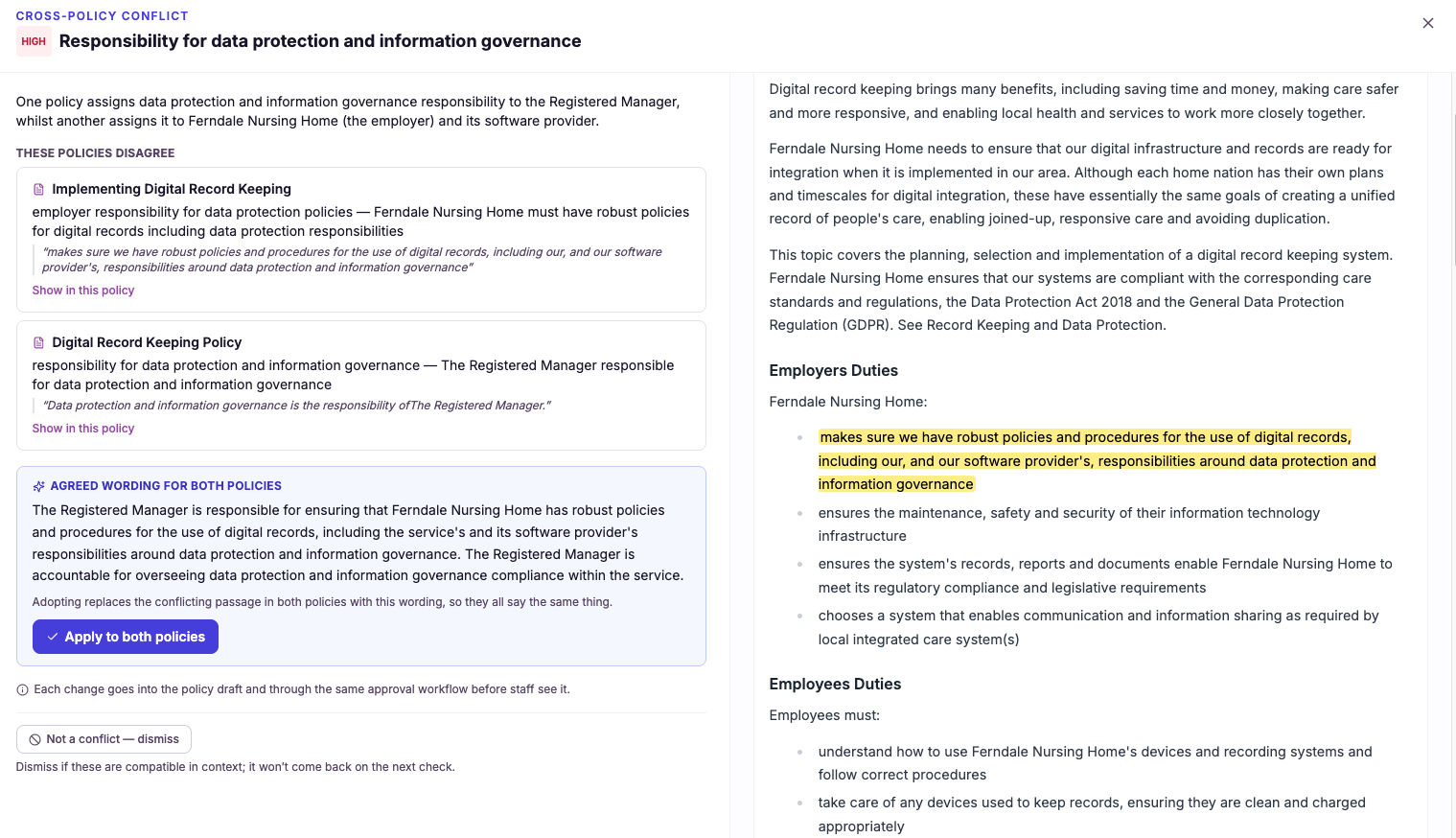
Cross-policy consistency (contradictions between policies)
Individual policies can each look perfectly reasonable on their own, yet still disagree with one another the moment you place them side by side. One might say a task can be delegated to a senior carer, while another reserves the same task for a nurse. One might set a 24 hour reporting window, while a related procedure says 48 hours. These clashes are the kind of thing an inspector spots quickly and a busy manager rarely has time to hunt for.
Cross-policy consistency treats your policies and procedures in health and social care as a single connected body of guidance rather than a pile of separate files. CareStream reads across the whole set, compares what each document says about the same topics and responsibilities, and surfaces the specific contradictions so you can resolve them and present one clear, consistent position on how your service operates.
- You find contradictions between separate policies before an inspector ever opens the folder.
- Your documents reinforce each other instead of quietly telling staff two different things.
- You spend minutes reviewing flagged clashes rather than days reading every policy line by line.
- Staff get one clear instruction per situation, which reduces confusion and mistakes on shift.
- You can show inspectors a policy set that hangs together and tells a single consistent story.
- Every time you update a policy, you can re-check the whole set for new contradictions in one pass.
How it works, step by step
CareStream takes in your full set of care home and nursing home policies so it can work across all of them at once.
It identifies what each policy says about the same tasks, roles, thresholds and procedures.
It cross-references those statements to find places where one policy contradicts another for the same situation.
Each clash is surfaced in plain English, naming the policies involved and the passages that disagree.
You choose the correct position and bring the conflicting documents into line, guided by the flag.
Whenever you add or edit a policy, you can run the whole set again to catch any new inconsistencies.
- Checks your entire policy set, not one document at a time
- Finds contradictions between separate policies for the same situation
- Names the specific policies and passages that disagree
- Lets you re-run the check whenever a policy changes
- Turns a full library into one consistent, defensible position
Regulation change tracking + update alerts
Most providers only discover that guidance has moved when something forces the issue: a peer mentions it, an inspector raises it, or a bad outcome exposes it. By then the update is overdue and the conversation is defensive. Keeping watch on the whole regulatory landscape yourself is not realistic when you are also running a service.
Regulation change tracking closes that gap. CareStream monitors changes in regulation and statutory guidance over time, and when a change touches something your policies rely on, it alerts you and points to what needs attention. It turns staying current from a background worry you can never fully discharge into a stream of clear, relevant prompts you can act on.
- You learn that a regulation or guidance change affects you without having to monitor the landscape yourself.
- Each alert tells you which of your policies is affected, so you know exactly where to look.
- You update documents in response to real change rather than guessing when a review is due.
- You stop finding out at inspection that the rules moved months ago.
- Your policy set stays aligned with current sector expectations as they evolve.
- You spend your time acting on relevant changes instead of scanning everything for the few that matter.
How it works, step by step
CareStream tracks changes in regulation and statutory guidance across the sector over time.
It notices when a standard, requirement or piece of guidance is revised or replaced.
It works out whether the change actually affects your service and your existing policies.
You are notified about the change in plain English, with the affected policies identified.
The alert connects the change to the specific documents that need attention, so nothing is vague.
You update the affected policies knowing the prompt is grounded in a real, current change.
- Tracks regulation and guidance changes over time, not as a one-off snapshot
- Filters changes to the ones that actually affect your policies
- Alerts you in plain English and names the affected documents
- Grounded in current sector rules rather than model memory
- Turns reactive scrambles into planned, timely updates
Generate onboarding from a policy update
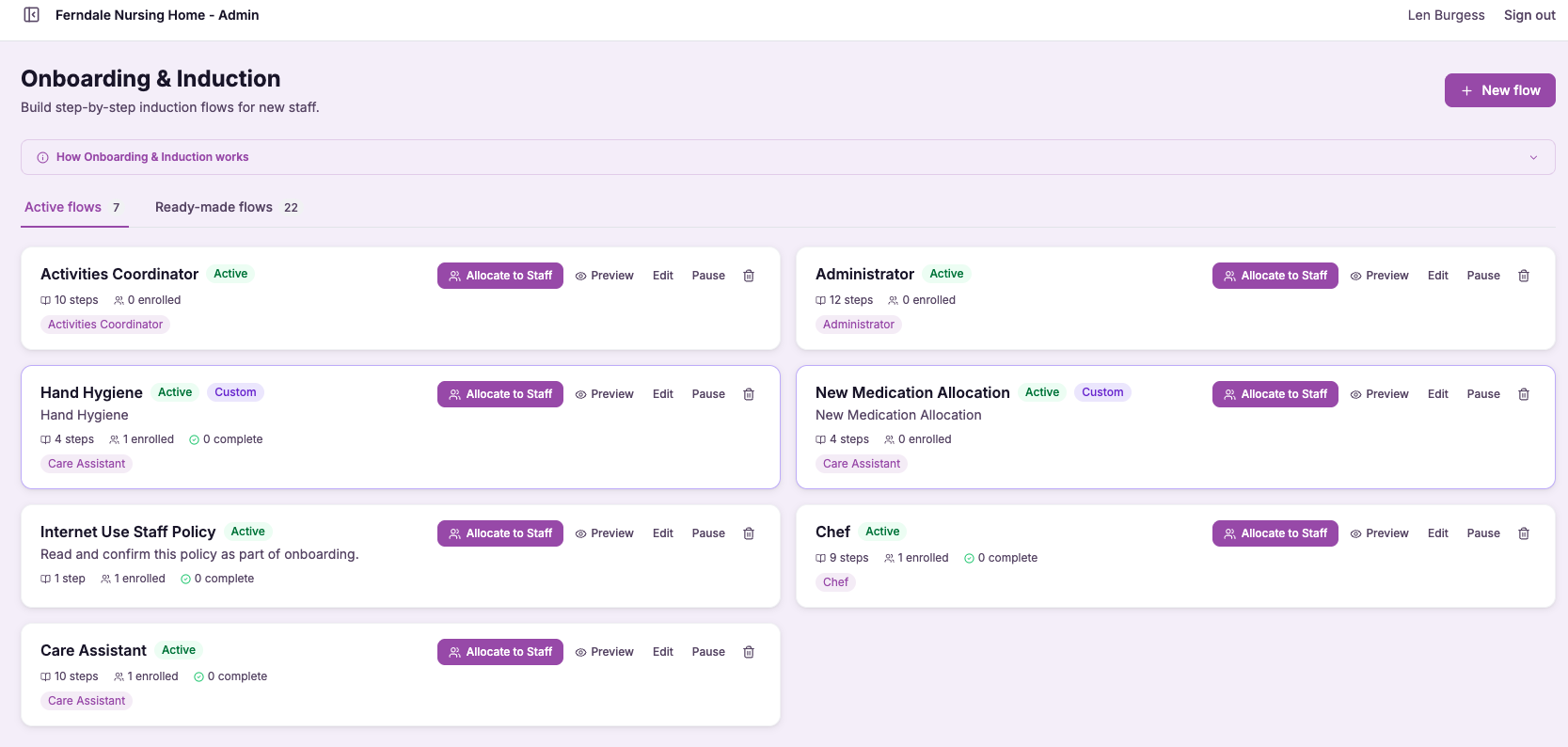
This feature takes an update to a policy and produces onboarding or refresher content built around that specific change. Rather than asking staff to reread an entire policy, CareStream focuses the content on what actually moved, so the people affected learn the new expectation quickly and clearly.
This matters because a policy is only as strong as staff understanding of it. Registered managers know the risk of a well written policy that nobody has read, and inspectors probe exactly that gap. By generating targeted onboarding from every meaningful update, you connect your policies and procedures in health and social care directly to practice, and you build evidence that staff were informed of the change.
- Make sure every affected member of staff knows exactly what a policy change means for them.
- Turn a paper revision into practical, focused training rather than a filed document.
- Save staff time by teaching the change, not the whole policy again.
- Build evidence that your team was brought up to speed after each update.
- Reduce the gap between what a policy says and what staff actually do.
- Keep practice aligned with current guidance as policies evolve.
How it works, step by step
You revise a policy in CareStream the way you normally would.
CareStream creates onboarding or refresher content built around what specifically changed in that update.
The material centres on the new expectation, so staff learn the difference rather than the whole policy again.
The content is directed to the members of staff the change applies to.
Your team works through the refresher, taking in exactly what has moved and why.
Completion is recorded, so you can show that affected staff were brought up to speed on the change.
- Onboarding content is generated straight from a policy update
- The training focuses on what changed, not the whole policy
- It reaches the staff the change actually affects
- Completion is recorded as evidence of understanding
- Connects policy changes directly to practice
Frequently asked
01Regulation coverage analysis (reads inside your policies)
How is this different from a policy checklist that just confirms I have each document?
A checklist only confirms that a document with a given title exists in your folder. It cannot tell you whether that document actually covers the regulation it is meant to address, which is where most inspection surprises come from. You can own every policy on a list and still have serious content gaps hiding inside them. CareStream's regulation coverage analysis reads the full text inside each policy and maps what it genuinely covers against the CQC regulations for your service. So instead of a green tick beside a title, you get a real, content-level view of where you are covered, where you are thin, and where a topic is missing entirely.
Do I need to reformat my policies before the analysis can read them?
No. You upload your existing care home or nursing home policies exactly as they are, in the format you already keep them. The analysis works on your real wording, so there is no need to restructure documents, apply a template, or split them up first. This matters because the whole point is to assess what your policies actually say today. Forcing your documents into a new shape before reading them would defeat the purpose, so CareStream reads them in their current form and maps that genuine content to the regulations that apply to your setting.
Is the coverage mapped to my specific type of service?
Yes. The regulations and requirements that apply to a nursing home are not identical to those for a domiciliary care agency or a supported living service, so a generic mapping would be misleading. CareStream maps your policy content against the CQC regulations relevant to your particular service type. That means the coverage view you receive reflects what your service is genuinely assessed against, not a broad catch-all list. You can prioritise the gaps that actually matter for your setting rather than chasing requirements that do not apply to you.
Will this tell me which policies to prioritise?
It will. Because the analysis distinguishes full coverage from thin coverage and from outright gaps, you can immediately see which policies carry the most significant shortfalls against the regulations for your service. That lets you tackle the highest-risk gaps first rather than working through your library alphabetically. For a busy registered manager, this turns an overwhelming folder of policies and procedures into a clear, ordered list of what genuinely needs attention. You spend your limited time on the content that affects quality care and inspection readiness, instead of re-reading documents that are already sound.
02What-to-add remediation with example wording
Does CareStream just point out gaps, or does it actually give me the words to fix them?
It gives you the words. Simply flagging a gap would leave you with the hardest part still to do, which is drafting the missing content in language that reads properly and covers the requirement. That is where most policy improvements stall. For every gap the analysis finds, CareStream tells you specifically what to add and supplies ready-to-use example wording in care-appropriate language. You review the suggested text, adapt it if you want to, and drop it straight into the policy, so the gap is closed rather than just noted.
Can I edit the suggested wording, or do I have to use it exactly as written?
You are always in control. The example wording is a well-crafted starting point, not a mandate. You can accept it as written, adjust a few words to match your service, or replace it entirely if you prefer your own phrasing. The value is that you never begin from a blank page. Even when you choose to adapt a suggestion, you are editing solid, care-appropriate text rather than composing from nothing, which is far faster and gives you a properly worded addition every time.
Will the wording actually sound right for a care policy?
Yes. The suggestions are written in the register that policies and procedures in health and social care actually use, so they sit naturally alongside your existing content rather than reading as a generic paragraph pasted in from elsewhere. The aim is text a registered manager would be comfortable presenting at inspection. Because each suggestion is tied to the specific gap it resolves, it addresses the requirement directly rather than padding the document. The result is wording that both closes the gap and matches the tone your care home or nursing home policies are written in.
I don't have a policy-writing background. Will this still work for me?
This feature is especially useful if policy writing is not your strength. Many capable registered managers understand exactly what a policy is missing but lose hours trying to phrase the fix correctly. CareStream removes that barrier by writing the example wording for you. Your role becomes reviewing and approving rather than authoring, which is a far more comfortable place to be. You bring the knowledge of your service and CareStream brings the words, so your policies and procedures get properly remediated without you needing to be a policy author.
03Where-to-add (target policy) guidance
Why does it matter which policy a fix goes into, as long as the content exists somewhere?
Because inspectors and staff do not read your whole library to find a topic; they open the specific policy that should cover it. If your safeguarding addition sits in your induction procedure instead, an inspector looking at your safeguarding policy still finds a gap, no matter how well written the content is elsewhere. CareStream names the exact target policy for each recommendation so the content lands where it will actually be looked for. That way the fix genuinely resolves the gap rather than existing in a document nobody would think to check, and your policy set stays properly organised.
Does it just name the policy, or tell me where in the policy to add the content?
It does both. Naming the right document is the first step, but a long policy can have many sections, and dropping content into the wrong part of the right policy still leaves it awkward to find. So CareStream also points to the specific section within the target policy where the new content belongs. This means you are guided all the way to the correct spot, not just the correct file. You open the named policy, go to the identified section, and add the content there, which keeps the document readable and the addition exactly where it should sit.
Will this help keep my overall set of policies tidy?
Yes, and that is one of its quieter benefits. Without clear guidance, managers tend to add fixes to whichever document feels closest, which slowly swells some policies with content that was never meant for them and leaves others incomplete. Over time the whole library drifts out of shape. By directing every recommendation to its proper policy and section, CareStream keeps your policies and procedures coherent as you remediate. Each document stays focused on what it is responsible for, so your library remains organised and easy to navigate rather than becoming a patchwork of misplaced additions.
What if the right policy doesn't exist in my library yet?
The guidance is based on the policies you have uploaded and the subjects each one is responsible for covering. If a recommendation relates to a subject and you hold a suitable policy for it, CareStream directs the content to that document and section. This keeps your existing library coherent and your fixes correctly placed. Where a subject sits at the boundary of your current documents, the guidance still points you to the most appropriate home among your policies so the content is not left orphaned. The aim throughout is that every fix has a clear, sensible destination rather than being added at random.
04Legal basis + source citation on each recommendation
How do I know a recommendation is based on real regulation and not just an opinion?
Because every recommendation carries its source. Rather than asking you to take a suggested change on trust, CareStream cites the specific regulation, standard or item of statutory guidance the recommendation rests on, presented right alongside the change itself. That means you can check the reasoning before you act, not after. A suggestion with a named regulatory basis is a defensible decision; an unattributed one is just an opinion, and in regulated care the difference matters a great deal when someone asks you to justify what you changed and why.
Can I use these citations as evidence when talking to inspectors or trustees?
Yes, that is exactly what they are designed to support. When a board member questions a change, or an inspector asks why a policy was updated, you can point to the specific regulation, standard or guidance CareStream cited as the basis for the recommendation. The reasoning is documented rather than left in your memory. This turns each cited basis into ready-made evidence. Instead of scrambling to reconstruct why a decision was made, you have the justification attached to the change from the moment it was suggested, which is a far stronger position to be in during any form of scrutiny.
Does every recommendation get a source, or only some of them?
Every recommendation carries its basis. The regulatory source is not an optional extra bolted on to a few high-profile changes; it is part of how each recommendation is formed, because the gap was identified against that requirement in the first place. So whether the change is significant or minor, you can see the regulation, standard or statutory guidance behind it. That consistency is what lets you trust the whole set of recommendations, rather than wondering which ones are grounded and which are guesswork.
I'm not a compliance specialist. Will the cited basis actually help me?
It is particularly helpful if compliance is not your specialism. Many registered managers are asked to justify decisions to people who are more senior or more expert than they are, and doing that from memory is uncomfortable. Having the regulatory basis cited for you removes that pressure. You do not need to know every regulation by heart, because CareStream names the relevant one for each change and keeps it attached to the recommendation. That gives you the language and the authority to explain your policy decisions confidently, even when the questions come from a board, a trustee or an inspector.
05Applicability by care setting + service profile
How does CareStream know which requirements apply to me?
It starts from your service profile: your care setting, such as residential, nursing, domiciliary or supported living, and the service user groups you support. From that profile it relates the wider body of regulation and guidance to your specific type of service and filters the requirements down to the ones that genuinely apply. This matters because a nursing home, a home care agency and a supported living service carry meaningfully different responsibilities. By anchoring everything to who you actually are, CareStream makes sure you are looking at the requirements that belong to your service rather than a blended list written for every kind of provider at once.
What if my service does more than one thing?
Many providers do not fit a single tidy label, and the applicability logic is built with that in mind. Your service profile can reflect the combination of setting and service user groups you actually deliver, so the applicable requirements reflect your real mix rather than forcing you into one box. The goal is always accuracy: to include what genuinely applies across everything you do, and to exclude what does not. If your service spans more than one model, the aim is that your compliance view covers all of it without dragging in requirements that belong only to providers you are not.
Could tailoring cause me to miss a requirement I should meet?
The purpose of tailoring is the opposite: to reduce the chance of missing a relevant requirement, not increase it. When a checklist is generic, the requirements that truly apply to you are buried among many that do not, which is exactly the situation in which important ones get overlooked. Narrowing to relevance makes the ones that matter stand out. Applicability also factors in the service user groups you support, so requirements that arise specifically because of who you care for are treated as applicable. The result is a view built to be both focused and complete for your service, rather than comprehensive in the abstract but hard to act on.
What happens if my care setting or service profile changes?
If your service changes, for example you begin supporting a new service user group or your registration changes, the applicable requirements adjust to match your updated profile. The tailoring is not a one-off setup that goes stale, it reflects who you are now. That keeps your compliance work aligned with your service as it evolves, so you are always being assessed against the right requirements rather than the ones that fitted an earlier version of your service. Keeping your profile current is what keeps the whole picture accurate.
06Out-of-date content detection (superseded law, placeholders)
What exactly counts as out-of-date content?
It covers the specific things that make a live document look neglected: references to legislation or guidance that has since been superseded, template placeholders like [insert name] that were never filled in, role titles that no longer match your staffing structure, and review dates that have already passed. Each of these is small on its own but damaging when an inspector finds it. CareStream targets these signatures deliberately rather than giving you a vague sense that a policy might be old. That focus is what makes the output useful, because you get a concrete list of things to change rather than a warning you cannot act on.
Does it tell me the current law, or just flag the old reference?
The detection step flags where a policy cites law or guidance that has been superseded, so you can see clearly which documents are relying on something that has moved on. That alone is valuable, because these references read fluently and are easy to miss on a normal review. CareStream's wider analysis is grounded in a maintained external knowledge base of current sector rules, so recommendations sit on top of up-to-date regulation rather than the model's memory. The point of this feature specifically is to make sure no live document is still quietly pointing at the old version.
Will it flag placeholders even if they do not look like [insert name]?
Yes. Placeholders take many forms depending on the template a policy came from, and CareStream is designed to recognise the common patterns of content that was meant to be completed but never was. The classic square-bracket placeholder is only the most obvious example. The reason this matters is that an unfilled placeholder in a policy you hand to an inspector is one of the quickest ways to signal that documents are not being maintained. Surfacing them all in one list means you can clear them out before they ever cause that impression.
How is this different from the cross-policy consistency check?
Cross-policy consistency compares your documents against each other to find places where two policies contradict one another. It is about disagreement between separate documents. Out-of-date content detection instead looks within your policies for content that has simply aged, such as superseded law, placeholders, old titles and stale dates. The two work well together but answer different questions. One asks whether your policies agree with each other, the other asks whether each policy is still current. Running both gives you a set that is internally consistent and individually up to date, which is exactly what inspection readiness looks like.
07Cross-policy consistency (contradictions between policies)
How is this different from just proofreading each policy?
Proofreading checks a single document for spelling, grammar and clarity within its own pages. It cannot tell you that this policy disagrees with another one filed somewhere else, because you are only ever looking at one document at a time. That is exactly the gap that lets contradictions survive for years. Cross-policy consistency works the other way round. It compares your documents against each other, so it catches the clashes that only appear when two policies describe the same situation differently. It is not a substitute for careful writing, it is the layer that makes sure your carefully written policies do not quietly contradict one another.
What kinds of contradictions does it actually find?
The most common are disagreements about responsibility and thresholds. One policy might say a task can be delegated to a particular role while another reserves it for someone more senior, or two documents might set different reporting timescales, review frequencies or sign-off requirements for the same event. These are easy to create and very hard to spot by eye. CareStream surfaces each clash in plain English, naming the policies involved and the passages that disagree, so you can see immediately what the conflict is. You then decide which version is correct for your service and bring the others into line, which keeps the fix quick and firmly in your hands.
Do I need to reorganise my policies before using this?
No. The feature is designed to work with the policy set you already have, however it has grown over time. You do not need to restructure your library, rename files or force everything into a single template first. In practice, running the check often becomes the reason a library gets tidier, because the contradictions it surfaces point you straight to the documents that have drifted apart. You fix those as you go, and the set becomes more consistent with each pass rather than requiring a big reorganisation up front.
How often should I run the consistency check?
A good rhythm is to run it whenever you add a new policy or make a meaningful edit to an existing one, because that is exactly when a new contradiction is most likely to creep in. A change that looks self-contained can still clash with a related document elsewhere in the set. Many providers also run a full check ahead of an inspection or as part of a periodic review, so they can walk in confident that the whole library agrees with itself. Because the check runs across the entire set in one pass, keeping this habit adds very little effort and gives you ongoing reassurance rather than a once-a-year scramble.
08Regulation change tracking + update alerts
How do I know an alert is actually relevant to my service?
CareStream does not simply forward every change in the sector. It checks whether a given change touches your service profile and the policies you actually hold, then only raises an alert when there is a genuine connection. That filtering is the point, because an unfiltered feed of every regulatory movement would be as useless as no feed at all. When an alert does come through, it names the specific documents affected, so you are not left wondering whether it applies to you. You can see straight away which policy the change relates to and why, which keeps the path from alert to action short and clear.
Does this replace my own responsibility to stay compliant?
No, and it is not meant to. You and your nominated individual remain responsible for your service's compliance. What regulation change tracking does is make that responsibility manageable, by making sure a relevant change does not slip past unnoticed while you are busy running the home. Think of it as a watchful assistant rather than a replacement for judgement. It brings the right changes to your attention and tells you which policies are affected, and you decide how to respond. The decisions stay with you, but you are making them with timely information instead of finding out too late.
How is this different from out-of-date content detection?
Out-of-date content detection looks at your existing documents right now and flags content that has already aged, such as superseded law, placeholders and stale dates. It is a check on the current state of what you have written. Regulation change tracking looks outward and forward, watching the rules themselves and alerting you when they move. The two are complementary. One tells you where your documents have already fallen behind, the other tells you when the ground is shifting so you can move with it. Used together, you both clean up existing decay and stay ahead of new change rather than only reacting after the fact.
What happens after I get an alert?
The alert connects the change to the specific policies that need attention, so your next step is clear: review those documents against the new expectation and update them. Because CareStream's analysis is grounded in a maintained knowledge base of current sector rules, the guidance you get sits on top of up-to-date regulation rather than guesswork. You stay in control of the wording and the final version, which keeps your policies genuinely yours. The alert simply makes sure you are updating the right documents, for the right reason, at the right time, rather than discovering the gap during an inspection.
09Generate onboarding from a policy update
Do staff have to reread the whole policy after every change?
No. The onboarding content is built around what specifically changed, so staff learn the new expectation rather than working through the entire policy again. This respects their time and makes the update far more likely to stick, because it is clear and focused. That focus is deliberate. When people are asked to reread long documents for a small change, the change often gets lost. By centring the training on the difference, CareStream makes sure the point of the update is exactly what your team takes away.
How does it know which staff need the training?
The content is directed to the members of staff the change actually affects, so the update reaches the relevant part of your team rather than everyone indiscriminately. This keeps the training proportionate and avoids fatigue from irrelevant material. Reaching the right people also strengthens your evidence. When you can show that a specific change was trained to the specific staff it applied to, you demonstrate a considered, targeted approach to keeping practice aligned with your policies and procedures in health and social care.
Is completion recorded for evidence?
Yes. When affected staff complete the onboarding or refresher generated from an update, that completion is recorded. So you have a clear line from the policy change to the training to the evidence that staff were brought up to speed. This is valuable at inspection, where the concern is often whether policies translate into practice. Being able to show that each meaningful change was followed by targeted training that staff completed is strong assurance that your policies are lived rather than just written.
Does this create extra work for the manager?
No, it removes work. Instead of building a training update from scratch every time a policy changes, CareStream generates the onboarding content from the update itself, so the effort of turning a revision into a training moment is largely handled for you. That means a registered manager can keep policies current without dreading the follow-up. The change is made, the focused content is generated, it reaches the right staff and their understanding is evidenced, all as a natural part of updating the policy rather than a separate project.
Explore more features
More of what the CareStream compliance platform does for UK care providers.
See it on your own policies.
Upload what you already have and see what CareStream finds, inside a fortnight.





