The records behind your people, across every service you run
Recruitment documents, registrations and supervisions are the part of compliance that lives in a filing cabinet in most services. These bring them into the same place as the training and policy evidence, and give a group a view across all of it.
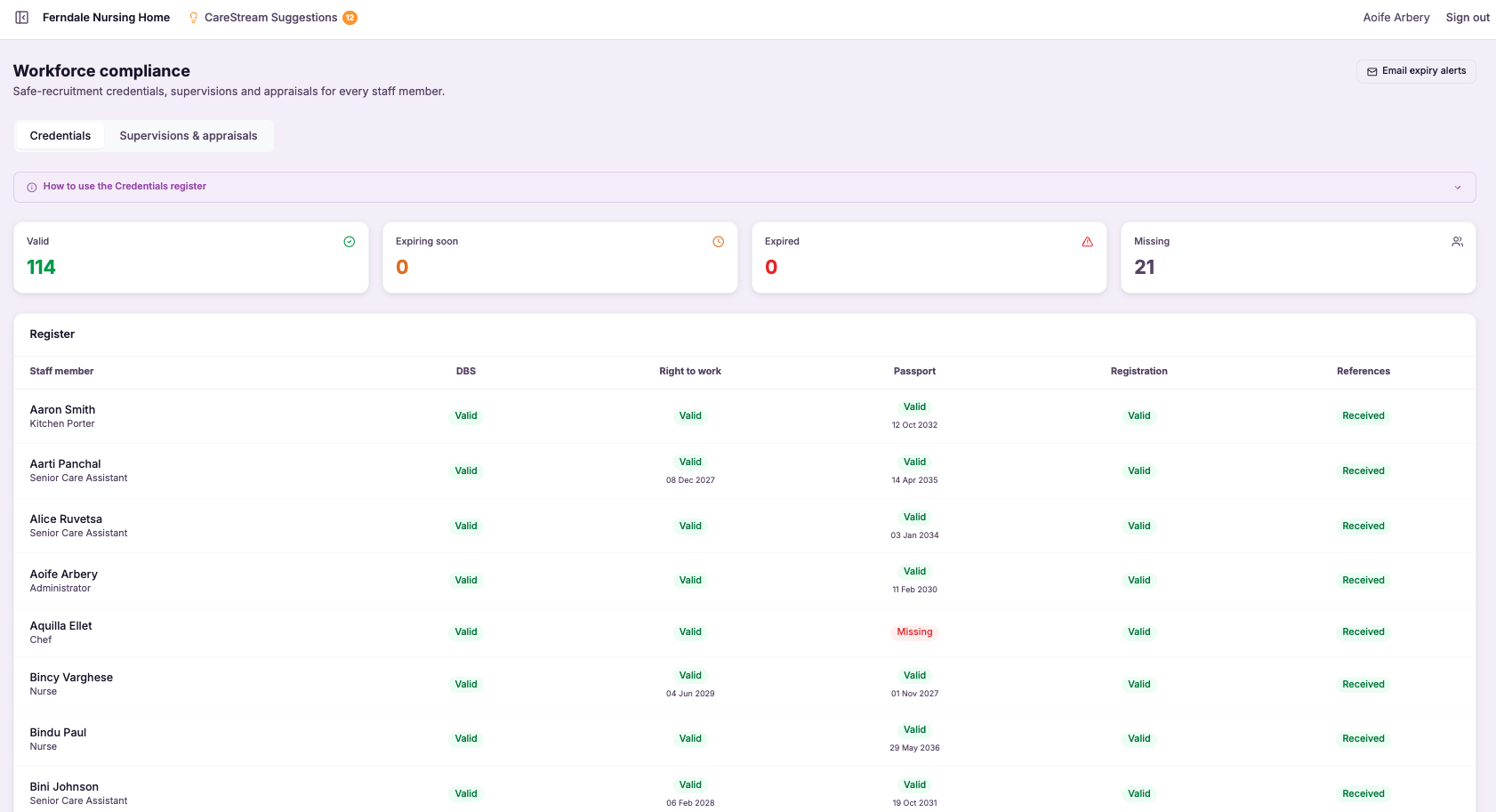
Supervisions and appraisals tracking
Supervisions brings the whole supervision cycle into CareStream. You book supervisions and appraisals from the Compliance register, choose an administrator to conduct each one, and they complete a structured recording form from their own hub. The form is pre-filled with the person being supervised, the supervisor and the date, and it captures the conversation section by section. Anything you agree becomes an action in the staff member's hub, and you can allocate the exact training, induction or CQC prep that comes out of the session in the same place.
- Supervisions actually happen, because the person conducting each one is told in their own hub and by email.
- Every session is recorded consistently, on the same structured form each time.
- What you agree turns into a clear to-do list the staff member can work through.
- Training, induction and CQC prep flow straight from the supervision into the staff member's hub.
- Nothing is lost between sessions, because the next date is booked as you finish the last one.
- You walk into inspection with a complete supervision record for every member of staff.
How it works, step by step
From Compliance, Supervisions and appraisals, log a session for a staff member. Choose supervision or appraisal, the date, and the administrator conducting it from a dropdown. Book a future date, or record one already held.
The person you choose to conduct the session is told straight away, in their own hub and by email, that they are conducting this staff member's session on the date. The staff member and your admins are kept in the loop too.
The conductor opens the recording form from their hub. It is pre-filled with the supervisee, the supervisor and the date, and walks through the conversation section by section, ending with the agreed actions and the next supervision date.
Each agreed action is written into the staff member's hub under My actions, so it works as a shared to-do list they can start, complete or reopen, and that you can see is being handled.
Next to any action, choose to allocate a training module, an induction flow or a CQC prep question. It is sent to the staff member's hub exactly as a normal allocation, with the same notification.
The completed supervision is saved on the staff member's record, with a link to open the full form and the next session booked off it, ready to show at inspection.
- Included on every plan
- Choose the conductor from your administrators
- Structured recording form, pre-filled and ready
- Agreed actions become the staff member's My actions
- Allocate training, induction or CQC prep from any action
- Saved on the staff record with the next session booked
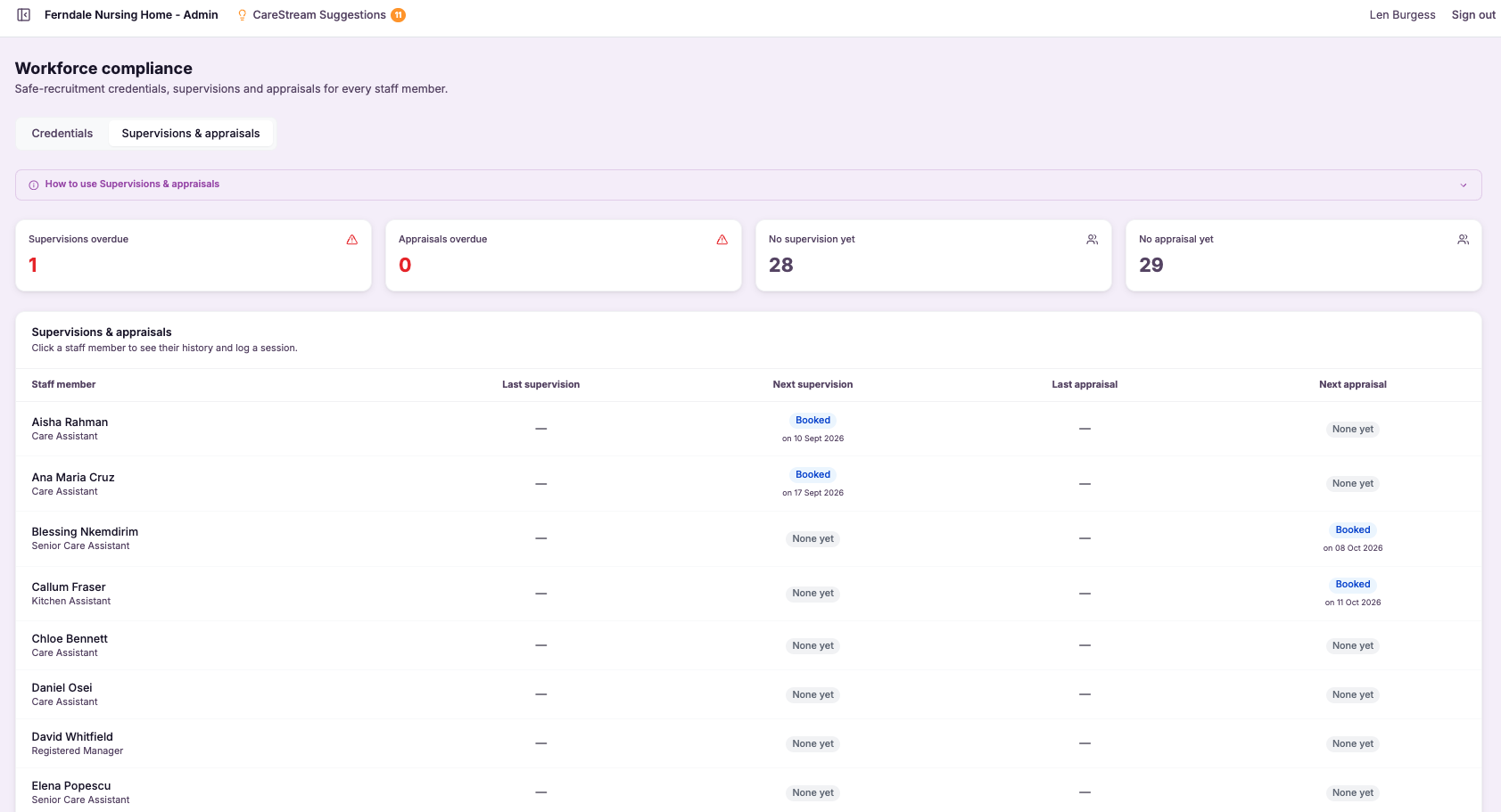
Workforce compliance register (DBS, right to work, registration, references)
The workforce compliance register brings together the key checks that sit behind safe recruitment and continued employment in care, DBS, right to work, professional registration such as NMC where it applies, and references. Rather than these living across spreadsheets, emails and paper files, the register holds them per staff member, so you can see each person's status in one view.
This matters because these checks are non-negotiable in adult social care and are among the first things an inspector will look at. A single lapsed or missing check can undermine confidence in your whole approach to safe staffing. The register makes the state of your workforce compliance visible and manageable, showing clearly who is fully compliant and where something is missing or approaching expiry.
- See at a glance which staff are fully compliant and which are not.
- Track DBS, right to work, professional registration and references in one register.
- Catch expiring checks in good time rather than after they lapse.
- Stop compliance slipping through the gaps of spreadsheets and paper files.
- Show inspectors that your safe recruitment checks are in order and current.
- Act on missing or overdue items before they become a finding.
How it works, step by step
Each person has a compliance record covering their DBS, right to work, professional registration and references.
The register holds the checks that underpin safe recruitment and continued employment in care.
You can see clearly who is fully compliant and who has something outstanding.
Missing checks are surfaced so you know exactly what needs to be obtained.
Items approaching renewal, such as a DBS or professional registration, are flagged before they lapse.
You address what is missing or expiring early, keeping your workforce compliant rather than catching up after the fact.
- Tracks DBS, right to work, professional registration and references per staff member
- Shows at a glance who is fully compliant and who is not
- Flags checks that are missing or approaching expiry
- Replaces scattered spreadsheets and paper files with one register
- Supports safe recruitment and continued employment evidence
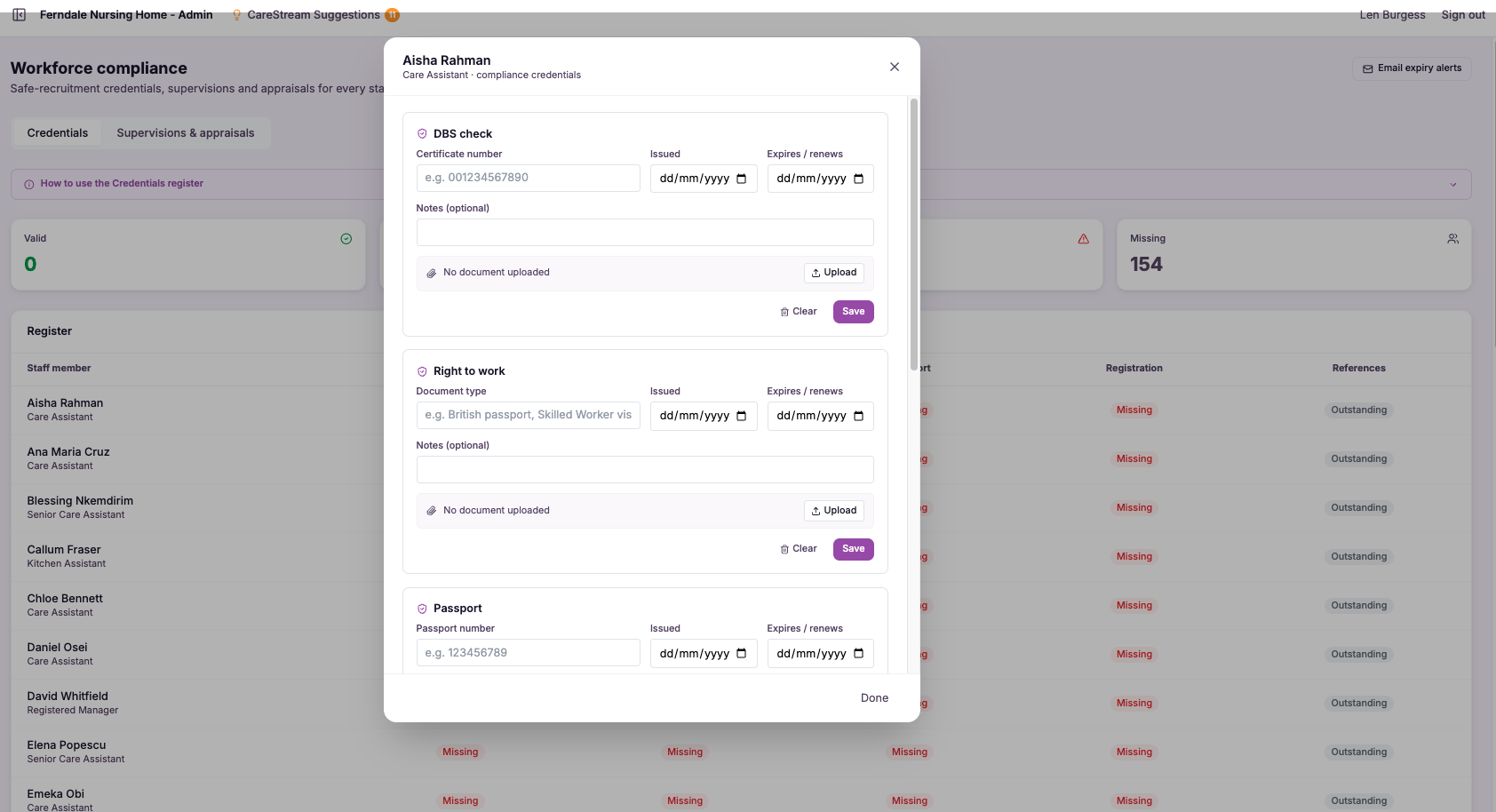
Credential document uploads + expiry alerts
Credential document uploads give each member of staff their own secure place to hold the evidence that makes them safe to work in a regulated care setting. DBS certificates, right to work documents, professional registration such as NMC or HCPC where relevant, and the qualifications tied to their role all sit together against that individual, rather than scattered across drives and cabinets.
This matters because the CQC well-led and safe quality statements expect you to show that the right checks were done and remain current. A credential that expired months ago is not just an administrative slip, it is a gap in your safer recruitment evidence. Keeping documents and their dates in one place, with alerts, turns that risk into something you can manage in a few minutes a week.
- You always know exactly which credential documents you hold for each member of staff, and which are still outstanding.
- DBS certificates, right to work evidence, registration and qualifications sit in one place, ready to show at inspection.
- Expiry alerts reach you before a document lapses, so you can renew in good time rather than react in a crisis.
- You reduce the risk of someone working with an expired check, protecting both the person and the people you support.
- Your safer recruitment and employment records stay complete without living inside one person's memory.
- New managers or nominated individuals can see the full credential picture from day one, without an inherited paper trail.
How it works, step by step
Add each DBS certificate, right to work document, registration or qualification straight onto the individual member of staff it belongs to.
Enter the expiry or renewal date for anything time-limited, so the platform knows when it needs to prompt you.
CareStream tracks every dated document quietly, without you having to keep a separate spreadsheet or reminder list.
You receive expiry alerts ahead of the deadline, giving you time to arrange a renewal rather than discovering a gap.
When a fresh document arrives, upload the new version and the record updates cleanly against that person.
Pull up any individual and demonstrate the credentials you hold and their status, without hunting through cabinets.
- DBS, right to work, professional registration and qualifications stored against each person.
- Expiry dates recorded once, then tracked automatically by the platform.
- Alerts arrive before a document lapses, not after.
- Records move with the individual and stay accessible for inspection.
- Reduces the risk of anyone working on an expired or missing check.
Multi-site group console and benchmarking
The group console is the head office view for providers running more than one home. It brings compliance and training data from every service into a single console and then benchmarks each home against the others, so you can compare them directly rather than reading each in isolation.
This matters because oversight across a group is where problems hide. A single struggling home can be easy to miss when its numbers sit in a separate login. By putting sites side by side and benchmarking them, CareStream makes the outliers obvious, so head office can direct support, share good practice and hold consistent standards across the whole portfolio of care homes and nursing homes.
- See compliance and training for every home in your group from one console.
- Benchmark sites against each other to spot which homes need support first.
- Compare like for like instead of reading each service in isolation.
- Direct head office attention and resources to where they will help most.
- Share good practice from your strongest homes across the whole group.
- Hold consistent compliance standards across your entire portfolio.
How it works, step by step
Compliance and training data from every home flows into a single group console for head office.
Each site is assessed on the same compliance and training measures so comparisons are fair and like for like.
Sites are ranked and compared against each other so strong and weak performers are easy to see.
Homes that are slipping on compliance or training stand out rather than hiding in a separate login.
Head office can target visits, training and resources to the services that need them most.
Lessons from top-performing homes can be shared across the group to lift standards everywhere.
- Shows every home in the group from a single head office console
- Benchmarks sites against each other on the same compliance and training measures
- Makes struggling services obvious rather than hidden in separate logins
- Helps direct support and share good practice across the portfolio
- Built specifically for multi-site care groups and their oversight teams
Frequently asked
01Supervisions and appraisals tracking
Which plans include supervisions?
All of them. Supervisions and appraisals are available on every CareStream plan.
Who can conduct a supervision?
Any of your administrators. When you book a session you choose the conductor from a dropdown, and they are notified in their hub and by email that they are conducting it.
What happens to the agreed actions?
Each agreed action is written into the staff member's hub under My actions, so it works as a shared to-do list. From any action you can also allocate a training module, an induction flow or a CQC prep question, which is sent straight to their hub.
Where are completed supervisions kept?
On the staff member's record page, with a link to open the full form and the next session booked off it, so you have a complete supervision history for inspection.
02Workforce compliance register (DBS, right to work, registration, references)
Which checks does the register track?
The register tracks each staff member's DBS, right to work, professional registration such as NMC where it applies, and references. These are the checks that sit behind safe recruitment and continued employment in adult social care, and the register holds them together per person rather than across separate files. Keeping them in one place matters because these are among the first things a CQC inspector will look at in a staff file. Having them tracked together means you can show a complete, current picture of each person's compliance rather than reconstructing it from scattered records.
How do I know who is fully compliant?
The register shows each staff member's status at a glance, making clear who is fully compliant and who has something outstanding. Instead of cross-checking multiple spreadsheets and folders, you get a single view of your whole team's compliance position. This visibility is the core value of the register. Because you can see where everyone stands in one place, you can act on gaps immediately and maintain confidence that your workforce meets the checks required, which supports the safe staffing that quality care depends on.
Will it warn me before a check expires?
Yes. The register flags items that are approaching renewal, such as a DBS or a professional registration nearing its expiry, so you can act before they lapse rather than after. This turns renewals from something you have to remember into something the register surfaces for you. Catching expiries early is what keeps your workforce continuously compliant. Instead of discovering a lapsed check when an inspector opens a file, you address it in good time, which protects both your inspection position and the safety of the people your service supports.
How does this support us at inspection?
Safe recruitment and continued employment checks are among the first areas a CQC inspector examines, and any gap in DBS, right to work, registration or references can undermine confidence in your staffing. The register lets you show that these checks are tracked, current and complete for every member of your team. Because the register makes both compliance and gaps visible, you go into inspection knowing your position rather than hoping the files hold up. Being able to demonstrate that your workforce compliance is actively managed, with expiries flagged and missing items chased, is strong evidence of a well run and safe service.
03Credential document uploads + expiry alerts
Which documents can I store against a member of staff?
You can upload the credential documents that matter for safer recruitment and safe working in a regulated care setting: DBS certificates, right to work evidence, professional registration such as NMC or HCPC where it applies, and the qualifications tied to the person's role. Each document is stored against the individual it belongs to, so the full picture for any member of staff sits in one place. Because everything is held per person rather than in a shared folder, the record stays meaningful even as your team changes. A new manager or nominated individual can open any individual and see exactly which credentials you hold and their current status, without inheriting a paper trail.
How do the expiry alerts work?
When you upload a time-limited document, you record its expiry or renewal date. From then on, CareStream tracks that date in the background and sends you an alert ahead of the deadline, so you are prompted while there is still time to arrange a renewal rather than after a gap has already opened. This is the difference between staying ahead and being caught out. Instead of relying on a spreadsheet or someone's memory, the platform does the watching and brings the reminder to you, which keeps your recruitment and employment records complete without constant manual checking.
Does this help with CQC inspection readiness?
Yes. The safe and well-led quality statements expect you to show that the right checks were carried out and that they remain current. Storing DBS, right to work, registration and qualification documents in one place, with their dates tracked, means you can produce the evidence for any individual immediately when it is asked for. Just as importantly, the alerts reduce the underlying risk that an inspector is worried about, which is someone working on an expired or missing check. By keeping credentials current before they lapse, you strengthen your safer recruitment story rather than scrambling to explain a gap on the day.
What happens when a document is renewed?
When a fresh document arrives, you simply upload the new version against the same person and record its new expiry date. The record updates cleanly, so the individual's credential status always reflects the current, valid document rather than the one that lapsed. This keeps the history tidy and the picture accurate. Over time you build a clear, per-person record of current credentials that you can rely on for both day-to-day management and inspection, without ever having to dig through old paperwork to work out what is actually in force.
04Multi-site group console and benchmarking
How does benchmarking between homes actually work?
The group console assesses every home on the same compliance and training measures, then lines the sites up so they can be compared directly. Rather than reading a separate report for each service, you see them side by side, which makes it easy to tell which homes are ahead and which are falling behind. Because the comparison uses consistent measures, the differences you see reflect real performance rather than different reporting styles. That is what lets head office move quickly from noticing an outlier to directing support where it is genuinely needed.
Do I still need to log into each home separately?
No. The point of the group console is to remove that. Compliance and training data from every service flows into a single head office view, so you get your whole portfolio in one place instead of juggling separate logins and chasing individual managers for updates. This is where oversight usually breaks down in a group, because a struggling home is easy to overlook when its numbers sit in a separate system. Bringing everything together means the services that need attention surface on their own.
Can the console help me share good practice across the group?
Yes. Benchmarking does not only highlight the homes that are struggling, it also shows you which services are performing strongly. That makes it straightforward to identify what your best homes are doing and spread those lessons across the rest of the group. Over time this helps you lift the whole portfolio rather than only firefighting the weakest site, because head office can see both where support is needed and where good practice worth copying already exists.
Is the group console useful for CQC oversight across our services?
Very much so. CQC expects providers running multiple services to have genuine oversight of every one, with consistent standards and clear evidence that head office is monitoring quality. A benchmarked, portfolio-wide view of compliance and training is exactly that kind of evidence. It shows a nominated individual or quality director can see how each home is performing, compare them fairly and direct support where it is needed, which demonstrates the consistent, well-led oversight inspectors look for across a group.
Explore more features
More of what the CareStream compliance platform does for UK care providers.
See it on your own policies.
Upload what you already have and see what CareStream finds, inside a fortnight.





