Audits you design, joined up to the training that follows
An audit that ends in a report has not changed anything. These build your own audits and then close the loop, so a finding turns into the training that addresses it and you can see whether it worked.
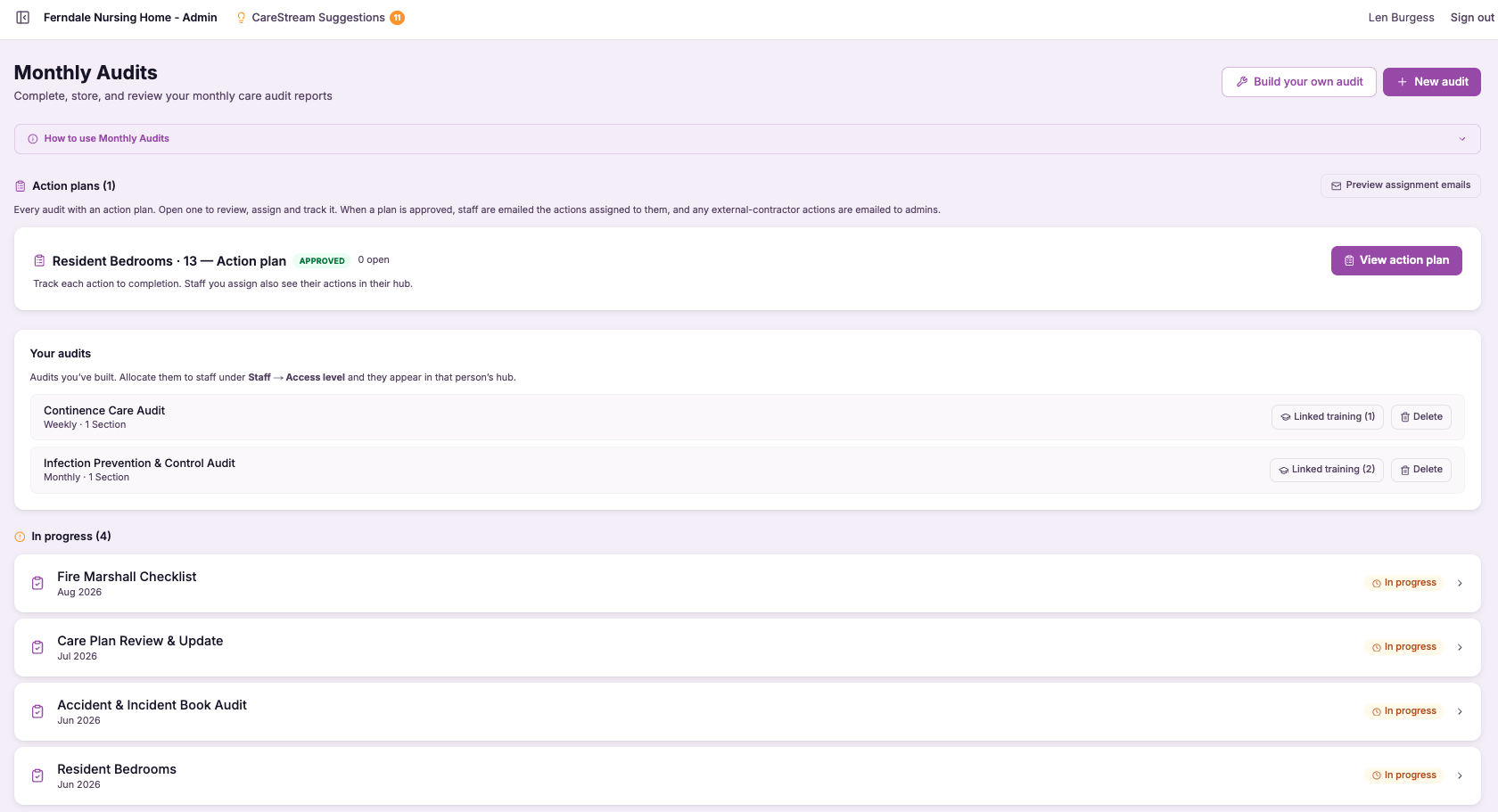
Build your own audits
Build your own audits lets you create custom audits from scratch, defining the questions and the structure that suit the thing you actually want to check. Rather than being limited to the built-in templates, you can capture a local requirement, a specific area of practice or a bespoke concern in an audit that fits it exactly, and run it as a first-class part of your quality programme.
This matters because good governance is specific to a service. The standard audits cover the common ground, but the checks that catch your particular risks are often ones only you know you need. Being able to build them, and track them alongside everything else, means your whole audit picture stays in one place instead of splitting between the platform and stray spreadsheets.
- You can create audits with your own questions, tailored to what your service actually needs to check.
- Local or bespoke requirements are captured in the platform rather than dropped into a spreadsheet.
- Custom audits run and are tracked in the same place as the built-in templates.
- You are no longer limited to standard forms when a check does not fit one.
- Your entire audit programme, standard and bespoke, stays visible in one system.
- Lessons from incidents or local concerns can become a repeatable audit you actually run.
How it works, step by step
Start a custom audit when a check you need does not fit any of the built-in templates.
Add your own questions in your own words, capturing exactly what you want to assess.
Arrange the audit the way that suits the subject, so it reads and runs the way your service works.
Carry out your custom audit exactly as you would a standard one, recording results as you go.
Follow your bespoke audit's results across runs, the same way you track built-in audits.
Run the audit again whenever you need it, and adjust the questions as your requirements change.
- Create audits with your own questions and structure.
- Not limited to the built-in templates.
- Custom audits run and are tracked in the same system as standard ones.
- Local, bespoke and incident-driven checks all stay inside the platform.
- Reusable, so a one-off concern can become a repeatable audit.
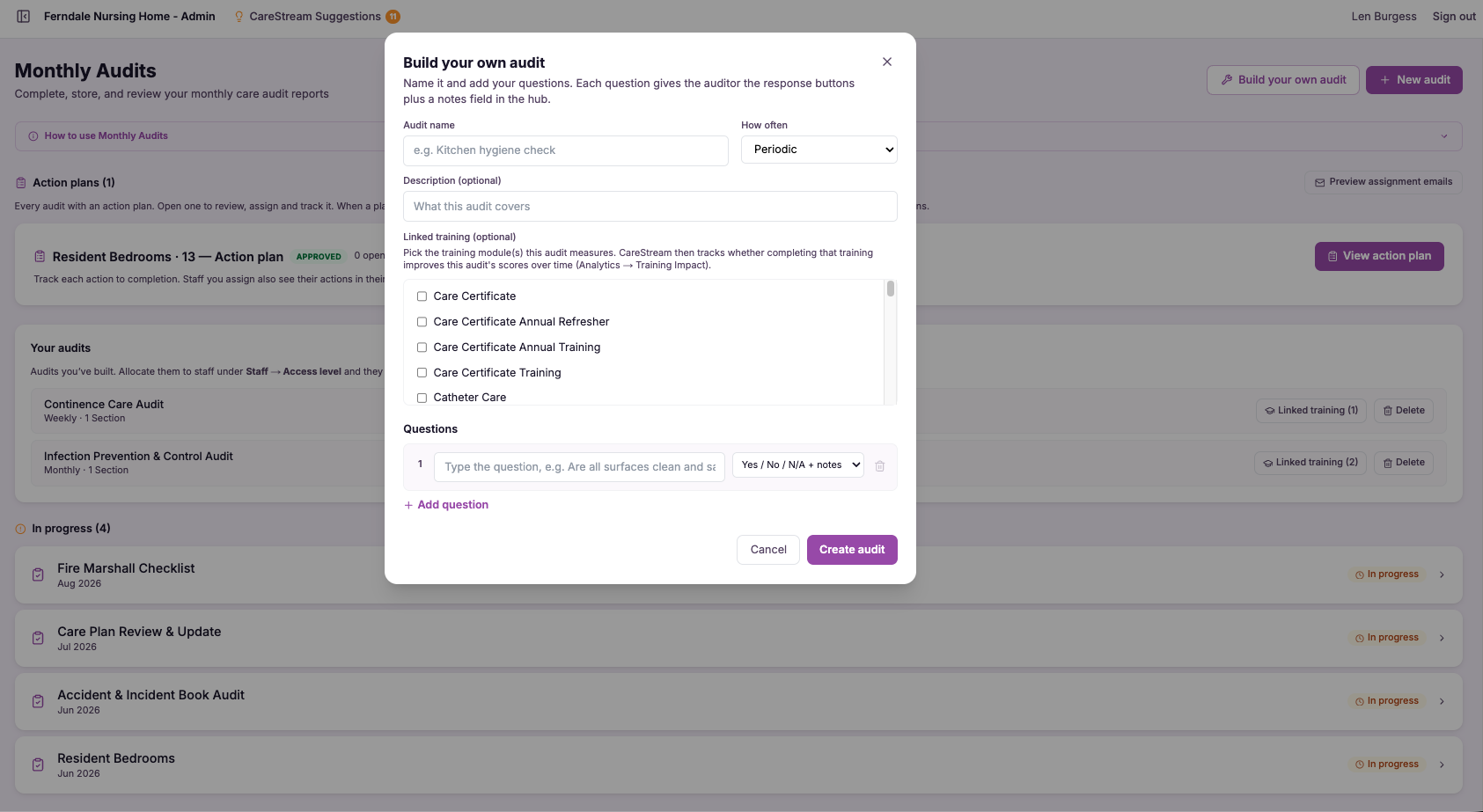
Audits linked to training
Linking audits to training means that an audit result is not the end of the process but the start of one. When an audit surfaces a weakness, for example an infection prevention and control audit scoring low, you can connect that finding to the training that addresses it, so the response to a problem is a concrete step to build competence rather than just a note in the minutes.
This matters because CQC's whole model is about continuous improvement, not one-off checks. Inspectors want to see that you notice a problem, do something about it, and can show the something worked. Connecting audits to training gives you exactly that chain of evidence, joining the moment you find an issue to the action that closes it.
- A low audit score leads to a clear training response rather than sitting unaddressed in a report.
- Weaknesses in practice are connected directly to the training that builds the missing competence.
- You close the loop between finding an issue and fixing the capability behind it.
- You can evidence to CQC that audit findings drive real improvement, not just documentation.
- Recurring low scores in an area point you to the training that needs strengthening.
- Your audit programme becomes a genuine improvement engine rather than a paperwork exercise.
How it works, step by step
Carry out an audit, such as infection control, and record the scores that show where practice is strong or weak.
Read where the audit scores low, which is the signal that competence in that area needs attention.
Connect the low-scoring finding to the relevant training that addresses the underlying gap.
Direct the right people to that training, turning the finding into a concrete step rather than a note.
Run the audit again later to check whether the training has actually moved the score.
Show the whole chain from finding to training to improvement, exactly what an inspector wants to see.
- Audit findings can be connected directly to relevant training.
- A low score, for example on infection control, leads to a training response.
- The loop from spotting an issue to fixing competence is closed and visible.
- Improvement can be evidenced, not just findings recorded.
- Re-auditing shows whether the training actually raised the score.
Frequently asked
01Build your own audits
Can I really build an audit with my own questions?
Yes. Alongside the built-in templates, CareStream lets you create custom audits from scratch, writing your own questions in your own words and setting the structure that suits what you want to check. You are not limited to standard forms, so a local requirement or a bespoke concern can be captured in an audit that fits it exactly. Once built, your custom audit behaves just like a standard one. You run it, record the results and track it over time within the same audit system, so a bespoke check gets all the same benefits and visibility as the templates that come as standard.
How is a custom audit different from the built-in templates?
The built-in templates cover the common audits that most services need, giving you a fast start on the shared ground. Custom audits are for the checks that are specific to your service, where no standard template quite fits, such as a local requirement or a concern that came out of a particular incident. The important part is that both live in the same place. Your custom audits are not a separate, second-class tool, they run and are tracked exactly like the standard ones, so your whole audit programme stays in one system rather than splitting between the platform and stray spreadsheets.
Can I reuse a custom audit or is it a one-off?
Custom audits are reusable, so a concern that started as a one-off can become an audit you run regularly. Once you have built it, you can run it again whenever you need to, and follow its results across runs the same way you would track any built-in audit. This is particularly useful for turning lessons into practice. When an incident or a local issue reveals something worth monitoring, you can build an audit for it once and then keep checking against it over time, adjusting the questions as your requirements change, so the learning actually sticks.
Does having my own audits help at inspection?
It does, because good governance is specific to a service and inspectors want to see that you monitor the things that matter for your particular setting, not just the generic checklist. Being able to build and run bespoke audits shows that you understand your own risks and have put deliberate checks in place for them. Just as importantly, because custom audits run and are tracked in the same system as the standard ones, you can present a complete governance picture rather than a partial one. Nothing important is hidden in a spreadsheet outside the platform, so your whole quality programme, standard and bespoke, is visible and evidenced in one place.
02Audits linked to training
How does linking audits to training actually work?
When you run an audit and it reveals a weakness, for example an infection prevention and control audit scoring low, you can connect that finding to the training that addresses the underlying gap in competence. Because both the audit and the training live in CareStream, that connection is a real, actionable link rather than a note in the minutes that someone has to remember to follow up. From there you can direct the right people to the relevant training, and re-audit later to see whether the score has moved. This turns the audit from something that simply documents a problem into the first step of actually solving it.
Can you give an example of the loop in practice?
Take an infection control audit that comes back with a low score in a particular area of practice. On its own, that score tells you there is a weakness but does nothing to address it. By linking the finding to infection control training, you turn the low score into a prompt to build the competence that was missing. The loop closes when you re-run the audit and see whether the score has improved. That gives you a complete story: you found the issue, you responded with training, and you can show the result. It is exactly the kind of continuous improvement cycle CQC wants to see evidenced.
Why is this better than just recording audit results?
Recording audit results tells you where the problems are, but it does nothing to fix them, and a low score that sits in a folder tends to reappear at the next audit because the competence beneath it never changed. The value is in what happens after the finding, which is where most audit programmes lose momentum. By connecting findings to training, CareStream deliberately closes the gap between spotting an issue and fixing it. Instead of a growing list of scores, you build a record of problems noticed and acted upon, which is far more useful for both quality and inspection.
How does this support CQC inspection readiness?
CQC's model is built around continuous improvement, so inspectors are less interested in a perfect set of scores than in whether you notice problems, act on them, and can show the action worked. Linking audits to training gives you exactly that chain of evidence, from a low score to the training that addressed it to a re-audit that confirms the improvement. This lets you tell a confident, evidenced story about how your service learns and improves. Rather than presenting audits as isolated checks, you can demonstrate a genuine loop where findings drive competence, which speaks directly to well-led and to the quality statements around learning and improvement.
Explore more features
More of what the CareStream compliance platform does for UK care providers.
See it on your own policies.
Upload what you already have and see what CareStream finds, inside a fortnight.





