Change a policy, approve it properly, prove it happened
A policy change is only finished when the right people have agreed it and the staff it applies to have read the version that resulted. This is the whole route: adopting a change, merging in the names of the people who hold the roles, getting it approved by whoever needs to approve it, and republishing to the team with the trail intact.
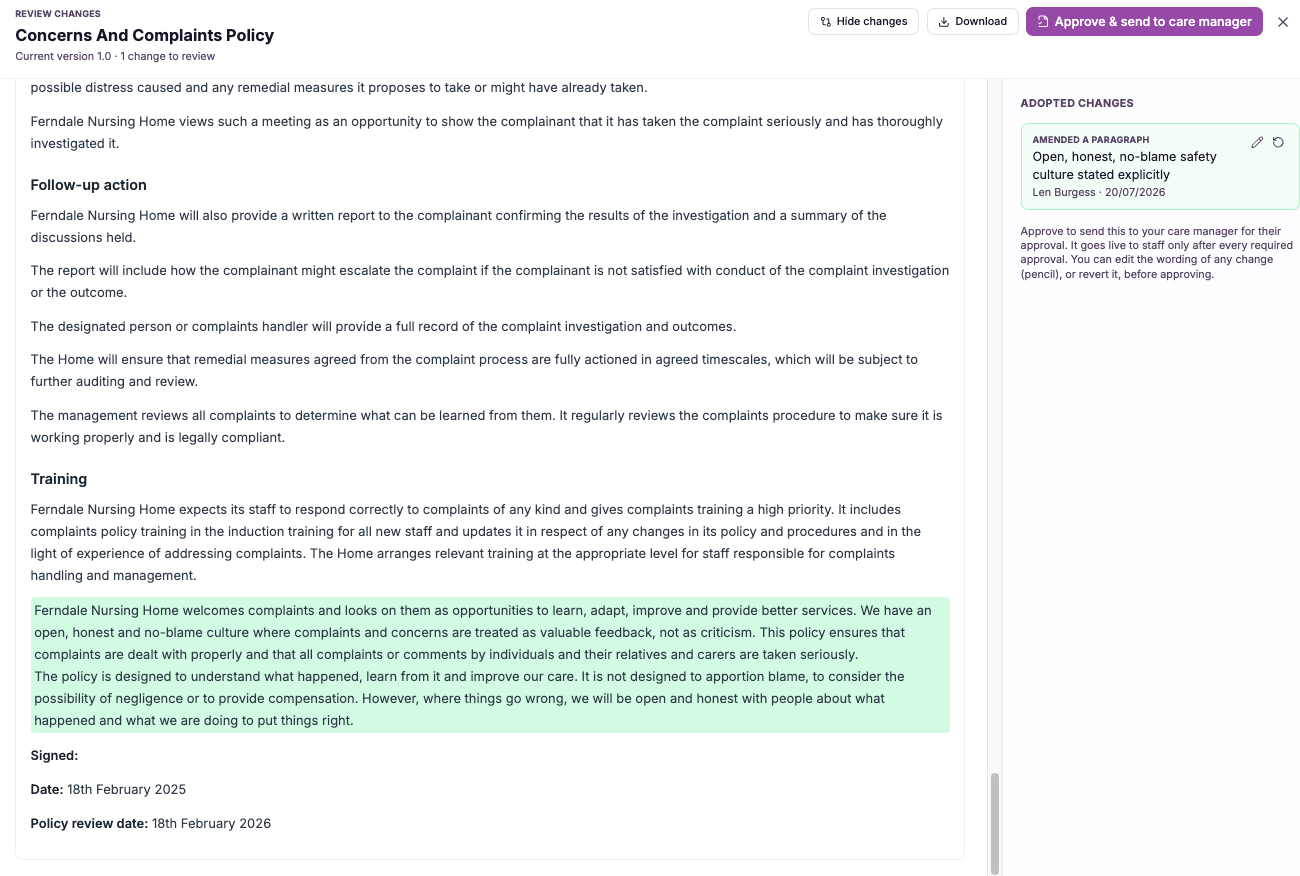
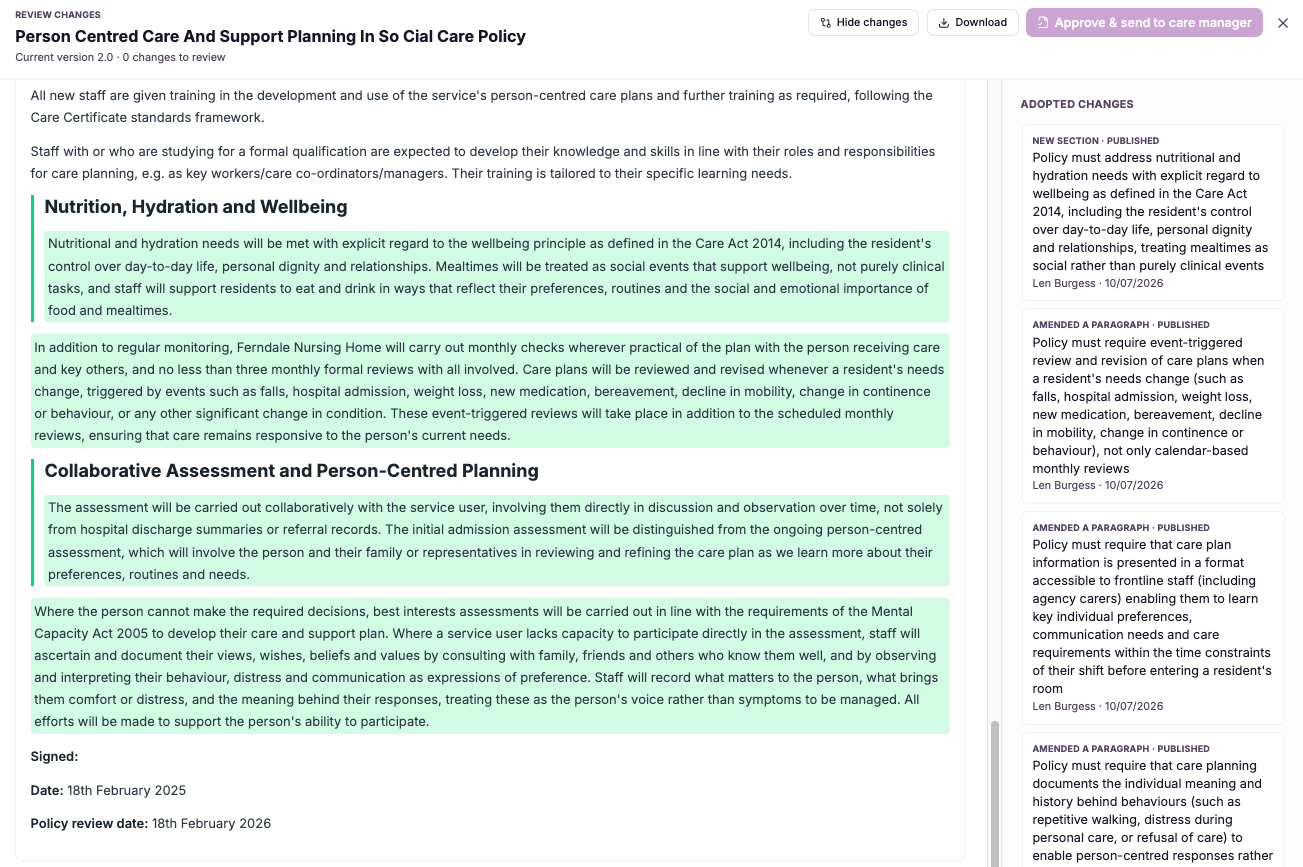
Adopt a gap fix into your policy (tracked changes)
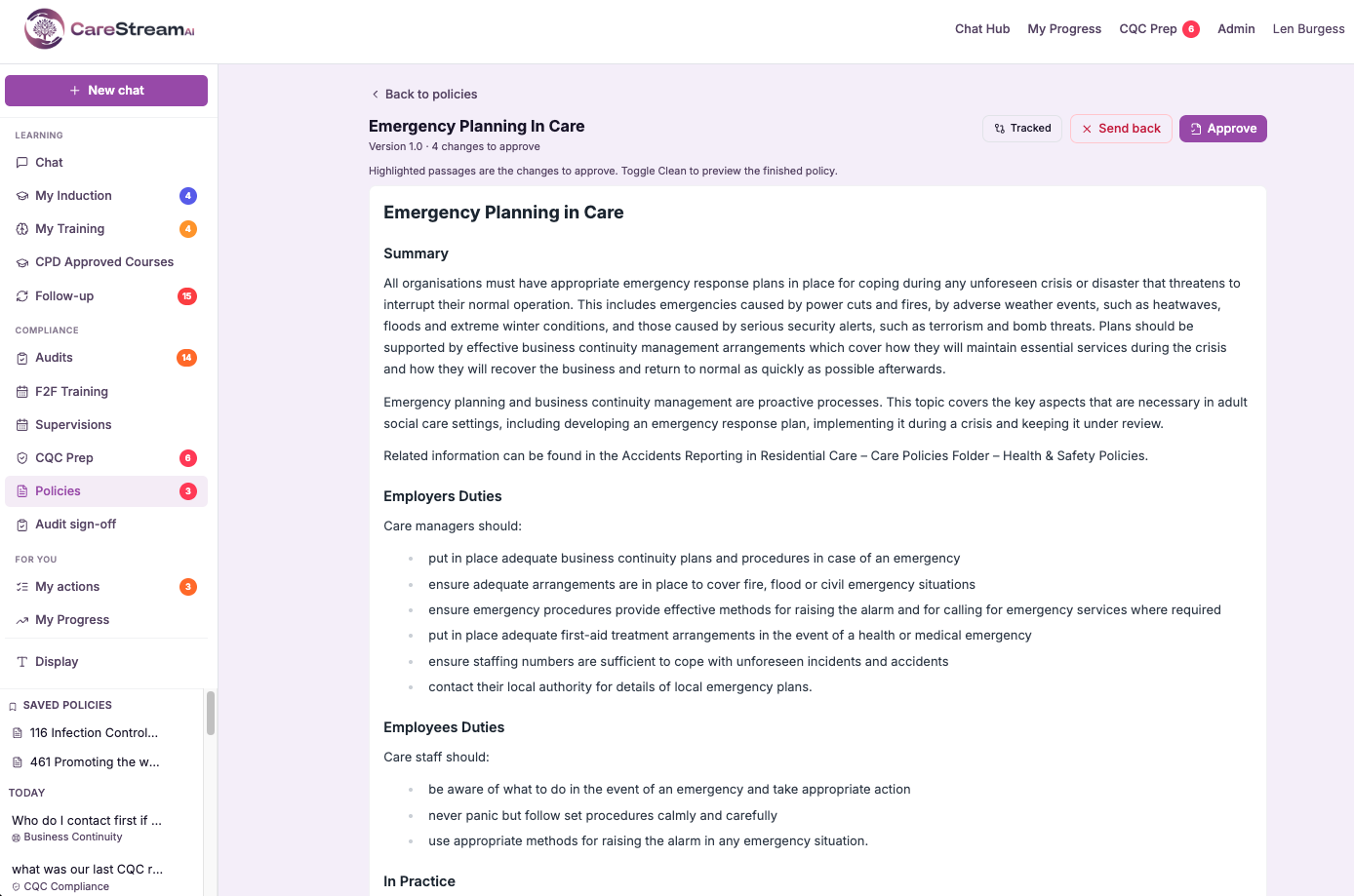
Adopting a gap fix as tracked changes means that when you accept one of CareStream's suggestions, the platform applies it into your policy in a marked-up form. Every insertion and alteration is highlighted against the existing text, so you can read the proposed wording exactly where it will sit rather than as a suggestion floating on its own.
This matters because policies and procedures in health and social care carry real weight. A change to a safeguarding or medication policy has to be understood before it is accepted, not after. By showing the fix as tracked changes, CareStream gives policy owners the same clarity and control they would expect from reviewing an edit in a familiar document, so nothing enters the live version without being seen first.
- You see exactly what an AI gap fix inserts or alters before it becomes live.
- Every proposed change appears in context, in the actual place it will sit within the policy.
- Nothing is applied silently, so you never lose track of what your policy now says.
- Reviewing a suggested fix feels as familiar as tracked changes in a document.
- You keep full authorship of your care home and nursing home policies at every step.
- You can move a well-understood improvement into your policy with confidence, not guesswork.
How it works, step by step
CareStream identifies a gap in a policy and proposes wording to close it, tied to the exact section it affects.
When you accept, CareStream applies the suggested wording into the policy as tracked changes rather than a silent edit.
Every insertion and alteration is highlighted against your existing text so nothing is hidden.
You read the change exactly where it will sit in the policy, seeing the before and after clearly.
You confirm the tracked change to move it forward, or refine the wording so it fits your service precisely.
Only once the tracked change is accepted does it form part of the current, live policy that staff work to.
- Accepted gap fixes are applied as tracked changes, never silent edits.
- Insertions and alterations are highlighted against your existing policy text.
- You review the change in context before it becomes the live version.
- The experience mirrors familiar tracked changes in a document.
- Policy owners keep full control and authorship of every change.
Adopt into your policy through review & approval
Adopting a change through review and approval means that a proposed update to a policy passes through a deliberate checkpoint before it becomes live. The change is reviewed, and a responsible person approves it, and only then does it replace the previous version as the current policy your staff work to.
This matters because policies and procedures in health and social care are only as trustworthy as the process behind them. A change that slips in without oversight undermines the whole document. By making review and approval the required route, CareStream ensures every policy update carries a clear moment of accountability, which is exactly what inspectors and your own governance expect to see.
- No policy change becomes live until a responsible person has approved it.
- Every update passes through a deliberate review checkpoint, not an automatic switch.
- Accountability for each change is clear, because someone signed it off.
- Your policies stay trustworthy because the process behind every change is controlled.
- Staff always work to a version that has been reviewed and approved, never a draft.
- You demonstrate sound governance over your care home and nursing home policies.
How it works, step by step
An update, whether an accepted gap fix or a manual edit, is prepared as a proposed change to a specific policy.
The proposed change is held as pending rather than applied, so it cannot affect staff until it is signed off.
Someone accountable examines the change, understands its impact and decides whether it should be adopted.
The responsible person approves the change, providing the deliberate sign-off that the adoption path requires.
Only after approval does the change replace the previous version as the live policy your team follows.
The approval is recorded so it is always clear that this version was reviewed and signed off before going live.
- Suggested changes never go live automatically.
- Every change passes through a required review and approval step.
- A responsible person signs off before a change becomes the current policy.
- This is the controlled adoption path for all policy updates.
- Staff only ever work to reviewed and approved versions.
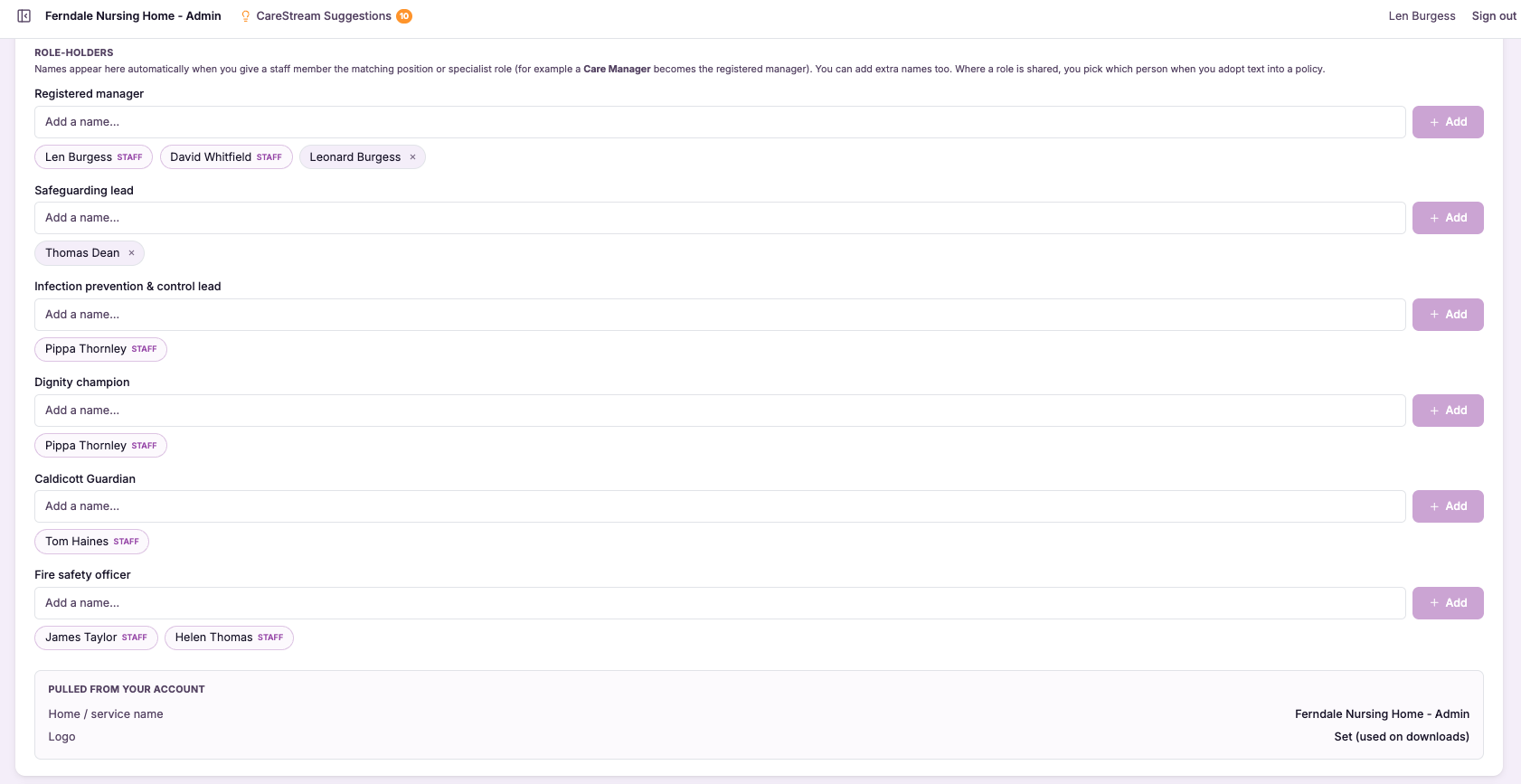
Role-holder names merged into policies
An inspector reading a policy wants to know who is actually responsible, not to see a placeholder where a name should be. Documents that still say [registered manager] or leave the accountable person blank suggest the policy is a template that was never truly adopted, and manually keeping real names correct across an entire library is the kind of task that quietly slips.
Role-holder names merged into policies solves both problems. CareStream holds your role holders, the registered manager, nominated individual, infection prevention lead and others, and merges their real names into your policies wherever those responsibilities appear. When a role holder changes, you update it once and every affected document reflects the new person, so your policies always show named, current, responsible people.
- Your policies show real named people rather than blanks or generic placeholders.
- The registered manager, nominated individual and named leads appear where they are actually responsible.
- When someone changes role, the name updates across every affected policy at once.
- You avoid manual find-and-replace across dozens of documents whenever a role holder changes.
- Inspectors see clearly accountable, named individuals instead of unfinished template text.
- Your documents stay current as your team changes, without a manual re-editing marathon.
How it works, step by step
You set who holds each role, such as registered manager, nominated individual and infection prevention lead.
CareStream connects each role to the places in your policies where that responsibility appears.
The actual names are merged into the documents, replacing blanks and generic placeholders.
Each policy displays the real, current person accountable for the relevant duty.
When a role holder changes, you update the role and every affected policy reflects it.
Your whole library keeps showing accurate named people as your team evolves.
- Merges real role-holder names into policies automatically
- Covers registered manager, nominated individual, named leads and more
- Replaces blanks and generic placeholders with accountable people
- A single role change updates every affected document
- Keeps named responsibility accurate as your team changes
Document versioning
Document versioning captures the state of a policy at every meaningful point in its life. Whenever a policy is edited or an approved change is made, CareStream saves that as a distinct version, keeping the older versions intact rather than overwriting them, and recording the date and the person responsible for the change.
This matters because policy history is evidence. Inspectors, auditors and your own governance want to know not just what a policy says today but how it got there, when it last changed and who signed that change off. Manual version control through renamed files and shared drives is fragile and easily broken, whereas automatic versioning gives you a reliable, continuous record of your policies and procedures in health and social care.
- Keep a complete history of every policy without ever having to save copies by hand.
- See exactly what changed between one version of a policy and the next.
- Know who made each change and when, for every policy you hold.
- Restore a previous version instantly if a change needs to be rolled back.
- Show inspectors a clean, dated trail behind any policy they ask about.
- Avoid the confusion of duplicate files and uncertain which version is current.
How it works, step by step
You work on your policy the way you always would, with no extra steps to save or preserve the old version.
Each edit or approved change automatically creates a new version, dated and attributed to whoever made it.
Every version is kept in a clear timeline, so the full life of the policy is always visible.
Open any earlier version to read exactly what the policy said at that point in time.
Set two versions side by side to see precisely what was added, removed or reworded.
Bring back a previous version as the live policy whenever a change needs to be reversed.
- Every edit or approved change creates a new version automatically
- Previous versions are preserved, never overwritten
- Each version records the date and the person who made the change
- You can view, compare and restore earlier versions
- Gives you a continuous, defensible policy history for inspection
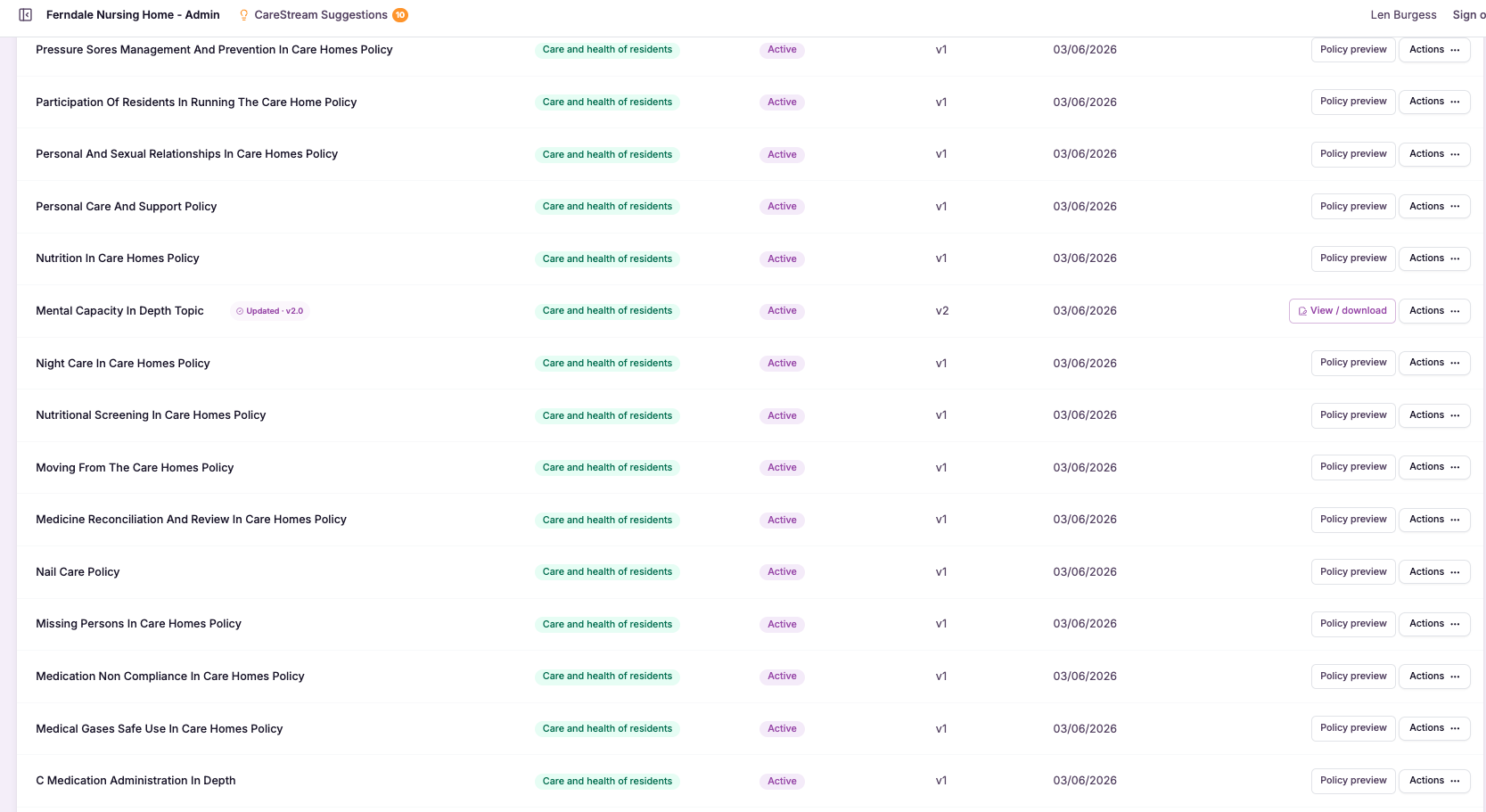
Admin approval with full version history
Admin approval with full version history means two things working together. Every change to a policy is signed off by an administrator before it takes effect, and every version, past and present, is retained so nothing is ever lost. The result is a policy that carries its own complete record of how it came to be what it is today.
This matters because governance in a care service depends on traceability. When you can show who approved a change and when, and demonstrate exactly what the previous wording was, you turn your policies and procedures in health and social care from static files into evidence. If a change ever needs undoing, a full version history means you can roll back rather than reconstruct.
- Every policy change is signed off by an administrator before it takes effect.
- You can see who approved each version and exactly when they approved it.
- No previous version is ever lost, because the full history is retained.
- You can compare any two versions to see precisely what changed between them.
- You can roll back to an earlier version if a change needs undoing.
- Your policies become traceable evidence of sound governance, not just current files.
How it works, step by step
An update to a policy is drafted, ready to move through admin approval before it can go live.
An administrator signs off the change, and that approval, with who and when, is recorded against the new version.
The approved change is saved as a distinct version, taking its place in the policy's ongoing history.
Every previous version stays available, so the full lineage of the policy is never lost.
You can view any two versions side by side to see exactly what changed between them.
If a change needs undoing, you can restore an earlier approved version rather than rebuilding it by hand.
- Every policy change is admin-approved before it takes effect.
- A full version history is retained, so no previous version is ever lost.
- You can see who approved each version and when.
- Any two versions can be compared to reveal exactly what changed.
- You can roll back to a previous version at any time.
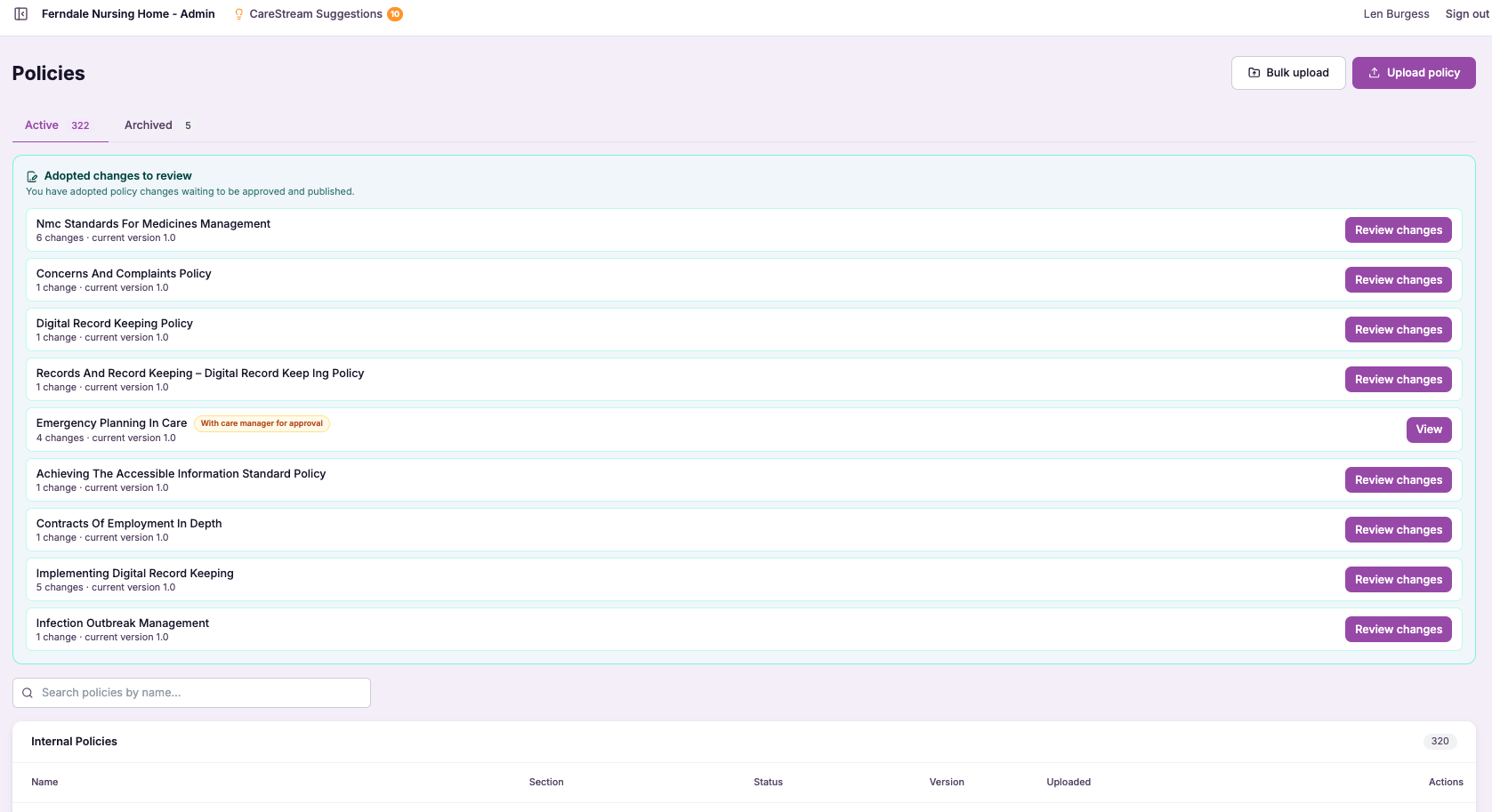
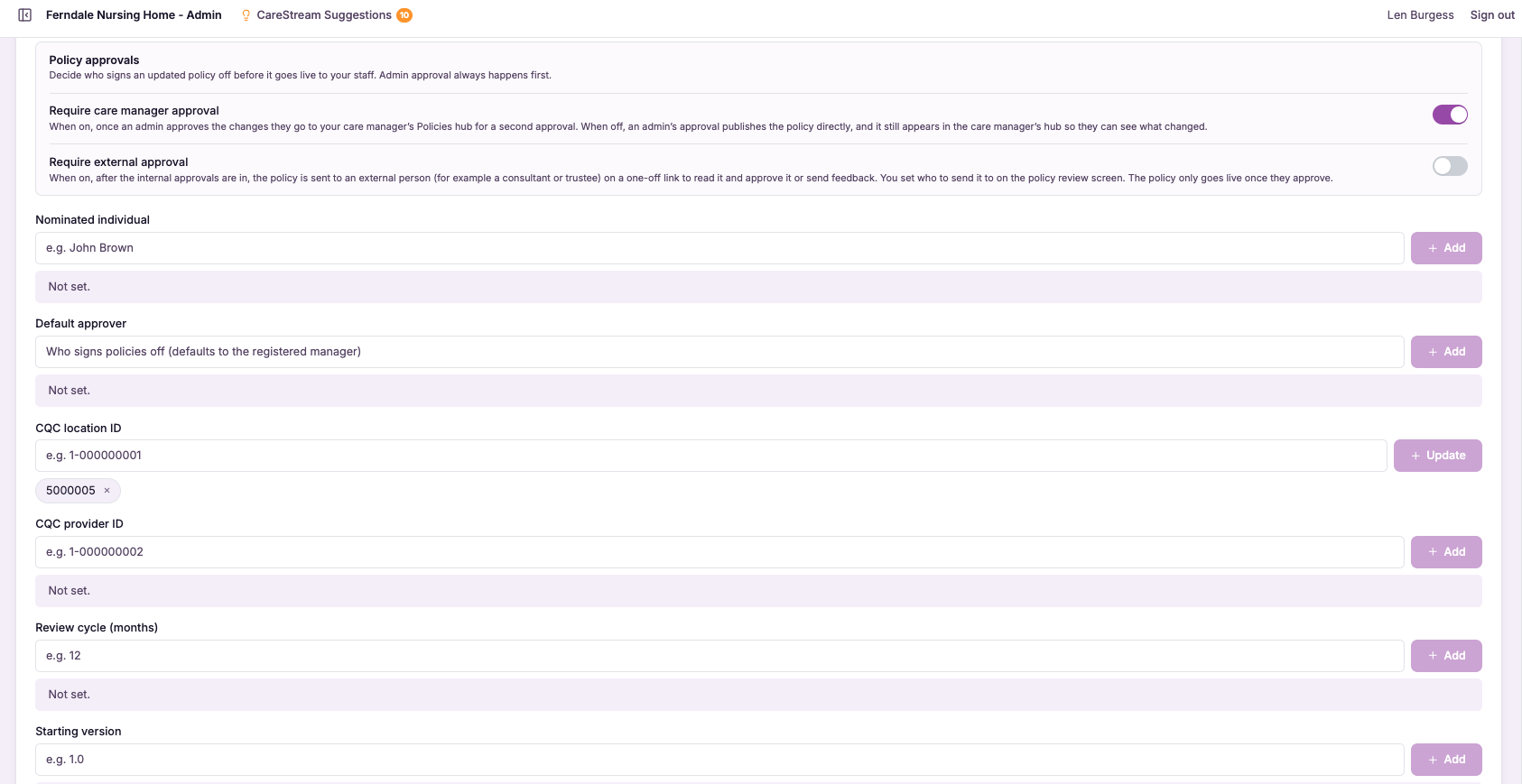
Care manager approval step (optional)
The optional care manager approval step lets you require a care manager to sign off a policy change before it is adopted, adding a second pair of eyes to the process. It is a switch you control: services that want that extra layer can turn it on, and services that prefer a simpler route can leave it off.
This matters because governance should fit the service, not the other way around. A larger provider managing many policies across multiple sites may want a care manager to review changes as an added safeguard, while a smaller team may find a single approval entirely sufficient. By making the step optional, CareStream lets you set a level of control over your care home policies and nursing home policies that genuinely matches how you operate.
- You can require a care manager to sign off changes, or choose not to.
- Services that want a second pair of eyes get one built into the process.
- Smaller teams can keep a leaner approval route without unnecessary steps.
- Your governance matches your service rather than a one size fits all model.
- Extra oversight is available for the policies where it matters most.
- You retain a controlled, accountable adoption path whichever setting you choose.
How it works, step by step
Choose whether your service requires a care manager approval step before a change is adopted.
If you want a second pair of eyes, enable the step so changes must be reviewed by a care manager.
When a policy change is prepared, it enters the adoption path you have configured for your service.
With the step enabled, a care manager reviews and approves the change before it can move forward.
Smaller teams can keep the step disabled, so changes follow the standard approval route without it.
Change the setting as your service grows or your governance needs shift, without disrupting existing policies.
- The care manager approval step is optional, not mandatory.
- Enable it to add a second pair of eyes before a change is adopted.
- Leave it off for a leaner route suited to smaller teams.
- The controlled adoption path stays intact whichever setting you choose.
- You can change the setting as your governance needs evolve.
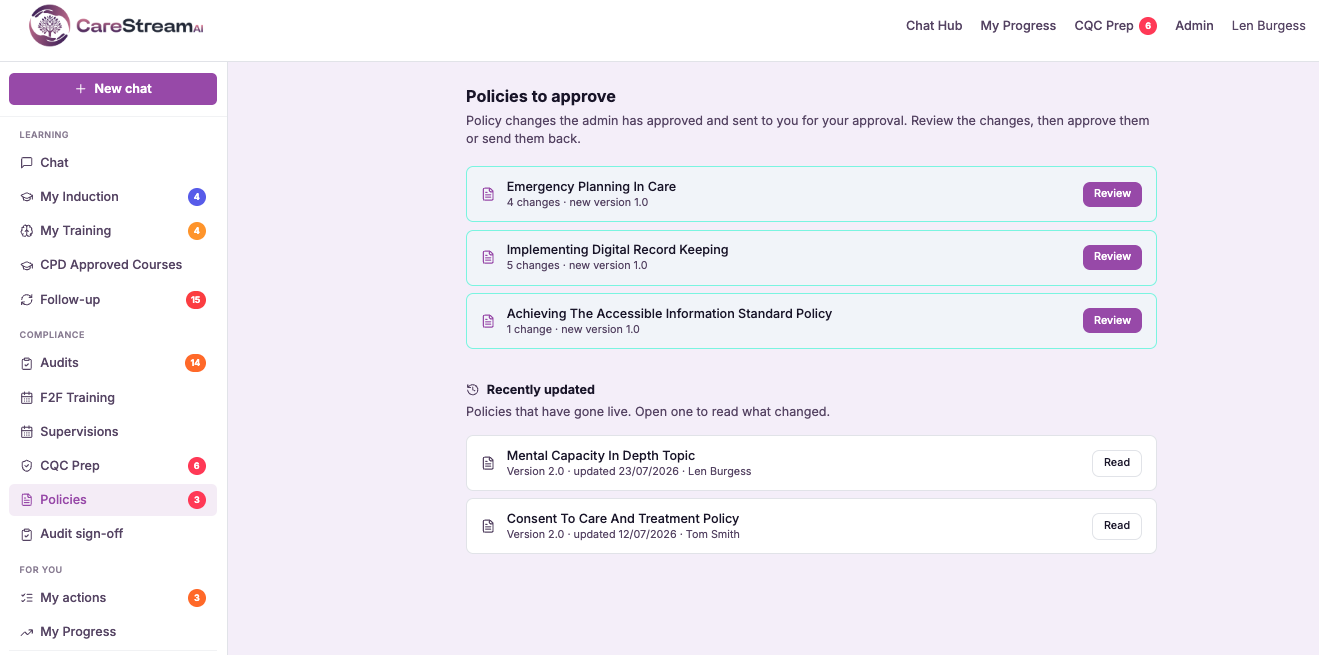
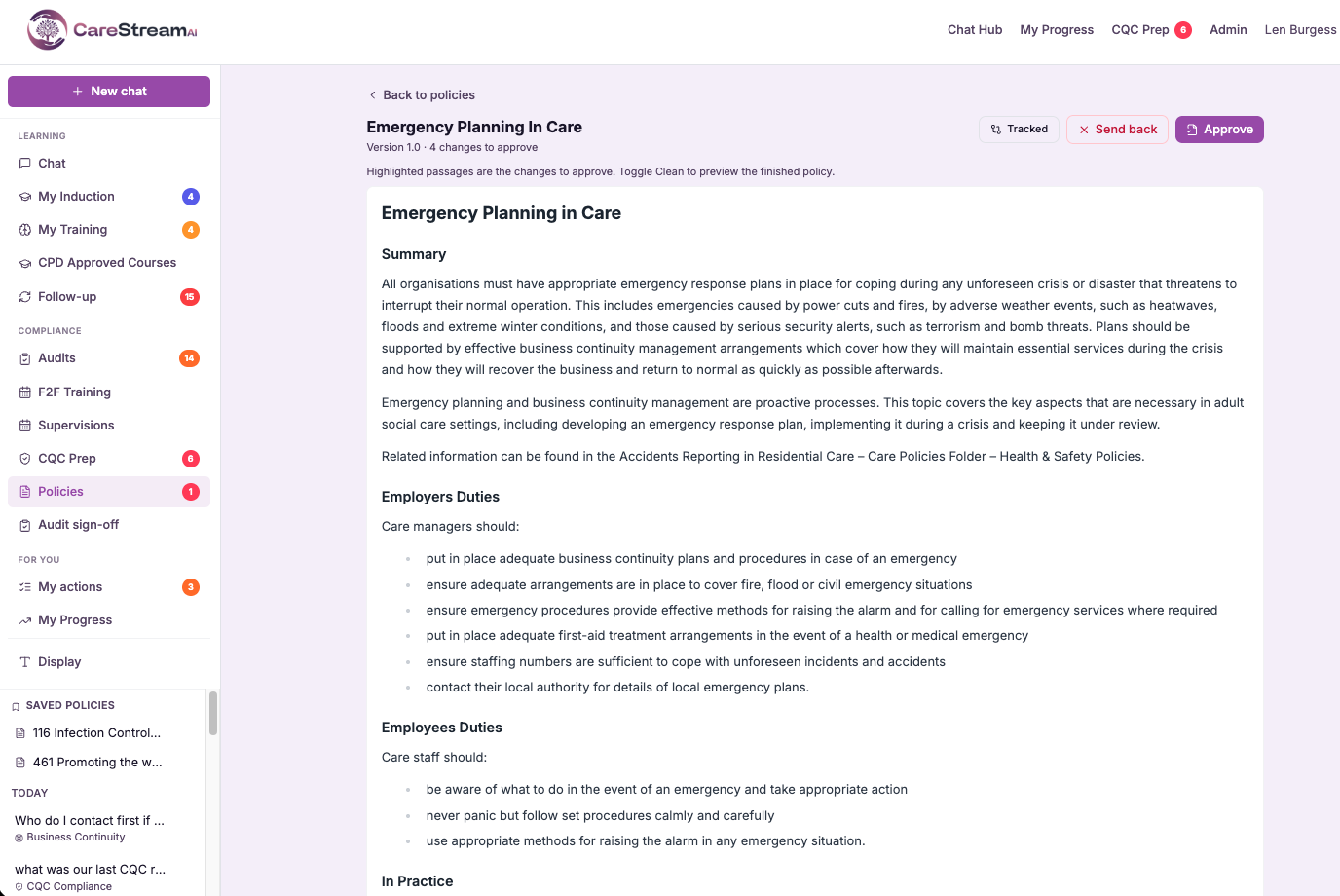
Care manager Policies hub (approve + see what changed)
The care manager policies hub is a dedicated view where a care manager can see every pending policy change, understand exactly what changed in each one, and approve it. Rather than tracking changes across separate documents or messages, everything that needs a decision sits together in one place, ready to review.
This matters because good approval depends on clarity. A care manager who can see precisely what a change alters, in plain view, can sign it off with genuine confidence rather than rubber-stamping something they only half understand. By pairing all the pending changes with a clear see what changed view, the hub makes responsible approval of your policies and procedures in health and social care straightforward and quick.
- Every pending policy change sits in one place, ready for the care manager to review.
- You see exactly what changed in each policy before you approve it.
- Approval becomes a clear, confident decision rather than a rubber stamp.
- You no longer chase changes across separate documents or messages.
- Nothing waiting for sign-off is missed, because it is all in one view.
- Responsible approval of your policies becomes quick and straightforward.
How it works, step by step
Every policy change awaiting your sign-off appears in your dedicated care manager view.
You get a clear list of all changes waiting for approval, so nothing is overlooked.
Select any pending change to review the policy it affects and the decision it needs.
A clear view shows you exactly what was altered in that policy before you decide.
Once you understand the change, you approve it directly from the same place.
With one change signed off, you move straight to the next pending item in the hub.
- A dedicated hub for the care manager to review pending policy changes.
- Every change waiting for approval is gathered in one place.
- You clearly see what changed in each policy before approving.
- Review and approval happen together, with no switching between tools.
- Approval becomes a confident decision, not a rubber stamp.
External approval by one-off link (consultant, trustee)
External approval by one-off link is a way to bring a named reviewer who does not use CareStream into your policy sign-off process. You choose the policy, generate a secure link and send it to your consultant, trustee or director, and they open it, read the exact version you sent and record their approval or feedback directly against it.
This matters because governance in adult social care often sits with people beyond the registered manager. Nominated individuals, boards of trustees and external advisers all carry accountability for policies and procedures in health and social care, and they need a clean, traceable way to sign off without being onboarded onto a system they will only touch occasionally. This feature gives them exactly that, while keeping the record complete for you.
- Get policies approved by trustees, directors and consultants without setting them up with accounts.
- Send a single policy for review without exposing the rest of your platform or your data.
- Know that the version reviewed is the exact version that was approved, with no mix-ups.
- Capture external sign-off in the same audit trail as your internal approvals.
- Keep approval moving even when the decision-maker sits outside your service.
- Show inspectors that policies carry proper external oversight where your governance requires it.
How it works, step by step
Open the policy you need signed off and select the option to send it for external approval.
Enter the name and email of the trustee, director or consultant who needs to review it, so their identity is recorded against the approval.
CareStream creates a one-off secure link tied to that exact policy and version, which you send to the reviewer.
The reviewer opens the link, reads the full policy and records their decision without needing a CareStream account.
Their approval or feedback is written straight into the policy's approval trail alongside your internal steps.
Once acted on, the single-use link expires so the document cannot be reopened or shared onward.
- Reviewers need no CareStream login, password or account setup
- Each link is single use and tied to one specific policy version
- External sign-off is recorded in the same approval trail as internal steps
- Reviewers only ever see the policy you sent, nothing else in your platform
- Ideal for trustees, directors, group quality leads and external consultants
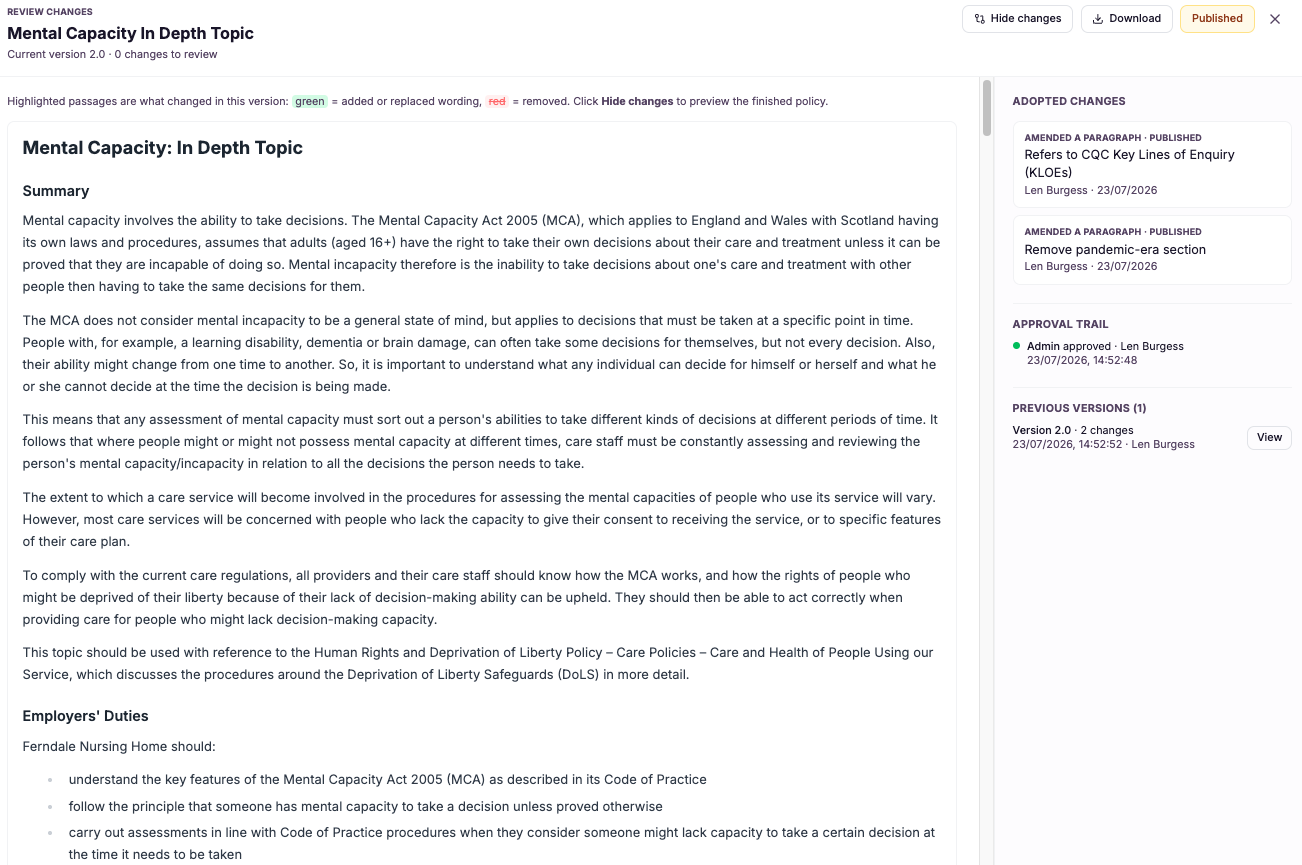
Approval trail + auto re-publish to staff Q&A
This feature does two things the moment a policy change is approved. First, the approval is written into an audit trail, capturing that the change was signed off so you can evidence it later. Second, the updated policy is automatically re-published to the staff Q&A assistant, so the assistant immediately answers from the latest approved version.
This matters because a policy that is approved but not distributed is worse than useless: staff continue to act on old guidance while believing it is current. By recording the approval and re-publishing automatically, CareStream closes the gap between sign-off and practice, so your care home policies and nursing home policies are always both traceable and live where your team actually uses them.
- Every approval is recorded in an audit trail you can produce as evidence.
- The updated policy is automatically re-published to the staff Q&A assistant.
- Staff immediately get answers from the latest approved version, not an old one.
- No one has to manually re-distribute a policy after it is approved.
- The gap between sign-off and frontline practice is closed straight away.
- You can always show who approved a change and that staff received it.
How it works, step by step
A responsible person signs off the policy change through the controlled adoption path.
The sign-off is written into an audit trail, capturing who approved the change and that it happened.
The updated policy is automatically re-published to the staff Q&A assistant without any manual step.
From that moment the assistant answers staff questions from the newest approved version of the policy.
The previous wording no longer drives answers, so staff cannot act on a superseded version.
The recorded approval remains in the audit trail as evidence you can produce whenever it is needed.
- Every approval is recorded in an audit trail.
- The updated policy is automatically re-published to the staff Q&A assistant.
- Staff immediately get answers from the latest approved version.
- No manual re-distribution is needed after sign-off.
- Records and frontline practice stay in step at all times.
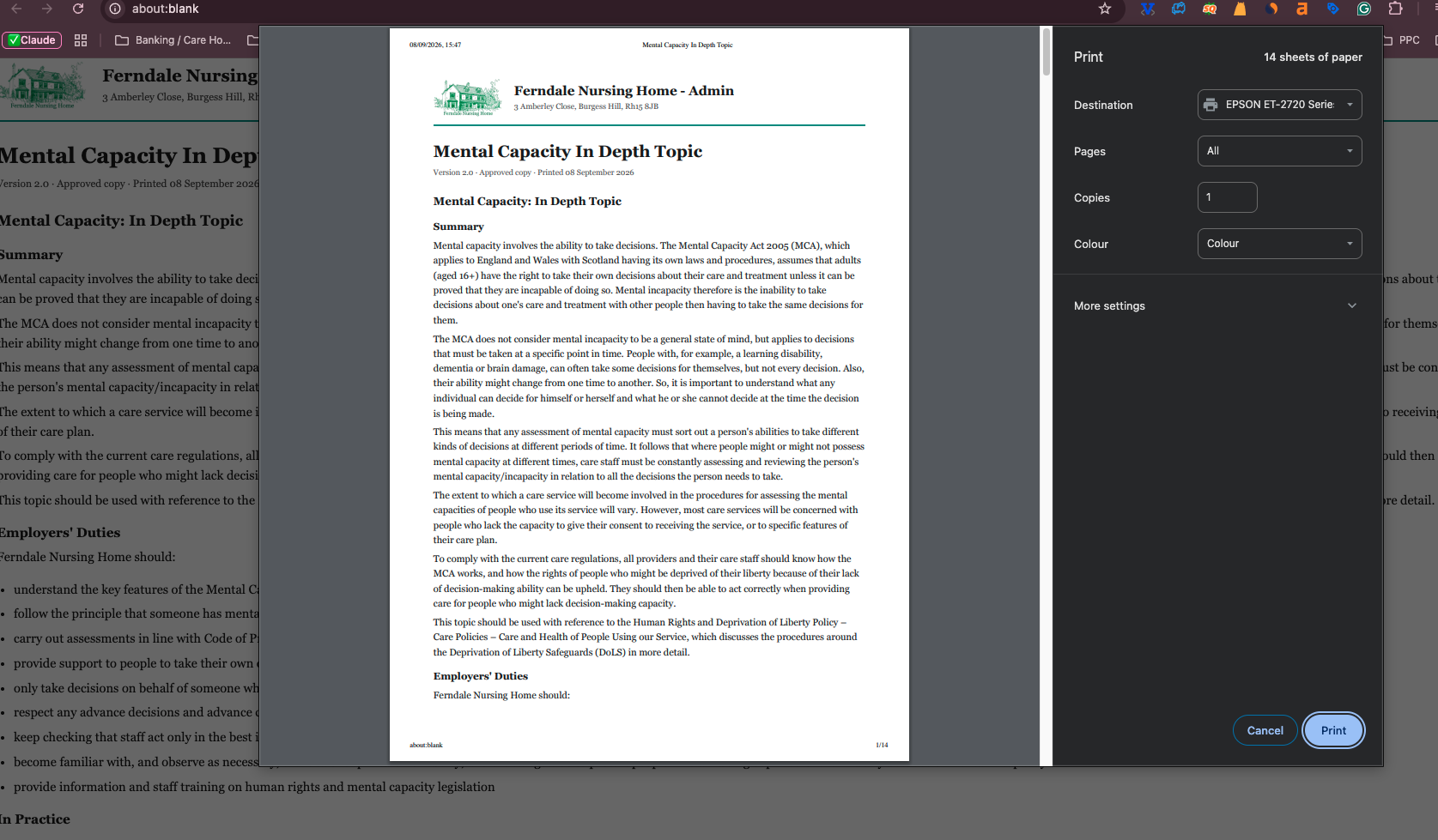
Download a print-ready policy (letterhead + sign-off)
This feature turns any policy in CareStream into a polished, print-ready document. Rather than exporting plain text that you then have to lay out yourself, the policy is produced on your own letterhead with a clear authorisation and sign-off block, so it is ready to print, file or hand over as it comes.
This matters because presentation carries weight in a care setting. A policy that appears on headed paper with a proper sign-off block signals that it is controlled, authorised and current, which is exactly the impression you want to give an inspector or auditor. It also saves the fiddly, error-prone work of reformatting documents every time you need a physical copy for staff files or evidence.
- Hand inspectors and auditors a policy that looks professional and properly authorised.
- Produce documents on your own letterhead without any manual formatting.
- Include a sign-off block automatically, so authorisation is visible on the page.
- Add finished policies to staff files without reworking the layout each time.
- Present a consistent, branded look across every policy you print.
- Save time whenever a physical or PDF copy of a policy is requested.
How it works, step by step
Go to the policy you need a physical or shareable copy of.
Select the print-ready download option rather than copying raw text.
The document is produced on your own letterhead so it clearly belongs to your service.
An authorisation and sign-off block is placed on the document ready to be signed or countersigned.
Headings, spacing and layout are set for you, so the policy reads cleanly on the page.
Print the document for staff files, add it to an inspection folder or share it as a finished PDF.
- Any policy can be downloaded as a print-ready document
- Documents come out on your own letterhead
- A sign-off and authorisation block is included automatically
- No manual reformatting before printing or sharing
- Ready for staff files, inspectors and auditors
Frequently asked
01Adopt a gap fix into your policy (tracked changes)
What does adopting a gap fix as tracked changes actually mean?
When CareStream suggests a fix to close a gap in one of your policies and you accept it, the platform does not rewrite the document behind your back. It applies the suggested wording as tracked changes, highlighting every insertion and alteration against your existing text. This works exactly like the tracked changes you know from editing a document. You can see the before and after in context, understand precisely what the fix does, and confirm it only when you are satisfied. The change becomes part of the live policy only after that point.
Will a fix ever change my policy without me seeing it?
No. That is the whole purpose of showing accepted fixes as tracked changes rather than silent edits. Nothing is merged into the live version of a policy until you have reviewed the marked-up change and confirmed it. This keeps policy owners firmly in control of policies and procedures in health and social care. Because a change to something like a safeguarding or medication policy carries real weight, CareStream makes sure you understand every inserted or altered word before it takes effect.
Can I adjust the wording of a suggested fix?
Yes. Seeing a fix as tracked changes means you can treat it as a starting point rather than a fixed instruction. If the suggested wording is close but not quite right for your service, you can refine it so it fits your home precisely before it becomes live. This matters because every service has its own context, and a good policy reflects how your care is genuinely delivered. Tracked changes give you the room to shape the improvement, keeping the speed of an AI suggestion while preserving your authorship of the final text.
How is this different from the review and approval step?
Tracked changes are about visibility of the change itself: what an accepted gap fix inserts or alters, shown clearly in context within the policy. It answers the question of what is changing. The review and approval step is about who signs the change off before it goes live. The two work together, so you first see exactly what the tracked change does, and then it moves through the controlled adoption path where a responsible person approves it as the current, live policy.
02Adopt into your policy through review & approval
Does a suggested change ever go live on its own?
No. This is the core of the controlled adoption path. A suggested change is held as pending and cannot affect the live policy until a responsible person has reviewed it and approved it. That deliberate stop is what keeps your policies and procedures in health and social care trustworthy. Because nothing reaches your staff without sign-off, you can always be sure that the version they are working to has passed through a proper checkpoint.
Who is the responsible person who approves a change?
The responsible person is whoever your service has designated to sign off policy changes, typically a registered manager, nominated individual or quality lead. They examine the proposed change, understand its impact and decide whether it should be adopted. By attaching a named, accountable person to every approval, CareStream ensures each change carries a clear moment of ownership. This is exactly the kind of governance inspectors expect to see behind your care home policies and nursing home policies.
How does this relate to tracked changes?
The two features work hand in hand but answer different questions. Tracked changes show you what is changing, highlighting every insertion or alteration in context so the reviewer understands the proposed update clearly. Review and approval then govern whether that change goes live and who signs it off. So a reviewer first sees the marked-up change, and then the controlled adoption path requires a responsible person to approve it before it becomes the current policy.
Why does controlled adoption matter for CQC?
Inspectors look not just at what your policies say but at how they are governed. A change that appeared without oversight suggests weak control, whereas a change that was reviewed and signed off demonstrates that your service manages its policies and procedures deliberately. By making review and approval the required route for every update, CareStream gives you a clear, defensible story: no policy change reached your staff without a responsible person reviewing and approving it first. That is strong evidence of sound governance and inspection readiness.
03Role-holder names merged into policies
Which roles can be merged into my policies?
The feature is built around the responsible roles that care policies actually reference, such as the registered manager, nominated individual and named leads like the infection prevention lead, alongside the other role holders your documents depend on. Wherever a policy points to a person by their role, that is where a real name can be merged in. The aim is to make sure every duty that names a role also shows the real person who holds it. That turns a document full of generic labels into one where accountability is visible and specific, which is exactly what an inspector is looking for when they ask who is responsible for something.
What happens when a role holder leaves or changes?
Because names are linked to the role rather than typed into each document, you update the role holder once and every affected policy reflects the new person automatically. There is no need to open dozens of files and find and replace an old name, and no risk of one being missed in a document you forgot about. This is the part that saves the most work and prevents the most embarrassment. Staff changes are frequent in care, and manually keeping names correct across a whole library is exactly the sort of task that slips. Tying the name to the role means your documents simply stay current as your team changes.
How is this different from filling in placeholders manually?
Filling placeholders by hand fixes a document once, at that moment. The instant a role holder changes, the name you typed is wrong again, and you are back to editing files one by one. It also does nothing to stop the same blank reappearing in a new policy you add later. Merging role-holder names is a living link between your people and your documents. The names are always the current ones because they flow from the role, so the policies stay right as your team evolves. It replaces a repeated manual chore with something that maintains itself, which is why the names actually stay accurate over time rather than drifting out of date.
Does this help with inspection specifically?
Yes, in a direct and practical way. Inspectors routinely want to know who is responsible for a given area, and a policy that names a real, current person answers that immediately. A policy that leaves the responsible person blank, or still shows a generic label, invites the opposite impression: that the document was never truly adopted. By ensuring your registered manager, nominated individual and named leads appear by name where they are accountable, the feature turns your policies into clear evidence of ownership. It is a small detail that quietly reinforces the message that your service knows who does what and keeps its documents alive.
04Document versioning
Do I have to remember to save each version myself?
No. Versioning is fully automatic. Every time a policy is edited or an approved change is made, CareStream captures that as a new version and keeps the previous one intact, so there is nothing for you to save, rename or file manually. This is a deliberate move away from the fragile habit of renaming files on a shared drive. Because the platform handles it every time, your version history is always complete, and you never have to worry that a change slipped through without a record.
Can I see what actually changed between two versions?
Yes. You can open any two versions of a policy and compare them, so you can see exactly what was added, removed or reworded rather than just knowing that something changed. This makes it easy to review the impact of an update or to explain a change to a colleague or inspector. Each version also carries the date it was created and the person who made the change, so alongside seeing what moved, you can see who was responsible and when. Together that gives you the full picture behind any policy revision.
What happens if a change needs to be reversed?
Because previous versions are preserved rather than overwritten, you can restore an earlier version and make it the live policy again whenever a change needs to be rolled back. Nothing is ever truly lost, so a mistaken or premature edit is easy to undo. The restore is itself captured in the history, so the record stays honest. You can see that a previous version was brought back, when and by whom, which keeps your policy trail transparent even when you have had to reverse a decision.
How does versioning help at a CQC inspection?
Inspectors often want to understand not just what a policy says now but how it has evolved, when it was last reviewed and who signed changes off. Automatic versioning gives you a clear, dated history for every policy, so you can answer those questions immediately instead of searching through drives or emails. This strengthens your governance evidence considerably. Being able to show a continuous, attributed history behind your policies and procedures in health and social care demonstrates that your document control is deliberate and well managed, which is exactly the kind of assurance inspection looks for.
05Admin approval with full version history
What exactly does the version history record?
For every change to a policy, CareStream stores a distinct version along with the approval attached to it, so you can see who approved that version and precisely when. Every previous version is retained too, giving each policy a complete and unbroken lineage. This turns your care home policies and nursing home policies into traceable records rather than single current files. Whether you need to answer an inspector, investigate a complaint or simply understand how a policy evolved, the full history is there to show exactly what happened and when.
Can I roll back to a previous version?
Yes. Because the full version history is retained and nothing is overwritten, you can restore an earlier approved version if a change needs undoing. You do not have to reconstruct the old wording by hand or hunt for a copy, because it is already stored. This is a real safeguard for governance. If a change turns out to have been a mistake or no longer fits your service, rolling back is fast and clean, and the rollback itself becomes part of the traceable history of the policy.
Does every single change need admin approval?
Yes. Admin approval is the point at which a change takes effect, so every version that goes live has been signed off by an administrator. That approval, including who gave it and when, is recorded against the version. This matters because governance depends on accountability. By requiring admin sign-off for each change, CareStream ensures there is always a named person and a moment behind every version of your policies and procedures in health and social care, which is exactly what strong control looks like.
How does this help at a CQC inspection?
Inspectors want to see that your policies are controlled, not just present. Being able to show who approved each version and when, and to produce any earlier wording on request, is powerful evidence that your service governs its policies deliberately and carefully. A full version history also lets you demonstrate exactly what changed and why over time. Rather than presenting a single current document with no memory, you present a traceable lineage, which strengthens your inspection readiness and your wider approach to quality care.
06Care manager approval step (optional)
Is the care manager approval step required?
No, it is entirely optional. You decide whether your service requires a care manager to sign off a policy change before it is adopted. Services that want that extra layer can enable it, and those that prefer a simpler route can leave it off. This flexibility exists because governance should fit the service. A larger provider may want a care manager to review changes as an added safeguard, while a smaller team may find a single approval sufficient, and CareStream supports both without forcing one model on everyone.
Why would a service turn this step on?
Turning it on adds a second pair of eyes to the adoption of any policy change. For services that manage many policies, operate across multiple sites, or simply want extra assurance on sensitive documents, that additional review can be valuable. With the step enabled, a care manager reviews and approves each change before it can move forward, which strengthens oversight without abandoning the controlled adoption path. It is a way to build more governance into the process precisely where a service feels it is warranted.
Can smaller teams leave it off?
Yes, and many will. A small team often has a single responsible person who is entirely sufficient to approve policy changes, and adding a second required step would only introduce delay without adding real control. By leaving the care manager approval step off, those teams keep a leaner route where changes follow the standard approval path. The controlled adoption path still applies, so nothing goes live without sign-off, but the process stays proportionate to the size and structure of the service.
Can I change the setting later?
Yes. The care manager approval step is a setting you can adjust as your service evolves. A home that starts small and later becomes part of a group, or one that decides it wants more oversight on its policies, can enable the step when the time is right. Changing the setting does not disrupt your existing policies or their version history. It simply adjusts the adoption path that future changes follow, so your governance can grow and adapt alongside your service.
07Care manager Policies hub (approve + see what changed)
What is the care manager policies hub?
It is a dedicated view built for care managers to review pending policy changes, see exactly what changed in each one, and approve them, all in one place. Instead of tracking changes across separate documents or messages, everything awaiting a decision is gathered together. The hub exists to make responsible approval straightforward. Because you can clearly see what a change alters before you sign it off, approving your care home policies and nursing home policies becomes a confident decision rather than a chore, and nothing waiting for approval slips through the cracks.
How do I see what changed in a policy?
When you open a pending change in the hub, a clear view shows you exactly what was altered in that policy. You are not left to compare documents yourself or guess at the difference, because the change is presented plainly for you to review. This is central to the hub's purpose. Approval only carries weight if the person giving it understands the change, so the see what changed view ensures every care manager can sign off knowing precisely what they are approving before it becomes the live policy.
Do I have to leave the hub to approve a change?
No. The hub is designed so that review and approval happen together in the same place. You see what is pending, open a change to see what was altered, and approve it directly, all without switching between tools or documents. This matters for a busy care manager. Keeping everything in one smooth flow means you can work through pending changes quickly and confidently, moving from one to the next without losing your place or your understanding of what each one involves.
How does the hub support inspection readiness?
The hub gives you a clear, single place where policy changes are reviewed and signed off by a care manager, with a clear view of what changed in each one. That is exactly the kind of controlled, evidenced process inspectors look for behind your policies and procedures in health and social care. Because every approval follows a review of what actually changed, you can show that sign-off was meaningful rather than a formality. Combined with the wider approval trail and version history, the hub helps you demonstrate that your service governs its policies deliberately and carefully.
08External approval by one-off link (consultant, trustee)
Does the external reviewer need a CareStream account?
No. The whole point of this feature is that trustees, directors and external consultants can review and sign off a policy without ever creating a login. You send them a one-off secure link, they open it, read the policy and record their decision, and that is the entire process for them. This removes the friction that usually delays external sign-off. There is no password to set, no onboarding to complete and nothing for you to administer on their behalf, so occasional reviewers can act quickly whenever a policy needs their approval.
Can the reviewer see the rest of our platform or other policies?
No. The secure link opens only the exact policy and version you chose to send. The reviewer cannot browse your other policies, your staff records, your training data or anything else inside CareStream, because the link is scoped to that single document. This keeps your data protected while still giving the reviewer everything they need to make an informed decision. They see the full policy in context, sign it off or return feedback, and never gain access to anything beyond it.
Is the external approval recorded for inspection?
Yes. When an external reviewer signs off through the link, their approval is written into the same audit trail as your internal approval steps, with their name and the date. So the record shows clearly who reviewed the policy, which version they saw and when they approved it. This means external oversight carries the same evidential weight as internal sign-off. At inspection you can demonstrate that policies requiring board, trustee or consultant approval genuinely received it, with a clean, dated trail behind every one.
What stops the link being reused or forwarded?
Each link is single use and tied to one specific policy version. Once the reviewer has acted on it, the link expires, so it cannot be reopened, and because it is bound to a particular version it will never surface a different or later document. If you need the same person to review a revised version later, you simply send a fresh link for that version. This keeps every approval unambiguous, because there is never any doubt about which version of a policy a reviewer actually signed off.
09Approval trail + auto re-publish to staff Q&A
What happens the moment a policy change is approved?
Two things happen automatically and together. The approval is written into an audit trail, capturing that the change was signed off so you can evidence it later, and the updated policy is re-published to the staff Q&A assistant. Because both steps are automatic, there is no lag between sign-off and distribution. The assistant immediately begins answering staff questions from the latest approved version, so your records and your frontline practice stay perfectly in step.
Do I need to re-distribute a policy to staff after approving it?
No. That is the whole point of automatic re-publishing. Once a change is approved, the updated policy is pushed to the staff Q&A assistant on its own, without anyone having to remember to circulate it or update a shared copy. This closes a gap that catches many services out, where a policy is approved but staff carry on acting on the old version because no one distributed the new one. With CareStream, approval and distribution are a single event, so the latest approved wording reaches your team straight away.
How do staff get the updated answers?
Staff use the Q&A assistant to ask questions, and once a change is approved the assistant answers from the newest approved version of the policy. The previous wording no longer drives answers, so staff cannot act on a superseded version by mistake. This means your team always receives guidance that reflects your current, approved care home policies and nursing home policies. There is no window in which a policy has been updated on paper but not yet in the answers your staff are relying on day to day.
What does the audit trail let me prove?
The audit trail records that each policy change was approved, so you can show that sign-off genuinely happened and by whom. Combined with the automatic re-publish, it also lets you demonstrate that staff were answering from the latest approved version from that point on. For CQC and your own governance, this is strong evidence. You can produce a clear record that a change was properly approved and that it reached your frontline immediately, which shows an inspector that your policies and procedures in health and social care are both controlled and genuinely embedded in practice.
10Download a print-ready policy (letterhead + sign-off)
Will the policy come out on our own branding?
Yes. When you download a policy, it is produced on your own letterhead, so the finished document clearly belongs to your service rather than looking like a generic export. This gives every printed policy a consistent, professional appearance across your whole document set. That consistency matters when policies are seen by inspectors, auditors or new staff. A branded document signals that your policies and procedures in health and social care are properly controlled and current, which reinforces the impression of a well run service.
Is there a place to sign the policy off?
Yes. Every print-ready download includes an authorisation and sign-off block, placed on the document ready to be signed or countersigned. So the physical copy shows clearly that the policy is authorised, without you having to add that section yourself. This is particularly useful for staff files and inspection evidence, where a visible sign-off demonstrates that the policy carries proper authorisation. It turns a plain policy into a controlled document that stands up to scrutiny.
Do I have to reformat the document before I can use it?
No. The download is print-ready, which means headings, spacing and layout are all handled for you. The policy comes out formatted and ready to print, file or share, without the fiddly manual layout work that a raw text export would need. This saves real time whenever a physical or PDF copy is requested. Instead of laying out a document by hand each time, you download a finished version in moments, which keeps your evidence ready and your staff files up to date with far less effort.
Can I use these documents for staff files and inspection?
Yes. The print-ready format is designed exactly for that. Because each policy comes out on your letterhead with a sign-off block and clean formatting, it is suitable for adding to staff files, placing in an inspection folder or handing directly to an auditor. Having finished, branded copies ready means you are never scrambling to produce a presentable document when it is asked for. Your policies are always available in a form that looks professional and demonstrates proper control, which supports your inspection readiness.
Explore more features
More of what the CareStream compliance platform does for UK care providers.
See it on your own policies.
Upload what you already have and see what CareStream finds, inside a fortnight.





