Policies an inspector recognises, still written in your voice
Good practice described in your own words is harder to credit than the same practice described in the language of the assessment framework. Alignment closes that gap without touching what you actually do, and without making your policies read as though they were written for an inspector.
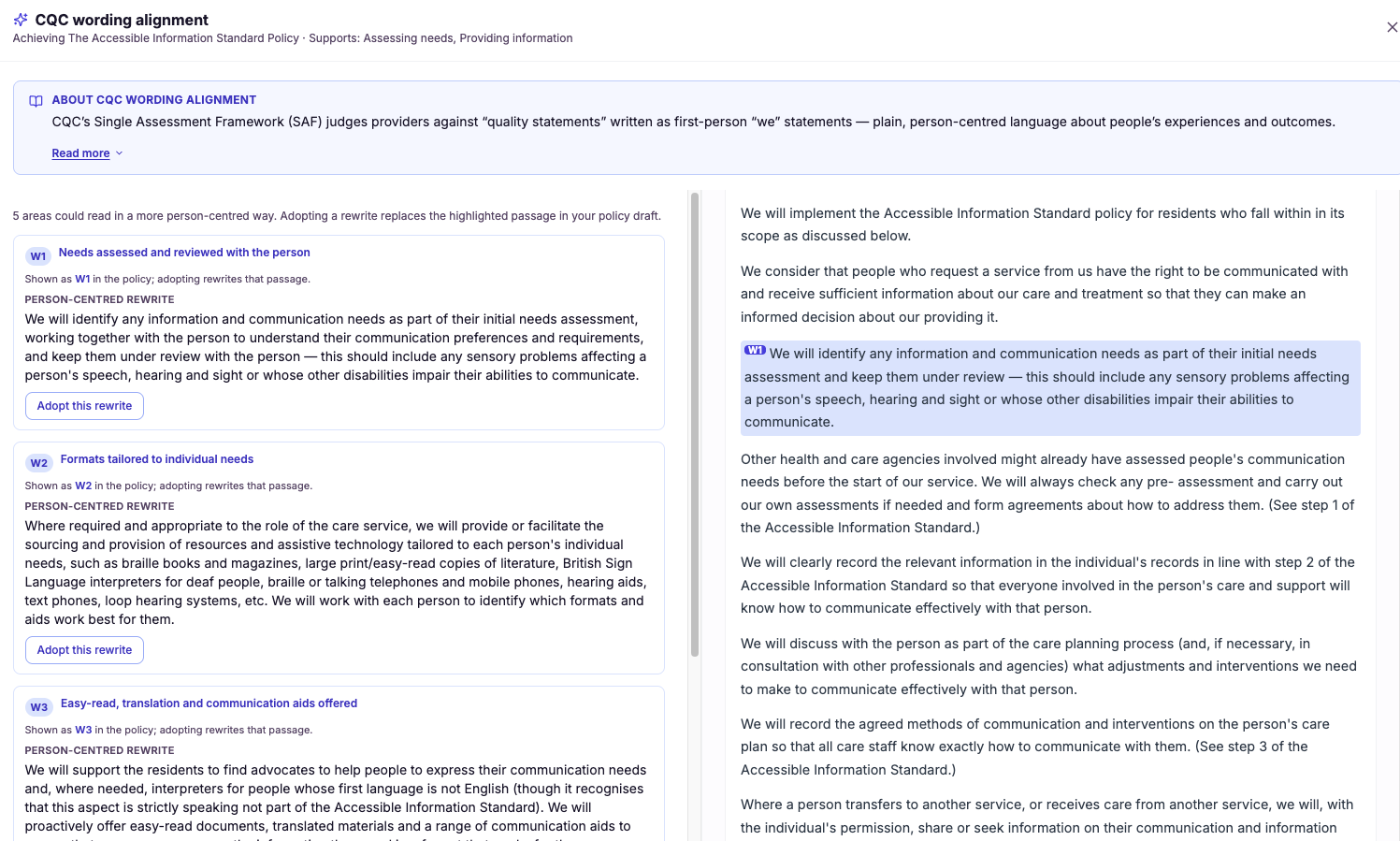
Wording alignment to the CQC quality statements
The single assessment framework changed the language of assessment. The quality statements express expectations as "we statements", grounded in the experience of people using your service, and that is the vocabulary inspectors now work in. Policies written for an earlier era can be perfectly sound in substance yet phrased in a way that no longer lines up with how you are assessed.
CareStream aligns your policy wording to the quality statements so the two match. This matters because inspection is, in large part, an exercise in mapping your evidence to the framework. When your documents already speak the same language as the quality statements, that mapping is clean and direct, and you spend far less time translating between what your policies say and what inspectors are assessing against.
- Your policy wording lines up with the CQC quality statements you are assessed against.
- Evidence maps cleanly to each quality statement rather than needing to be translated.
- Your documents speak the same language as inspectors working the single assessment framework.
- The link between what a policy says and how you are judged becomes obvious.
- You spend less time explaining how your evidence relates to the framework.
- Policies written for older standards are brought into line with current expectations.
How it works, step by step
CareStream reviews the language your existing policies currently use.
It identifies which CQC quality statements each part of your policy content relates to.
It finds wording that sits at a distance from the language of the relevant quality statement.
It proposes wording that brings your policies into line with the we statements you are assessed against.
The connection between your policy content and each quality statement is made explicit.
You apply the alignment so your documents speak the framework's language at inspection.
- Aligns policy wording to the CQC quality statements, the we statements under the single assessment framework
- Makes your documents speak the same language inspectors assess against
- Maps your evidence cleanly to each quality statement
- Brings policies written for older standards up to current expectations
- Reduces the effort of translating between your policies and the framework
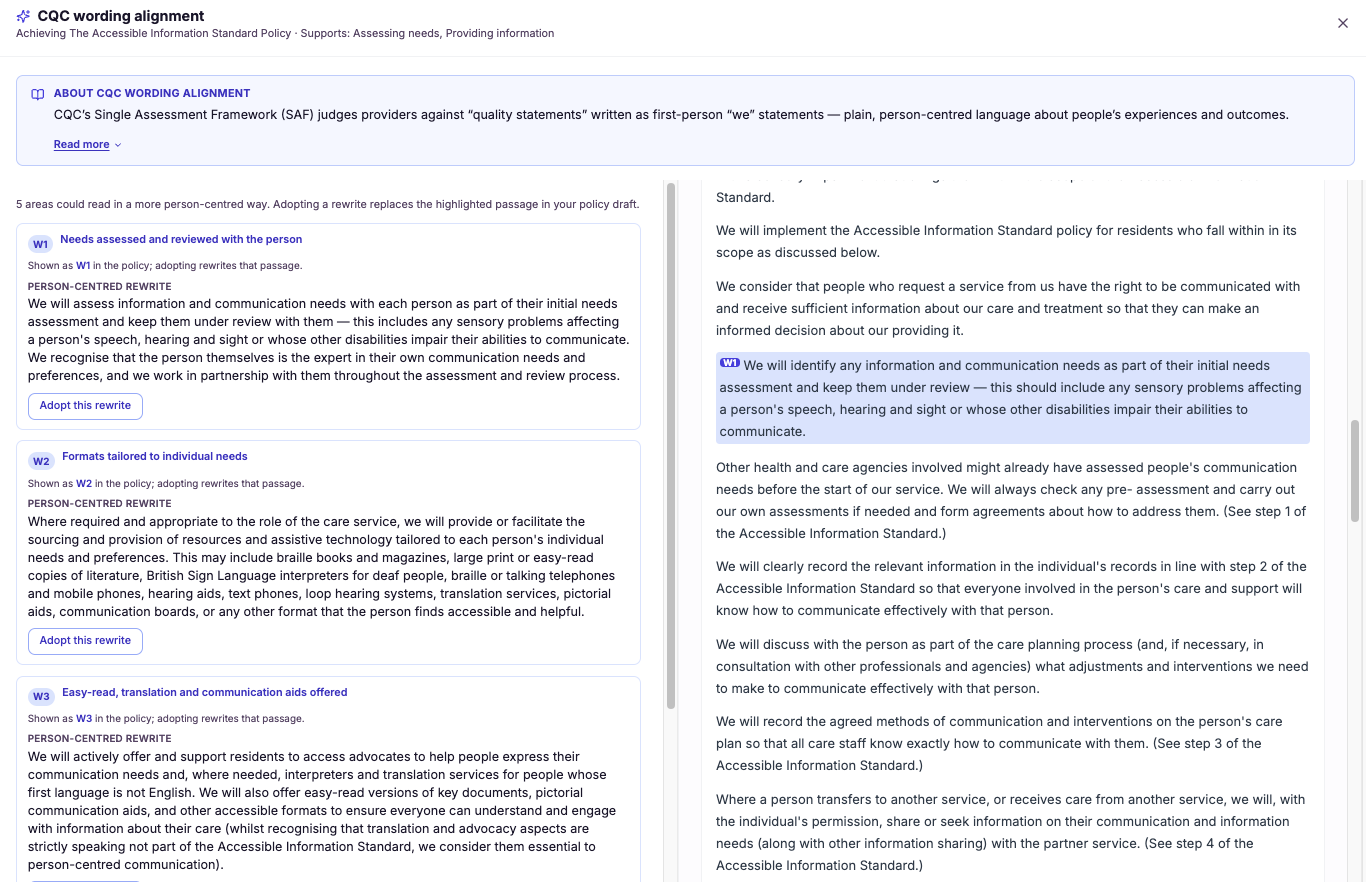
Person-centred rewording suggestions (in your policy voice)
Many tools would happily replace your policy with a polished generic version, and in doing so strip out the voice that makes your documents feel like they belong to your service. That is a poor trade: you gain tidiness but lose ownership, and staff notice when a policy suddenly reads like it came from somewhere else.
CareStream takes a different approach. It suggests person-centred rewording that works within your existing voice and house style, improving how people are described and how procedures read while leaving the character of the document intact. This matters because person-centred care should show through in your policies, and it lands far better when the improvement sounds like your service speaking, not a template imposed from outside.
- Residents and the people you support are described in warmer, more person-centred terms.
- Procedures read more clearly and respectfully without losing their meaning.
- Your policies keep their own voice and house style rather than sounding templated.
- The person-centred values in your practice start to show through on the page.
- You improve tone across your documents without rewriting any of them from scratch.
- Staff still recognise the policies as their service's own, so changes are readily accepted.
How it works, step by step
CareStream takes account of your policy's existing tone, terminology and house style.
It identifies wording that describes people or procedures in ways that could be more person-centred.
Rewording is proposed that improves the tone while matching the voice you already use.
The suggestions refine how something reads without changing what the procedure actually requires.
Each rewording is presented as a suggestion for you to accept, adjust or leave as it is.
Approved wording goes into the policy, keeping the document unmistakably yours.
- Suggests person-centred rewording rather than rewriting the policy from scratch
- Keeps your policy's own voice and house style intact
- Improves how residents and people are described and how procedures read
- Avoids imposing generic, templated language over your documents
- Every rewording is a suggestion you can accept, adjust or reject
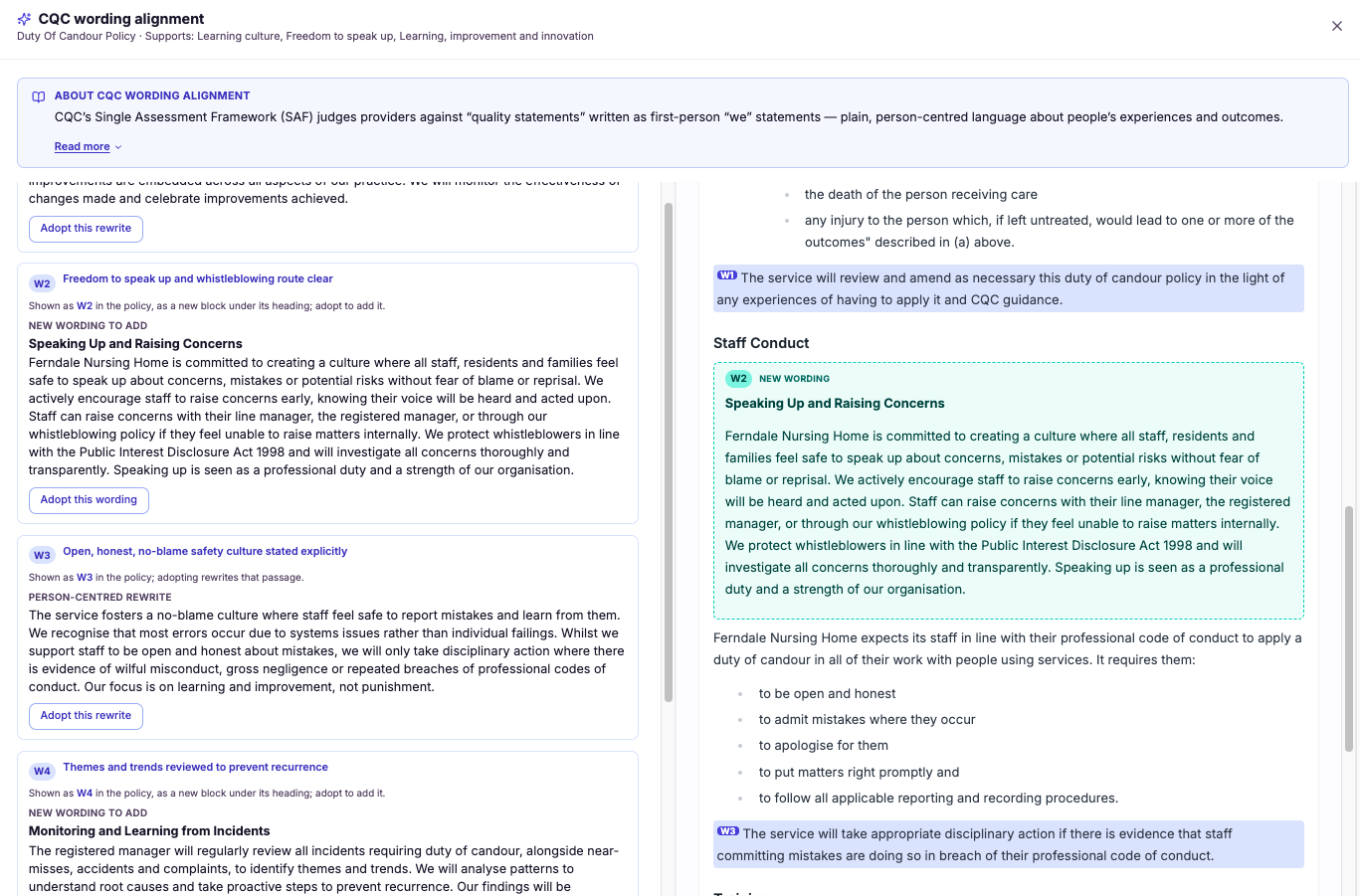
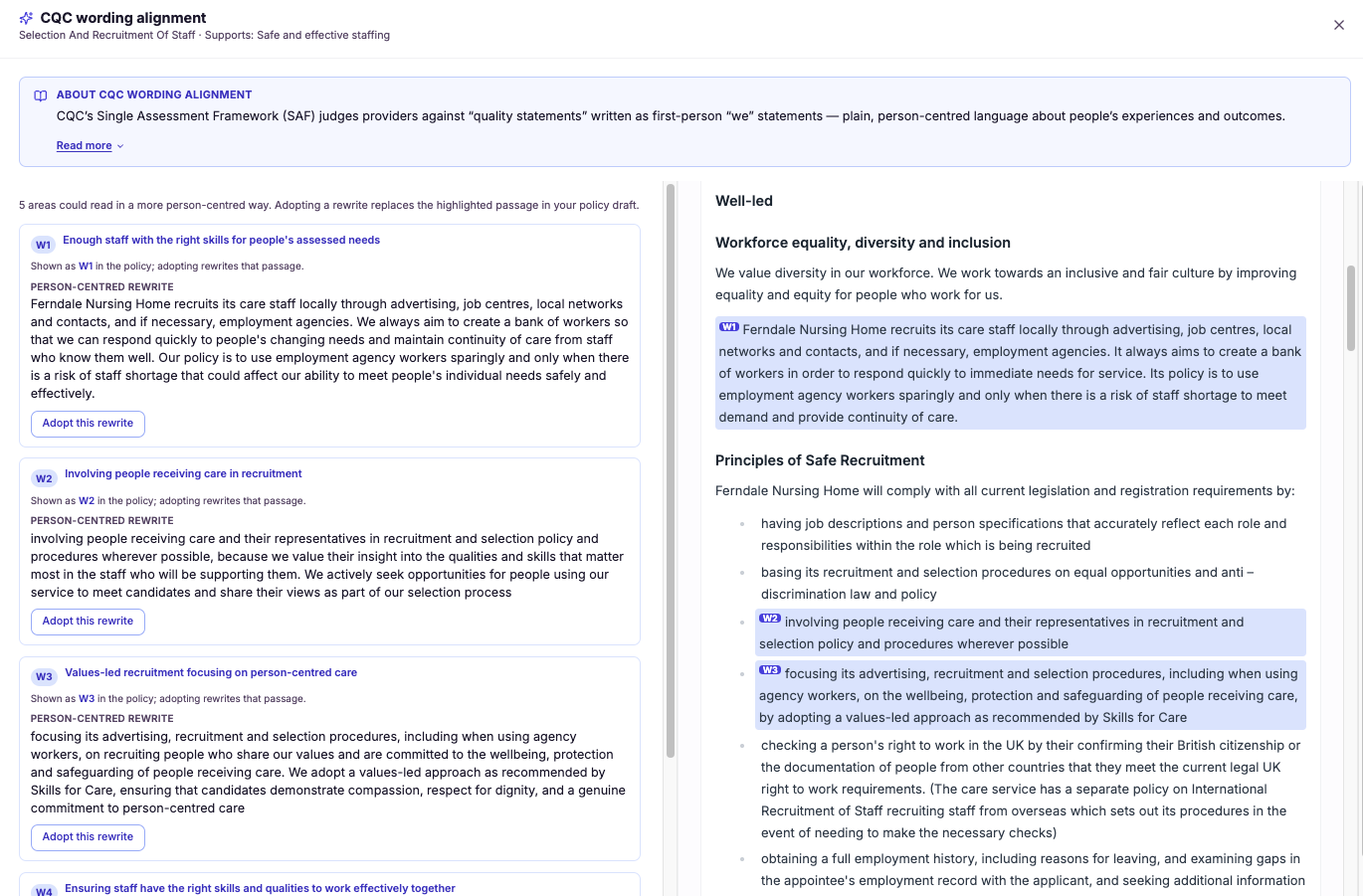
Suggestions numbered & highlighted in the policy
A separate list of recommendations forces you to hold two things in your head at once: the suggestion and the location it refers to. For a long policy, matching them up is slow and error-prone, and it is easy to apply a change to the wrong paragraph or miss one entirely.
CareStream instead numbers each suggested change and highlights it inline, in the policy document itself, at the exact point it applies. This matters because reviewing policies and procedures should be about deciding on the change, not hunting for where it goes. Seeing suggestion number three highlighted on the precise line it affects makes the review faster, clearer and far less prone to mistakes.
- You see exactly where each suggestion applies, highlighted on the line it affects.
- The flicking between a separate list and the document disappears entirely.
- Each suggestion is numbered, so nothing gets lost or applied twice.
- Reviewing a policy becomes faster because context and change sit together.
- You are far less likely to apply a change to the wrong paragraph.
- Colleagues can follow your review because every suggestion has a clear number and place.
How it works, step by step
The analysis produces a suggested change for a specific point in your policy.
Each suggestion is tied to the exact location in the document where it applies.
Every suggestion is given a number so it can be referred to and tracked without confusion.
The suggestion is marked within the policy text itself, right where the change belongs.
You read the policy and its numbered suggestions in a single view, with no cross-referencing.
You work through each numbered highlight in turn, applying or dismissing it in place.
- Suggested changes are highlighted inline within the policy document itself
- Each suggestion is numbered so it can be tracked and referred to clearly
- Removes the need to cross-reference a separate list against the document
- Shows the exact point in the policy each suggestion applies to
- Makes reviewing policies faster and less error-prone
Frequently asked
01Wording alignment to the CQC quality statements
What are the CQC quality statements and why should my policies align to them?
The quality statements are the "we statements" at the heart of CQC's single assessment framework. They describe what good care looks like from the perspective of the people using your service, and they are the language inspectors now assess you against. If your policies are written in the vocabulary of the old standards, they sit at a distance from that framework. Aligning your policy wording to the quality statements closes that distance. It means your documents speak the same language inspectors are working in, so the connection between what your policies say and what you are judged on is direct. That makes your evidence far easier to map and your inspection case clearer to make.
Does aligning to the quality statements change what my policies actually require?
The focus is on aligning the language, not overturning the substance of your procedures. A policy can be perfectly sound in what it requires yet still be phrased in a way that no longer lines up with the quality statements you are assessed against. CareStream addresses that gap in wording so your documents speak the framework's language. Where your practice is already good, this alignment simply makes it easier to evidence by expressing it in the vocabulary of the we statements. You are not rebuilding your policies, you are ensuring the way they are worded maps cleanly to how CQC now assesses, so your existing strengths show through under the framework.
How does this help my evidence at inspection?
Inspection under the single assessment framework is largely an exercise in mapping your evidence to the quality statements. When your policies are written in a different language from the framework, that mapping takes constant translation, and anything that needs translating is easier to lose or misread. By aligning your wording to the quality statements, CareStream makes the mapping clean and direct. Your policy content already speaks in terms of the we statements, so your evidence lines up with each quality statement naturally. You spend less time explaining how your documents relate to the framework and more time letting them do that job for you.
My policies were written for the old standards. Can they still be aligned?
Yes, and that is one of the main reasons this feature exists. Many providers hold sound, well-established policies that were written before the single assessment framework and simply have not been re-expressed in the language of the quality statements. That does not make them wrong, but it does leave a mismatch with how you are now assessed. CareStream reads your existing wording, relates it to the relevant quality statements, and suggests alignment that brings your documents up to current expectations. So you keep the substance you have built up over the years while ensuring the wording speaks the language inspectors assess against today.
02Person-centred rewording suggestions (in your policy voice)
Will this rewrite my whole policy or just improve the wording?
It improves the wording rather than rewriting the document. CareStream deliberately avoids replacing your policy with a generic version, because that strips out the voice that makes it belong to your service. Instead, it suggests targeted rewording that lifts how people and procedures are described. You keep your policy's structure, meaning and house style. The suggestions focus on tone, making the language warmer and more person-centred, while leaving the document unmistakably yours. It is refinement, not a rewrite, so your policies improve without losing their character.
How does it keep my policy's own voice?
Before suggesting anything, CareStream takes account of how your policy already speaks, including its tone, its terminology and the house style running through your documents. The rewording it proposes is shaped to match that voice rather than an external template. That is a deliberate design choice. Staff notice when a policy suddenly reads as if it came from somewhere else, and they are less likely to trust or follow it. By working within your existing voice, CareStream makes the improved wording feel like a natural evolution of your own document, so the changes are accepted rather than resisted.
Why does person-centred wording in policies matter for inspection?
Inspectors look for person-centred care to be reflected in your documents, not just described by your staff. When policies talk about people as cases or tasks, or set out procedures in cold, institutional language, the tone works against the person-centred practice you are trying to evidence, even when the underlying care is excellent. By improving how residents and the people you support are described and how procedures read, CareStream helps your policies reflect the values behind your care. The person-centred approach shows through on the page in your own voice, which is exactly the alignment between documents and practice that supports inspection readiness.
Do I have to accept every rewording suggestion?
No. Every rewording is presented as a suggestion, not a change made on your behalf. You review each one and decide whether to accept it as written, adjust it to suit your service, or leave the original wording exactly as it is. This keeps you in full control of your policy's tone. CareStream brings the person-centred phrasing and the sensitivity to your house style, and you make the final call on what actually goes into the document. The result is language you are genuinely comfortable standing behind, in your own voice.
03Suggestions numbered & highlighted in the policy
Do I get the suggestions as a separate list or inside the policy itself?
Inside the policy itself. A separate list forces you to constantly match each recommendation against the document to work out where it applies, which is slow and easy to get wrong on a long policy. CareStream avoids that by placing suggestions where they belong. Each suggested change is highlighted inline, at the exact point in the policy it relates to, and given a number. So when you open the document you see your policy and its recommendations together, with every suggestion marked in place rather than sitting in a detached list you have to cross-reference.
Why are the suggestions numbered?
Numbering gives each suggestion a clear, stable reference so it can be tracked and discussed without confusion. When you are working through several changes in a policy, being able to say "suggestion three" and know exactly which one that is keeps the review orderly and makes it easy to check that nothing has been missed. It also helps when more than one person is involved. A colleague reviewing your work can follow precisely which suggestions you acted on and which you left, because each one has a number and a highlighted place in the document. That shared reference point makes collaborative policy review much smoother.
Will this make reviewing my policies quicker?
Yes, noticeably. The slowest part of reviewing suggested changes is usually not deciding on them but finding where each one goes. Flicking between a list and the document, then hunting for the right paragraph, eats up time and attention on every single suggestion. By highlighting each numbered suggestion inline, CareStream removes that step entirely. You read the policy and see the recommendation exactly where it applies, so your effort goes into the decision rather than the search. For a busy registered manager, that turns policy review from an afternoon's chore into a focused, fast pass through the document.
Could I apply a change to the wrong part of the policy?
That risk drops sharply with inline highlighting. When suggestions live in a separate list, it is genuinely easy to apply a change to the wrong paragraph, or to a similar-looking section elsewhere in the document, because you are matching by memory rather than by position. Because CareStream anchors each numbered suggestion to the exact point it applies to and highlights it there, you can see precisely which line is affected. You are acting on a marked spot rather than reconstructing a location from a description, which makes misplaced or duplicated changes far less likely.
Explore more features
More of what the CareStream compliance platform does for UK care providers.
See it on your own policies.
Upload what you already have and see what CareStream finds, inside a fortnight.





