Where-to-add (target policy) guidance
When a recommendation says to add something to your policies, the obvious next question is: add it where? A safeguarding point might belong in your safeguarding policy, your whistleblowing policy, or your induction procedure, and putting it in the wrong one leaves the real gap open while cluttering a document that never needed it. Misplaced fixes are one of the quietest ways a policy library drifts out of shape.
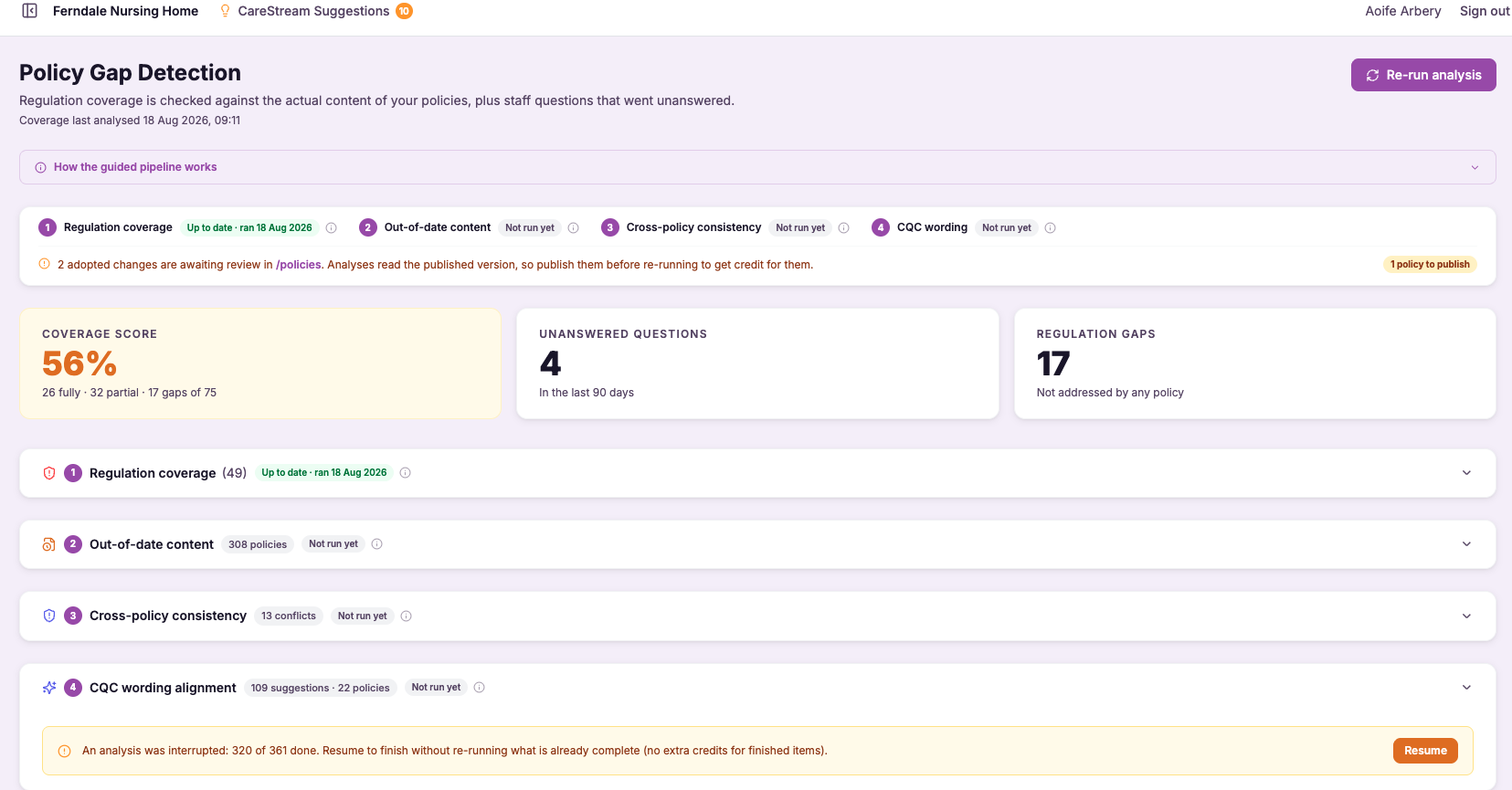
Every fix, addressed to the right document.
It is surprisingly easy to fix a gap in the wrong place. A manager reads a recommendation, opens whichever policy feels closest, and adds the text there, only for an inspector to look in the document where it should have lived and still find nothing. The gap persists and, meanwhile, an unrelated policy grows longer and less coherent.
CareStream's target policy guidance solves this by naming the specific policy each recommendation applies to, and the section within that policy where the content belongs. This matters because a well-organised set of policies and procedures is not just about having the right words somewhere; it is about those words being in the document an inspector, or a member of staff, would actually turn to.
CareStream removes the guesswork. Every recommendation names the exact target policy where the missing content belongs, and the section within it, so fixes land in the right document and nothing gets bolted on to the wrong one. You always know precisely where each change should go before you make it.
Registered managers and quality leads maintaining a full set of policies and procedures across any care service, who need fixes to land in the right document every time.
Because each addition sits in the policy and section an inspector would turn to, your evidence is exactly where it should be rather than buried in the wrong document.
The difference it makes day to day
- Every recommendation names the exact policy it applies to, so you never guess where a fix goes.
- You are pointed to the specific section within that policy, not just the document as a whole.
- Content lands where an inspector or member of staff would actually look for it.
- Unrelated policies stop swelling with additions that were never meant for them.
- Your policy set stays coherent and well-organised as you remediate over time.
- Fixes are made once, in the right place, rather than corrected later when the gap resurfaces.
How target policy guidance works.
As the analysis produces each recommendation, it does not treat your policy set as a single undivided pile of text. It understands which of your documents exists and what each one is responsible for covering.
So when it recommends an addition, it identifies the policy that owns that subject, locates the section where the content fits, and attaches that destination to the recommendation itself. You see the fix and its home together.
Recommendation created
The analysis produces a specific change to close a gap in your coverage.
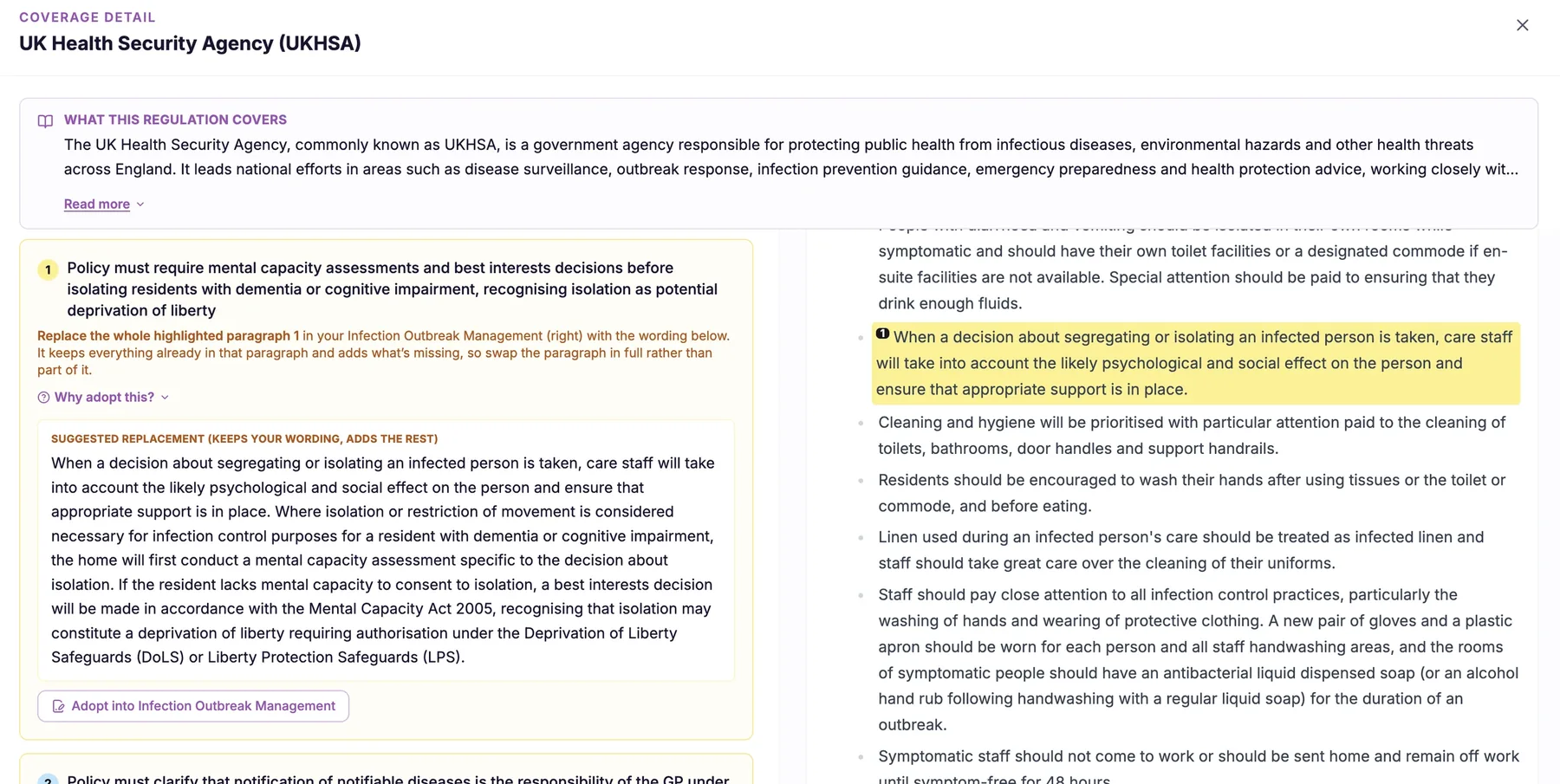
Match to the owner
CareStream identifies which of your policies is responsible for that subject.
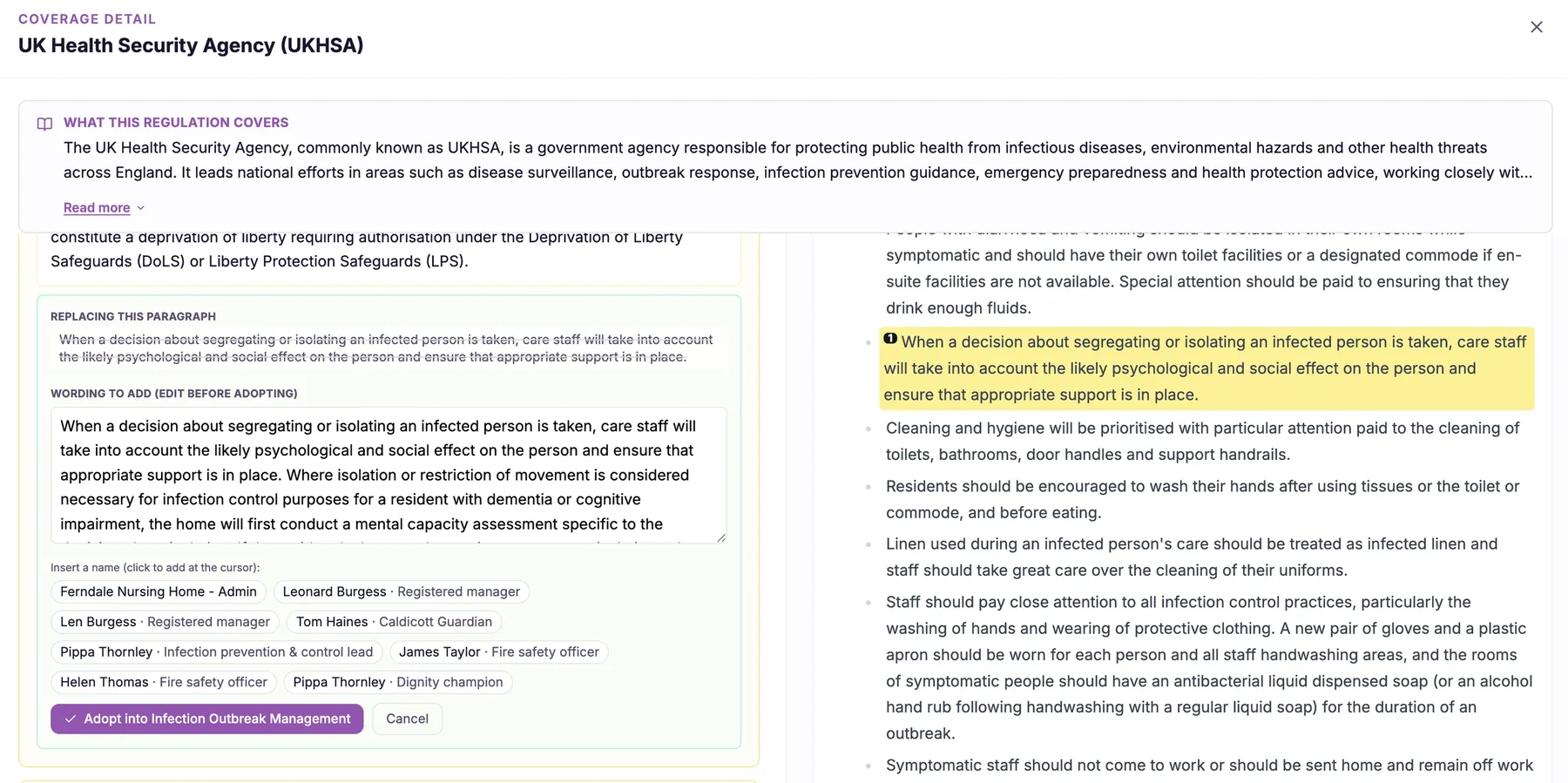
Locate the section
It pinpoints the section within that policy where the new content belongs.
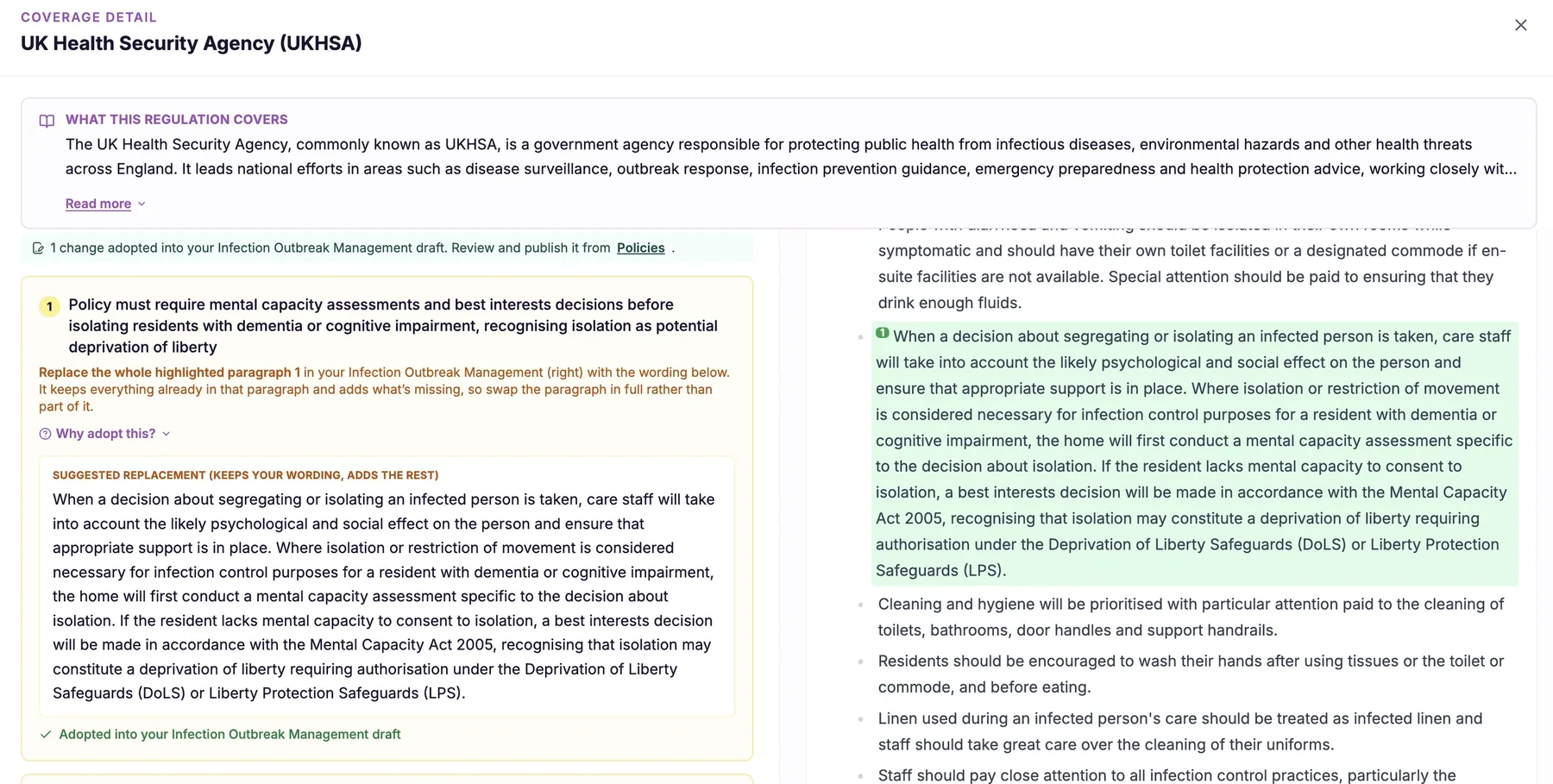
The target policy and section are tied to the recommendation so they travel together.
The recommendation tells you exactly which document and section to update.
You add the content once, in the correct policy, keeping your library coherent.
- Names the exact target policy for every recommendation, not just the general area
- Points to the specific section within that policy where the content belongs
- Prevents fixes being bolted on to the wrong document
- Keeps your policy set organised and coherent as you remediate
- Ensures content lives where inspectors and staff would actually look for it

The right words in the wrong policy still read as a gap.
An inspector does not search your whole library for a topic; they open the policy that should cover it. If your fix lives somewhere else, the gap effectively remains, however good the wording is. Placement is not a detail, it is the difference between a resolved finding and an open one.
By naming the target policy and section for every recommendation, CareStream makes sure content lands where it will actually be found. Your library stays coherent, and each fix does the job it was meant to do.
Each recommendation names the specific policy that owns the subject, so nothing is added to the wrong one.
You are pointed to the exact section within the policy, not left to hunt for the correct spot.
Because fixes go where they belong, your policy set remains organised rather than sprawling over time.
Content sits where an inspector or member of staff would look, so it counts as evidence when it matters.
Frequently asked
Why does it matter which policy a fix goes into, as long as the content exists somewhere?
Because inspectors and staff do not read your whole library to find a topic; they open the specific policy that should cover it. If your safeguarding addition sits in your induction procedure instead, an inspector looking at your safeguarding policy still finds a gap, no matter how well written the content is elsewhere. CareStream names the exact target policy for each recommendation so the content lands where it will actually be looked for. That way the fix genuinely resolves the gap rather than existing in a document nobody would think to check, and your policy set stays properly organised.
Does it just name the policy, or tell me where in the policy to add the content?
It does both. Naming the right document is the first step, but a long policy can have many sections, and dropping content into the wrong part of the right policy still leaves it awkward to find. So CareStream also points to the specific section within the target policy where the new content belongs. This means you are guided all the way to the correct spot, not just the correct file. You open the named policy, go to the identified section, and add the content there, which keeps the document readable and the addition exactly where it should sit.
Will this help keep my overall set of policies tidy?
Yes, and that is one of its quieter benefits. Without clear guidance, managers tend to add fixes to whichever document feels closest, which slowly swells some policies with content that was never meant for them and leaves others incomplete. Over time the whole library drifts out of shape. By directing every recommendation to its proper policy and section, CareStream keeps your policies and procedures coherent as you remediate. Each document stays focused on what it is responsible for, so your library remains organised and easy to navigate rather than becoming a patchwork of misplaced additions.
What if the right policy doesn't exist in my library yet?
The guidance is based on the policies you have uploaded and the subjects each one is responsible for covering. If a recommendation relates to a subject and you hold a suitable policy for it, CareStream directs the content to that document and section. This keeps your existing library coherent and your fixes correctly placed. Where a subject sits at the boundary of your current documents, the guidance still points you to the most appropriate home among your policies so the content is not left orphaned. The aim throughout is that every fix has a clear, sensible destination rather than being added at random.
Explore more features
More of what the CareStream compliance platform does for UK care providers.
Send every fix to the right policy.
Book a demo and see how CareStream names the exact target policy and section for each recommendation, so nothing lands in the wrong place.





