The decision is not which care home compliance software to buy. The real choice is between a place to store policies and a system that reads them. Those are different products, and the second costs more because it does more work.

Figure: Choosing a system starts with knowing what you already have on paper.
The decision underneath the shortlist
Getting it wrong is expensive in a quiet way. You pay for a library, staff keep asking the senior on shift, and nothing in the building changes.
A store is a filing cabinet with a search box. It answers one question: where is the policy? A reading system answers a harder one. What does our policy say about this, right now, for this resident?
That second question is the whole of policy management in a care home. It is also the one a filing cabinet has never been able to answer.
Have your policies read against the regulations to see what is missing or out of date. No card needed.
Create a free accountMost care home software sits in the first camp. That is fine, as long as you bought it knowing which camp it was in. The trouble starts when a store is sold as a reading system, and the invoice arrives before the difference shows up on shift.
Three tests worth more than a feature list
Run these before you look at any demonstration. None of them needs a procurement process, and all three can be done in an afternoon with the policies already on your desk.
- Load three of your own policies, not the vendor's samples. Ask the tool a question that only your documents can answer.
- Change one policy. See how long it takes the answers to change with it.
- Ask who approved the answer a care worker just read, and whether the tool can tell you.
If a tool fails the third test, it is not care compliance software. It is a search engine with your documents in it.
What a policy based knowledge base should do
It should build itself from the documents you already hold. Nobody in a care home has an afternoon to key in question and answer pairs.
It should keep up. When a policy is updated, the answers behind it should follow without anyone being asked to sync two stores.
It should show its working. A care worker reading an answer at two in the morning should be able to see which policy it came from.
And it should separate the approved from the suggested. In our knowledge base, entries sit as pending until someone approves them, and only approved entries are used to answer staff queries.
What it should not do
It should not answer from general care knowledge dressed up as yours. An answer that is true of care homes in general can be wrong for your home, and wrong in a way that sounds confident.
It should not rewrite your policy without a trail. If a tool can change a document, it must record who accepted the change and when.
It should never promise an inspection outcome. No software makes a service compliant, and any care home policy software that implies otherwise is telling you something about itself.
It should not bury the version either. Staff need to know which document they are reading, and so do you, six months later, when somebody asks why a decision was made.
The approval step is the whole argument
This is where we would spend the evaluation. Ask to see the queue of unapproved entries, because every tool has one, and few show it.
The reason is a regulatory one as well as a practical one. Providers must run systems to assess, monitor and improve quality and safety. That is the full text of Regulation 17 on good governance.
An approval queue is a system in exactly that sense. Somebody with a name looked at an answer before a care worker acted on it.
Training has a matching duty. Staff must receive the support and training they need for their role, under Regulation 18 on staffing, and a knowledge base is not a substitute for it.
What a gap check should actually read
A gap check that counts documents is a stock take. A gap check that reads inside them is a different thing.
The free policy check shows where a policy falls short of the regulations. Create a free account to begin.
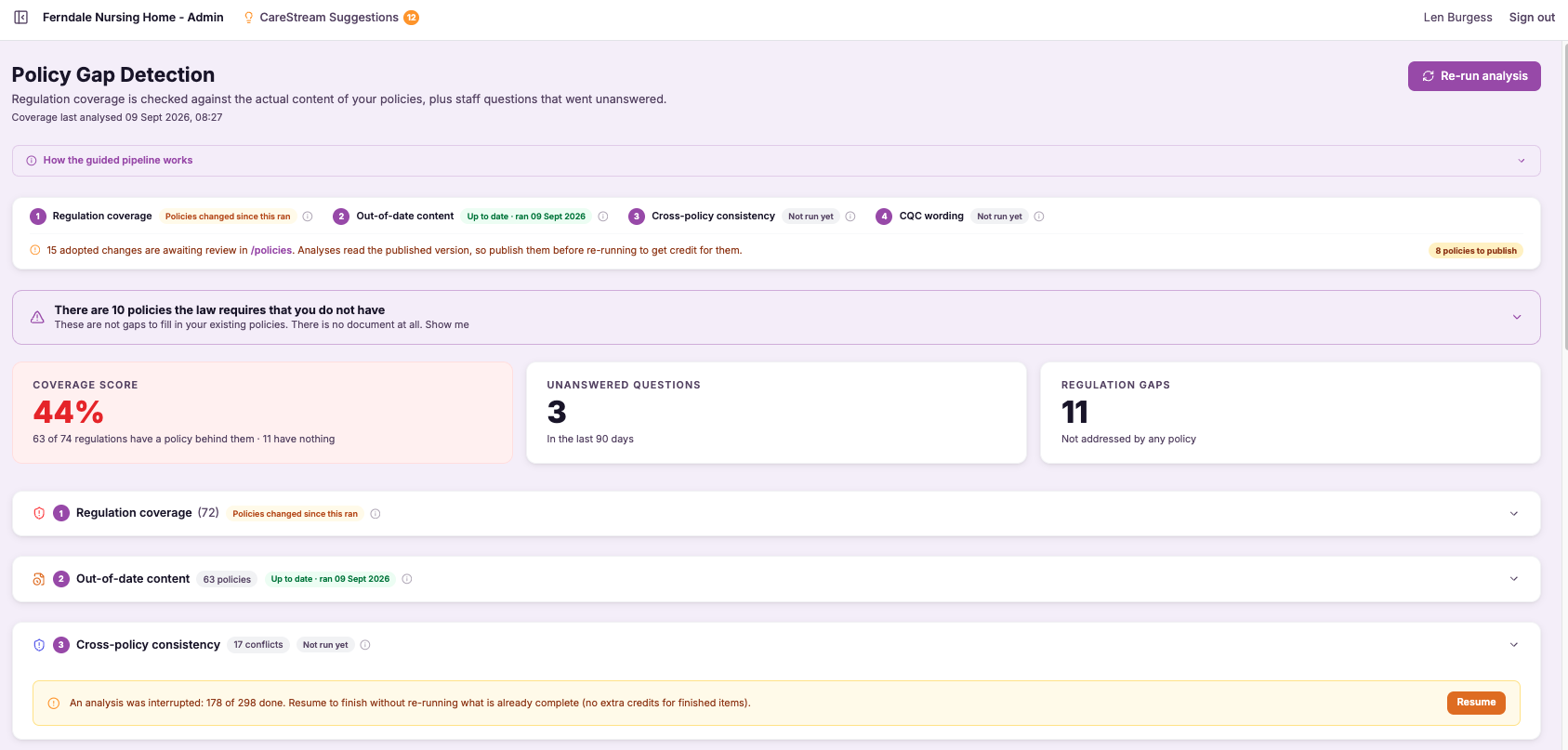
Create a free accountFigure: Coverage, out of date content, cross policy conflicts and wording are four separate questions.
Ours runs four passes over your policies. The first asks whether each regulation is covered anywhere at all. The second looks for law that has been overtaken, and for blanks nobody filled in.
The third hunts for two documents that contradict each other. The fourth compares your wording with the quality statements the Care Quality Commission uses.
The output is a coverage score and a list of regulations with nothing behind them. That second list is the useful one. A missing policy is invisible in a filing cabinet, and it stays invisible right up until somebody asks for it.
CareStream shows the gaps and the conflicts separately, because they need different work. A gap needs a new document. A conflict needs a decision about which of two documents is now wrong.
Who this suits, and who should wait
A single service with a shelf of policies and no compliance lead gets the most from this. The work being replaced is the work nobody has time for.
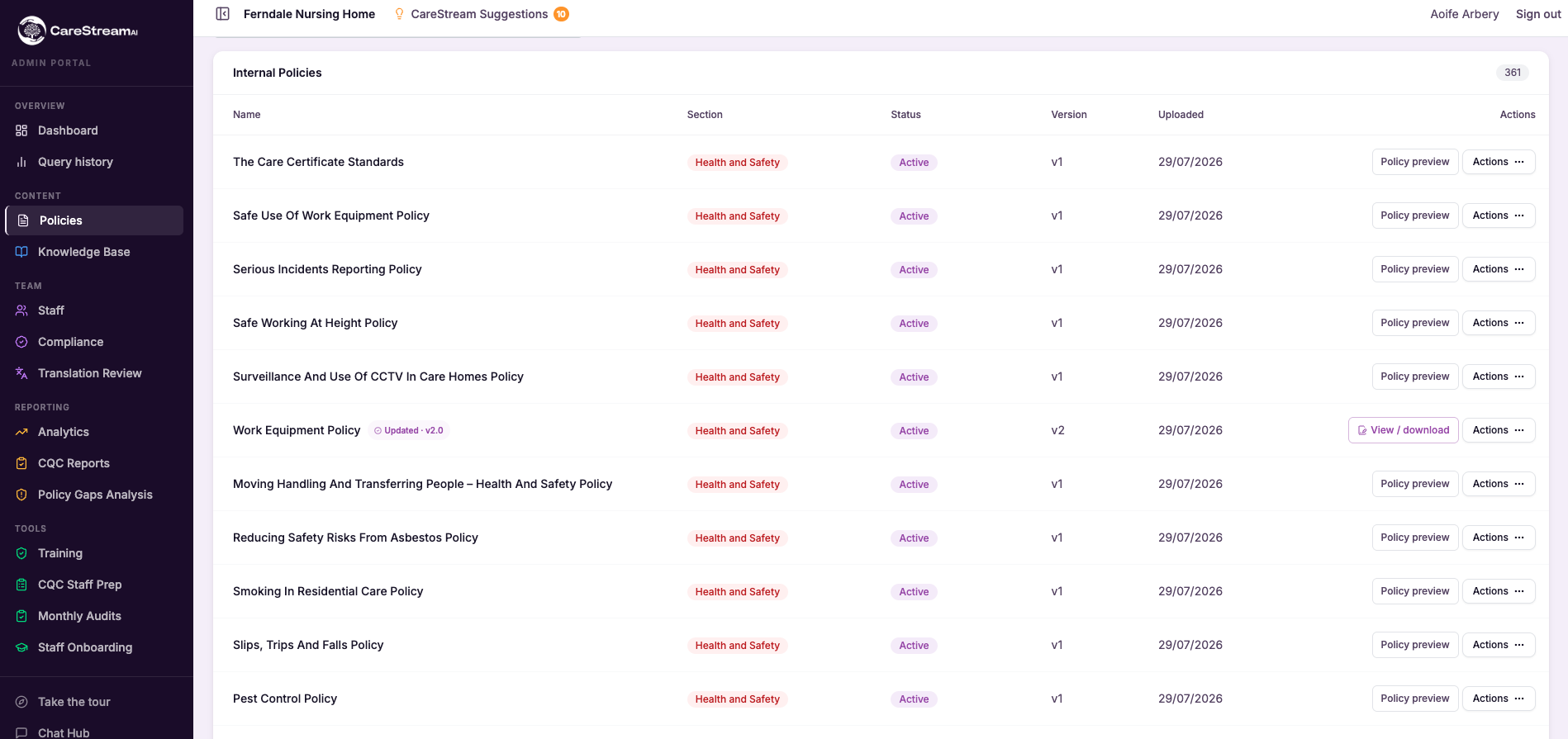
Figure: Version and status on every policy row is the minimum any tool should give you.
A care group running several sites has a harder problem: the same policy at four versions in four homes. Ask any CQC compliance software how it shows you that, in one screen, before you sign.
What if your policies are still in draft? A reading system makes a confident mess of a document nobody has agreed yet.
What if you have never audited the shelf? Tools read what you give them, and a library half full of documents from a previous owner will produce answers from a service that no longer exists.
Benefits of CareStream as care home compliance software
Our honest position on care home compliance software is that you should test the free part first.
- A free account checks your first 5 policies for regulation coverage, out-of-date content, consistency and wording.
- Every audit template is free to run, with reports, signatures and action tracking.
- Every member of staff gets CPD-certified training free, with as many logins as you need.
- The knowledge base that builds itself from your policies starts on the Starter plan, at £85 a month, which includes 'This is me' information about residents, collated from family and friends.
Start with the free policy gap check, or read how the home knowledge base builds itself from documents you already hold.
How to choose without a six-month trial
Pick your three hardest staff questions. The ones where the answer is different in your home than in the one down the road. Medicines, missing persons and money are usually where the gap between a general answer and a true one is widest.
Put them to every tool on your list, with your own policies loaded. Then ask each vendor who approved the answer, and where the policy version is recorded.
Our guide to policy gap analysis for care homes explains what each pass looks for. The plans and pricing page shows what sits free and what does not.
Buy the reading, not the storage. That is the whole of our advice, and CareStream is only one way to act on it.
Sources
- Regulation 17, good governance (legislation.gov.uk) · legislation.gov.uk
- Regulation 18, staffing (legislation.gov.uk) · legislation.gov.uk
- The 34 quality statements, including governance, management and sustainability (Care Quality Commission) · cqc.org.uk
Frequently asked