You have a new system, and you cannot be everywhere. A carer on a late shift has a question about the hub. She asks the colleague who always seems to know, because you are in a meeting.
That colleague is already your digital champion in social care, named or not. The decision is whether to make the role deliberate: choose one person, give them room to do it, and check what changes.
What the guidance says a champion is
The Department of Health and Social Care describes digital champions as people who help colleagues, and the people a service supports, build digital skills and confidence. Its national guidance on introducing digital champions calls this peer-to-peer support.
It adds that the role usually sits alongside a person's main job. Champions can be team leaders or care staff with a particular knowledge and interest in digital technology.
The same guidance gives the role four parts:
- Listen: understand colleagues' views and concerns.
- Mentor: help people learn at their own pace.
- Advocate: stay curious about new tools and share what you learn.
- Signpost: point colleagues to wider resources.
Notice what is missing. Nothing there says "be the IT department". A care home digital champion is a helpful colleague with a little time, not a technician. The digital champion role is about people, not equipment.
Why one person and not everyone? Digital champions in social care work because a colleague is easier to ask than a manual, and easier to reach than a helpdesk. One named person also gives the rest of the team a clear answer to the question of who to ask.
A single champion is also easier to support. You can agree their time and check in with them. You can also see whether their effort is making a difference, which is harder when everyone is hoped to help.
Day 0: choose one person, and ask them
Pick the person colleagues already turn to. Interest counts for more than job title, and the guidance backs that. You are looking for patience, curiosity and a willingness to say "I don't know, let me find out".
Then ask. Do not announce it. A role handed over by surprise tends to feel like extra work with a label on it.
In CareStream, one member of staff per service is tagged as the Super User, and the tag is simple to apply. You can tag them when you add them to the system, using Make them our Super User. You can also do it later from their record, using Make Super User.
Only one person holds the tag at a time. If you tag someone else, you are asked whether to replace the first. An administrator can be the Super User, so a small service where the manager does everything is not locked out.
The CPD certified Care Certificate and the annual courses are free on every plan. No card needed, and every staff login is included.
Create a free accountDay 1: make it their choice
The person gets a short welcome email and is asked to agree the next time they open the hub. They can say no. If they do, the tag is removed and nothing is shared.
Nothing about their use is recorded before they agree. That matters. A champion who feels watched without consent will not champion anything.
Have a human conversation first, though. The email should never be the first they hear of it.
Days 1 to 60: give them what the role needs
The GOV.UK guidance is practical about support. It suggests protected time so the role fits around day to day work, and the right equipment and access. It also suggests making champions feel valued, and flexible, bite sized learning.
Take the protected time seriously, and protect it on the rota, not only in conversation. Fifteen minutes in a quiet part of a shift is worth more than a promise of "when things calm down".
It also suggests building digital skills into appraisals and development plans. That fits a supervision or appraisal you already hold.
Give the champion small jobs with a clear end. Ask them to show one colleague how to find a policy in the hub. Ask them to run a five minute demo at handover. Ask them to collect the questions people keep asking.
How you will know it is working
Here is where most champion schemes go vague. Everyone feels the system is "going well" and nobody can say why.
The Super User card measures over 60 days from the day the person is tagged. It shows the champion's own use:
- active days and time on the hub
- chat questions and CQC prep questions answered
- audits completed and policies read
- training passed, split into ad hoc, CPD and annual
Two rules keep it fair. Several questions in a minute do not add up, and a course counts only when it is passed.
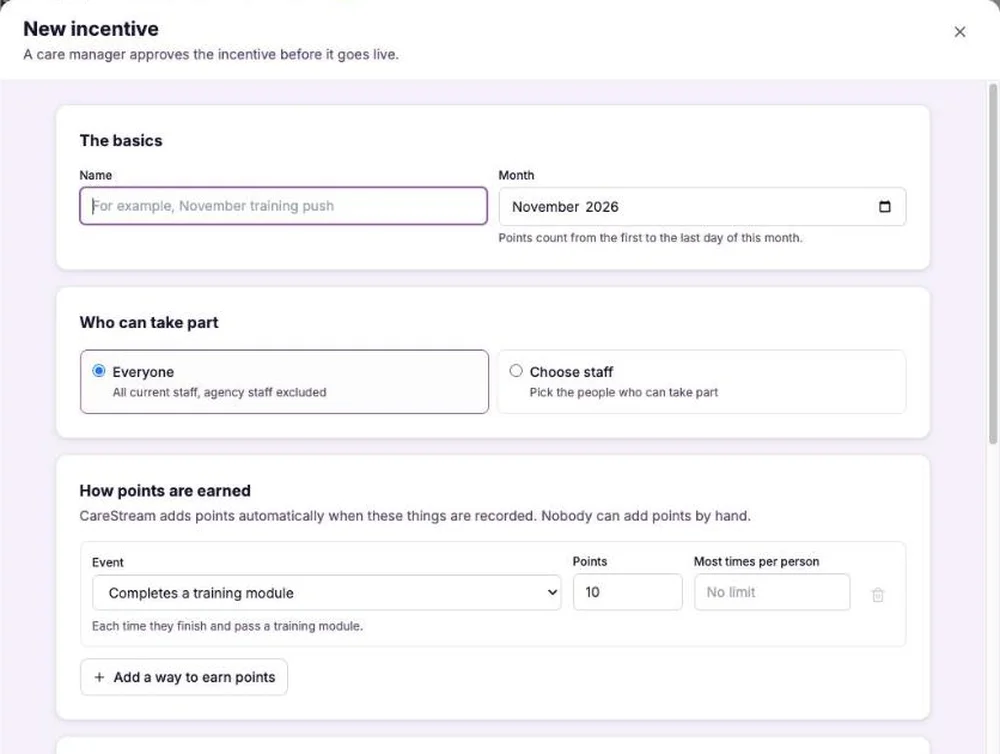
Figure: the new incentive form in the staff incentives feature, a separate tool for monthly recognition campaigns that a care manager approves before they go live.
What colleagues' use looks like, without naming anyone
The champion's own numbers say little on their own. What you want to know is whether colleagues are using the system more.
The card shows colleagues as counts only. It compares how many are active each week with the 30 days before the tag. It also shows how many are new to the hub and how many have logged in. Nobody is named or timed.
Free courses, an 80% pass mark assessment, certificates and a training matrix. Create a free account and start with the Care Certificate.
Create a free accountIt then gives one word: Rising, Steady, Falling or Too early. There is no minimum number of colleagues, so a service of six counts as much as a service of sixty.
Read the word as a prompt for a conversation. Falling is not a verdict on the champion. It may mean a rota change, a holiday fortnight or a question nobody has answered yet.
Who sees it, and the thank you
The company's administrators see a Super User card on the Incentives page. Colleagues are never singled out. If more than one colleague is keen, agree early who holds the tag, because a service has one.
When the first 60 days go well, the Super User gets a thank you from us. It is a thank you, nothing more. Nothing is ever given for reviews or testimonials.
What this does not do
The Super User feature does not make a service compliant. It does not improve a rating, and it cannot promise that people will use a system. It tells you, with counts, whether use is moving and gives one colleague a defined role.
The surrounding practice is still yours: protected time, a good first conversation, and a manager who asks the champion what is getting in the way.
The national guidance on getting more from digital social care records makes a similar point. It suggests identifying digital champions within your team and encouraging peer support.
Benefits of CareStream for a digital champion in social care
The Super User feature is on Starter, Professional and Enterprise, with no extra cost. It is not on Free.
It works alongside the staff hub, where colleagues read policies, ask questions and take training. If you also want to recognise the wider team, staff incentives is a separate feature for monthly campaigns.
CPD certified training is free to every member of staff, so a champion has something real to show colleagues on day one.
A checklist for your champion's first 60 days
- Choose one person colleagues already ask for help.
- Talk to them first, and let them say no.
- Tag them in CareStream, then check they have agreed.
- Agree protected time and write it on the rota.
- Give them three small jobs, each with an end point.
- Check the Super User card at the end of the 60 days.
- Ask what is getting in the way, whatever the card says.
Sources
Frequently asked