
Staff incentives, so training gets finished
Most care homes have the same problem. The training is set, the due dates are in the diary, and a few people always leave it until the last week. A reminder email only goes so far. What works is a good reason to get it done now, and a team that can see the effort has been noticed.
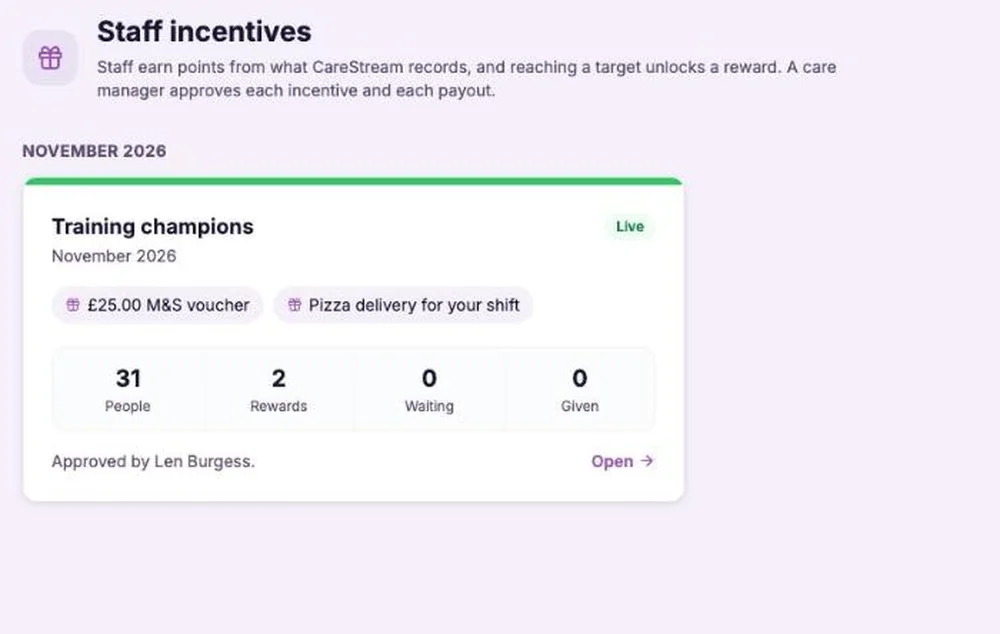
What staff incentives are.
A staff incentive is a monthly scheme. You choose who takes part, how points are earned, and what the rewards are. Points are added automatically when CareStream records that someone has completed a training module, finished it on or before its due date, completed a CPD course, completed an onboarding flow, or had a practical sign-off recorded. Nobody can add points by hand.
Points follow evidence, never speed. A module only earns points once the assessment has been passed at its pass mark, and where a module needs an observed practical, it earns nothing until a manager has signed the practical off.
A reward is whatever you decide: a shop voucher, a pizza for the shift, an extra break. You can add a picture, a value, and either a number of places or everyone who qualifies. CareStream records, approves and reports. It never buys vouchers or moves money. Staff incentives are on the Professional and Enterprise plans.
Staff incentives give you that reason without the paperwork. You set up an incentive for the month, staff earn points for the training they finish, and reaching a target unlocks a reward you have chosen. A care manager approves the incentive and every reward, and CareStream keeps the record.
Care homes and nursing homes that want a simple way to keep training up to date, and want to recognise the people who do it, without anything that feels like a competition.
It does not buy vouchers, pay anyone or move money. It records who earned what, asks a care manager to approve it, and tells you when it has been given. You give the reward yourself.
If a reward is paid through pay or has a cash value, check with your payroll provider or adviser how it should be treated. Each home decides which rewards are right for its team.
The difference it makes day to day
- Training is finished earlier in the month, because staff have a reason to start.
- Staff are thanked for effort that is usually invisible, without a league table or anyone being named and shamed.
- You keep control of the cost, with a number of places for each reward and an optional monthly budget.
- A care manager, usually the person who holds the budget, approves every incentive and every reward.
- Fair for everyone, because targets can be set person by person for part-time, new and long-serving staff.
- A clear record of who earned what and who was given it, with a file for payroll.
How staff incentives work.
You build the incentive once a month, a care manager approves it, and from then on points and places look after themselves. The screens below show an imaginary incentive called Training champions.
Build the incentive
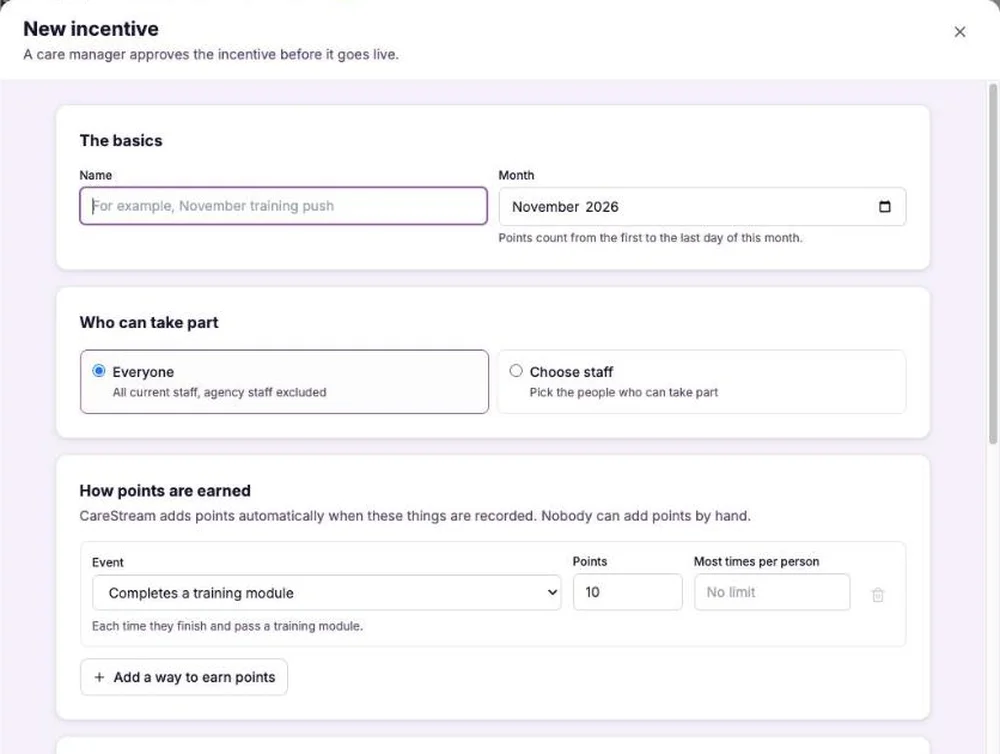
Open Incentives in the Team section of the sidebar and choose New incentive. Give it a name and a month, then choose everyone or the people who can take part. Agency workers are left out unless you choose them. Add the ways to earn points and what each is worth, then add the rewards: a title, a picture such as the shop logo, the points needed, and how many places there are. You can set a different target for a person, which keeps it fair across different working patterns. When you are ready, submit it for approval.
Staff see their own points
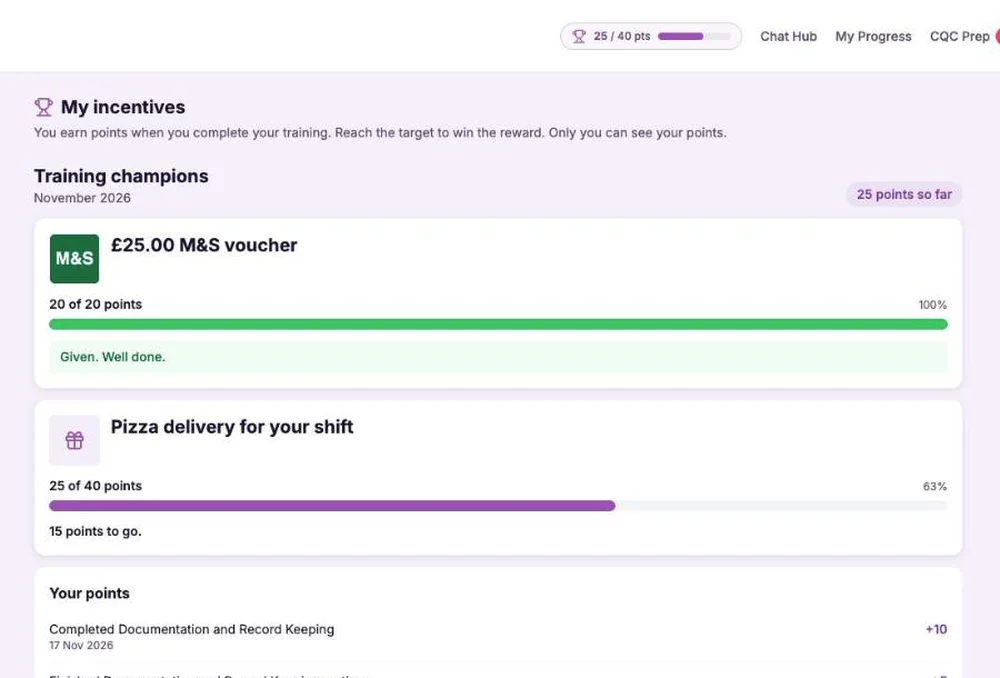
Staff find My incentives in their hub, with a progress bar for each reward, how many places are left, and how they earned each point. A small live points tracker sits in the top bar, on a phone as well as a computer. They get an email when an incentive starts, a short summary when they earn points, and a message when the month ends. They only ever see their own points. There is no leaderboard.
A care manager approves every reward
Before an incentive goes live, a care manager approves it from Incentive approvals in their hub. When someone reaches a reward it is held for them, and the care manager approves that too. Once it is approved, someone hands it over and marks it as given. If two people finish at exactly the same time and only one place is left, the care manager decides. You can download a CSV of who was given what for payroll.
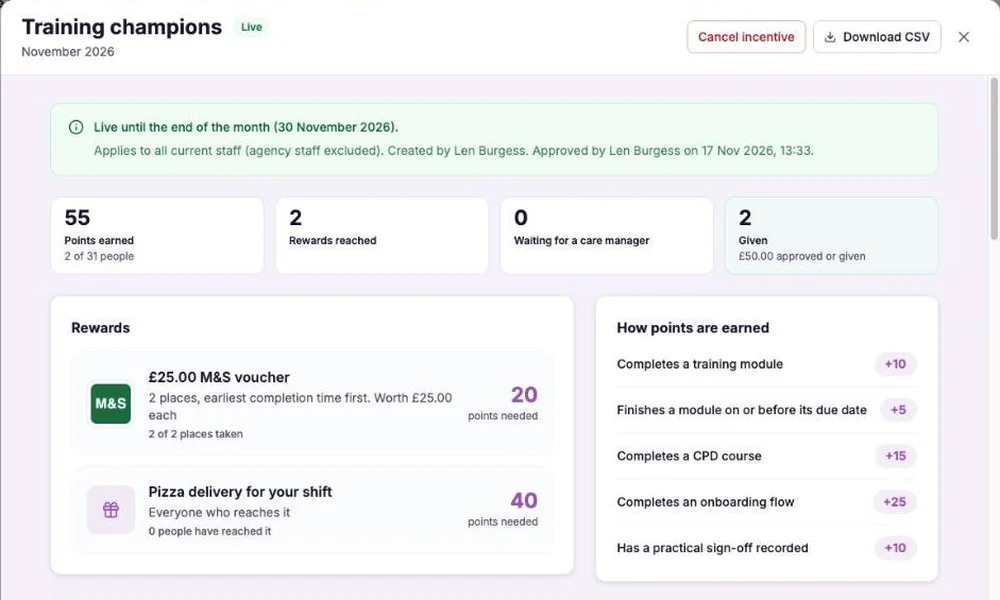
The Incentives page shows every incentive by month, with everyone's progress and the payouts. The dashboard has a card showing how many staff have earned points, how many rewards are reached, waiting and given, the cost this month, and training completions compared with last month. Each person's staff record shows this month's position and every month before, award by award.
- Points come only from records CareStream already holds, and only for assessments that were passed.
- Rewards you choose, with optional pictures, values and limited places.
- Limited places go to the first people to finish, decided by the real completion time.
- A care manager approves each incentive and each reward, and you mark it as given.
- Staff see only their own points, in the hub and in a live tracker in the top bar.
- Professional and Enterprise plans.
Why this works.
People finish things that are noticed. A due date on its own is easy to put off, and a reminder is easy to ignore. A clear target, a reward worth having, and a place that someone else might take first are a good deal harder to put off.
Staff incentives work because the rules are plain, the results come from records rather than opinion, and the person holding the budget stays in charge of what is paid out.
Points come only from recorded training, assessments have to be passed, and targets can be set person by person, so nobody is judged on a rota they did not choose.
You decide the rewards, the number of places and the monthly budget, and a care manager approves each one before it is given.
Staff see only their own points. Anyone who misses a limited reward gets a thank you that points them to the training still waiting for them.
Frequently asked
Which plans include staff incentives?
Staff incentives are available on the Professional and Enterprise plans.
Where do the points come from?
From records CareStream already holds: completing a training module, finishing it on or before its due date, completing a CPD course, completing an onboarding flow and having a practical sign-off recorded. Nobody can add points by hand.
What if someone fails the assessment?
They earn no points for that module until the assessment is passed at its pass mark. If a module needs an observed practical, it earns nothing until a manager has signed the practical off.
Who wins when the places are limited?
The first people to reach the target, decided by the real time the work was completed. If two people finished at exactly the same time and only one place is left, the care manager decides.
Does CareStream pay for the rewards?
No. CareStream never buys vouchers or moves money. It records who earned what, a care manager approves it, and you give the reward and mark it as given.
Can staff see each other's points?
No. Staff see only their own points and progress. There is no leaderboard.
Is it fair for part-time and new staff?
Yes. You can set a different target for any person, so part-time, new and long-serving staff each have a fair target.
Are agency workers included?
Agency workers are left out unless you choose them.
What happens when someone leaves?
They lose access to their points and rewards. A reward that has already been handed over stays on record.
Can I set a budget?
You can add a value to each reward and set an optional monthly budget on the dashboard card, which shows the cost this month against it.
What happens at the end of the month?
The incentive closes and points reset for the next one. Winners get a congratulations email, everyone else gets a thank you, and both say that a new incentive will launch soon.
Do I need to check anything with my payroll provider?
If a reward is paid through pay or has a cash value, check with your payroll provider or adviser how it should be treated. CareStream does not give tax or employment advice.
Explore more features
More of what the CareStream compliance platform does for UK care providers.
Give your team a reason to finish their training.
See how staff incentives turn recorded training into points and rewards, with a care manager approving every one.




