Workforce compliance register (DBS, right to work, registration, references)
Every member of your care team needs a set of checks in place before and while they work with people who draw on your service, and keeping track of them across a spreadsheet or a stack of files is where compliance quietly slips. A DBS that has lapsed, an NMC registration nearing expiry or a missing reference can turn into a serious finding at inspection. CareStream gives you a workforce compliance register that tracks each staff member's DBS, right to work, professional registration and references in one place.
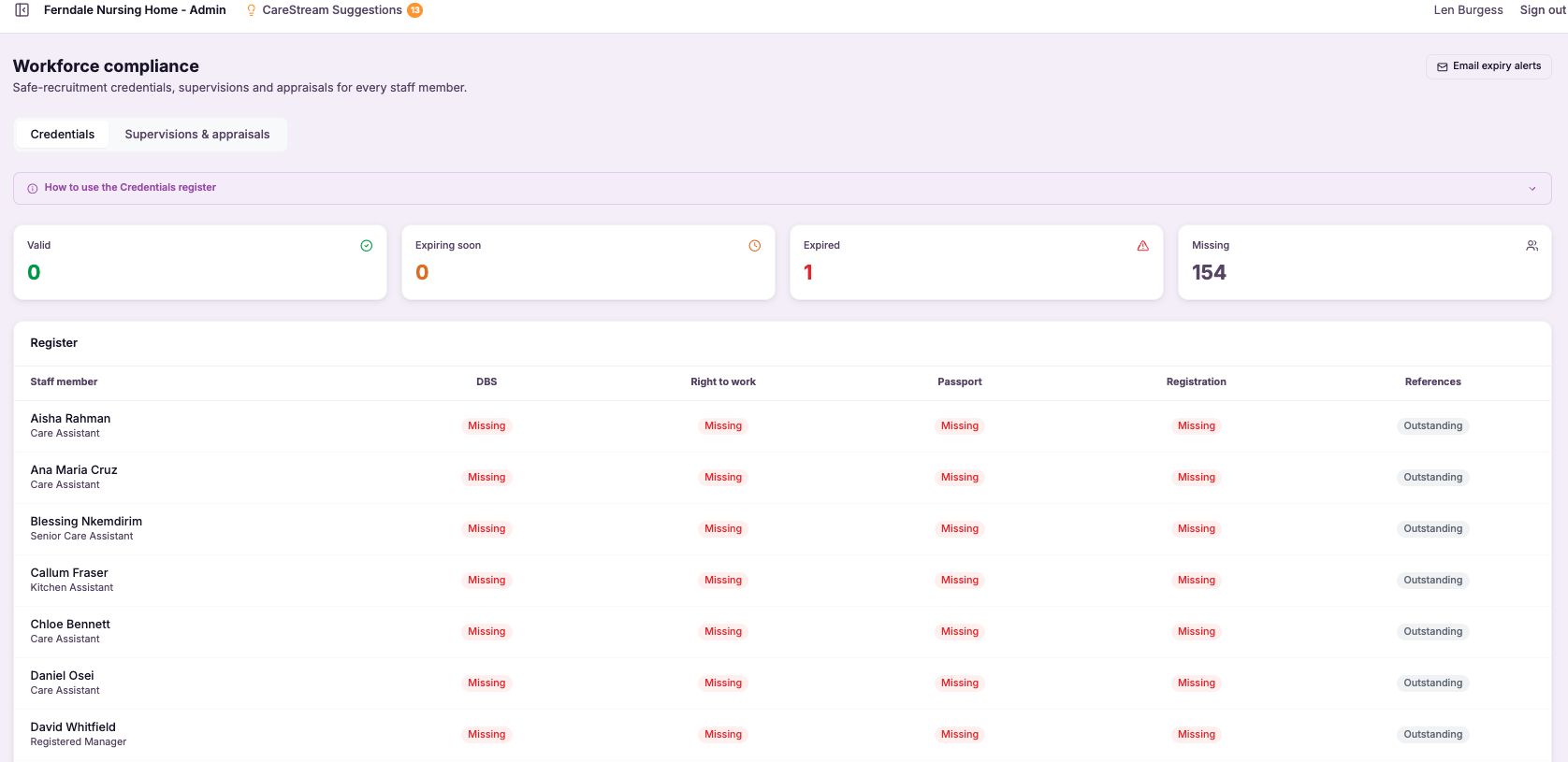
Every staff check, tracked in one place.
The workforce compliance register brings together the key checks that sit behind safe recruitment and continued employment in care, DBS, right to work, professional registration such as NMC where it applies, and references. Rather than these living across spreadsheets, emails and paper files, the register holds them per staff member, so you can see each person's status in one view.
This matters because these checks are non-negotiable in adult social care and are among the first things an inspector will look at. A single lapsed or missing check can undermine confidence in your whole approach to safe staffing. The register makes the state of your workforce compliance visible and manageable, showing clearly who is fully compliant and where something is missing or approaching expiry.
At a glance you can see who is fully compliant and what is missing or coming up for renewal. Instead of discovering a gap when an inspector opens a staff file, you see it in good time, so you can act before it becomes a problem for your service or the quality care your team delivers.
Registered managers and nominated individuals in any care home, nursing home or care provider responsible for staff DBS, right to work, registration and references.
You can show that every staff member's DBS, right to work, professional registration and references are tracked and current, which is among the first things an inspector checks.
The difference it makes day to day
- See at a glance which staff are fully compliant and which are not.
- Track DBS, right to work, professional registration and references in one register.
- Catch expiring checks in good time rather than after they lapse.
- Stop compliance slipping through the gaps of spreadsheets and paper files.
- Show inspectors that your safe recruitment checks are in order and current.
- Act on missing or overdue items before they become a finding.
How the workforce compliance register works.
The register holds a compliance record for each member of your team, covering the checks that matter for care roles. Rather than tracking these separately, you manage them together against each person.
The register then shows you the overall picture, making clear who is compliant and flagging what is missing or coming up for renewal, so you can keep your workforce in order without constantly cross-checking files.
One record per staff member
Each person has a compliance record covering their DBS, right to work, professional registration and references.
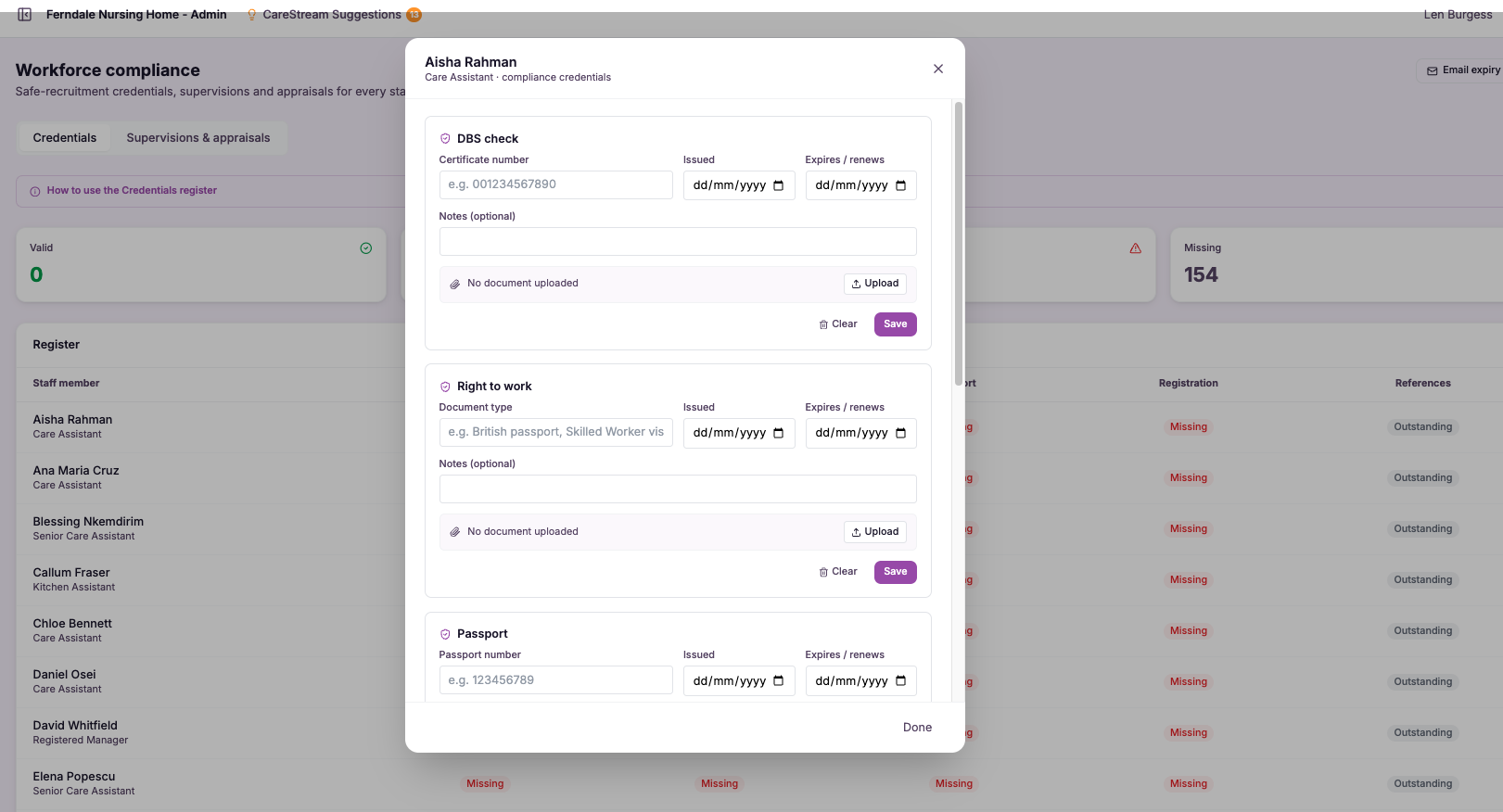
Key checks tracked
The register holds the checks that underpin safe recruitment and continued employment in care.
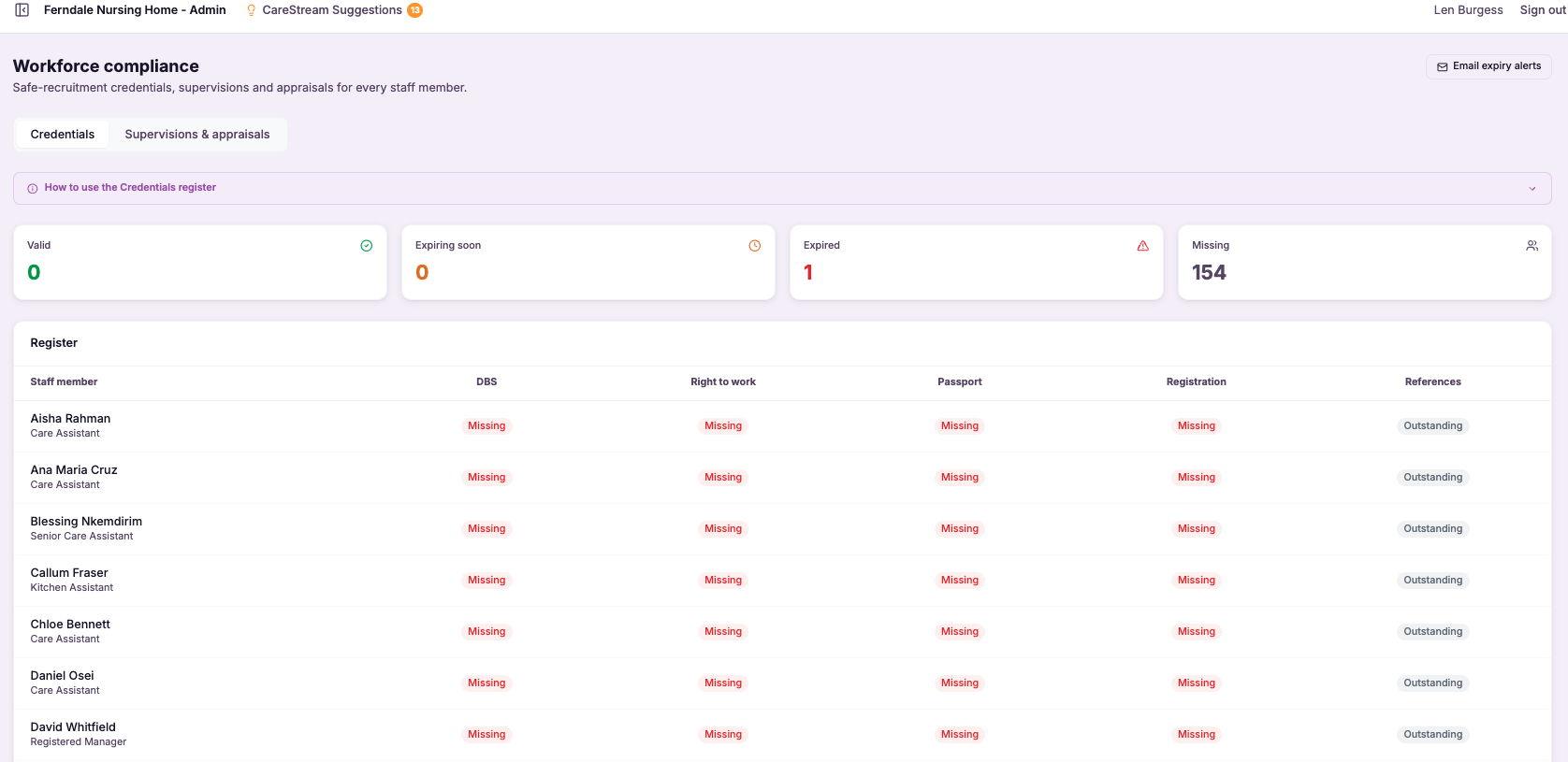
Status at a glance
You can see clearly who is fully compliant and who has something outstanding.
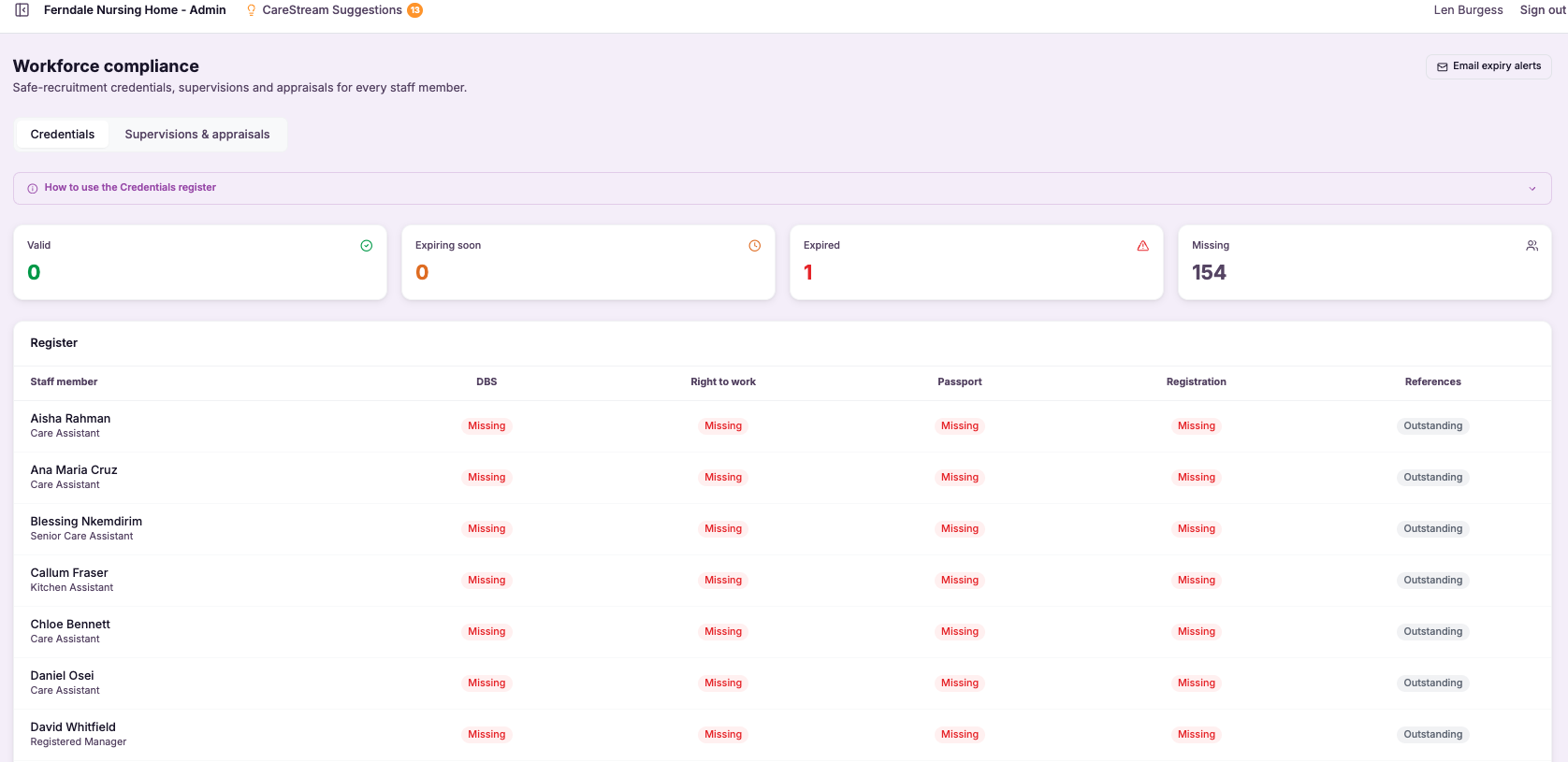
Missing checks are surfaced so you know exactly what needs to be obtained.
Items approaching renewal, such as a DBS or professional registration, are flagged before they lapse.
You address what is missing or expiring early, keeping your workforce compliant rather than catching up after the fact.
- Tracks DBS, right to work, professional registration and references per staff member
- Shows at a glance who is fully compliant and who is not
- Flags checks that are missing or approaching expiry
- Replaces scattered spreadsheets and paper files with one register
- Supports safe recruitment and continued employment evidence

Compliance you can see is compliance you can keep.
Staff checks slip not because managers do not care but because they are spread across too many places to keep on top of. A DBS renewal date buried in a spreadsheet or a reference filed and forgotten is easy to miss until it is too late.
Bringing every check into one register, with clear status and expiry flags, turns that hidden risk into something you can manage. Because you can see who is compliant and what is coming up, you stay ahead of renewals instead of chasing them, which keeps your workforce evidence strong and your inspection position secure.
DBS, right to work, professional registration and references sit in one register per staff member.
You see clearly who is fully compliant and who has something outstanding.
Checks approaching renewal are surfaced so you act before they lapse, not after.
You can show that safe recruitment checks are tracked and current for every member of staff.
Frequently asked
Which checks does the register track?
The register tracks each staff member's DBS, right to work, professional registration such as NMC where it applies, and references. These are the checks that sit behind safe recruitment and continued employment in adult social care, and the register holds them together per person rather than across separate files. Keeping them in one place matters because these are among the first things a CQC inspector will look at in a staff file. Having them tracked together means you can show a complete, current picture of each person's compliance rather than reconstructing it from scattered records.
How do I know who is fully compliant?
The register shows each staff member's status at a glance, making clear who is fully compliant and who has something outstanding. Instead of cross-checking multiple spreadsheets and folders, you get a single view of your whole team's compliance position. This visibility is the core value of the register. Because you can see where everyone stands in one place, you can act on gaps immediately and maintain confidence that your workforce meets the checks required, which supports the safe staffing that quality care depends on.
Will it warn me before a check expires?
Yes. The register flags items that are approaching renewal, such as a DBS or a professional registration nearing its expiry, so you can act before they lapse rather than after. This turns renewals from something you have to remember into something the register surfaces for you. Catching expiries early is what keeps your workforce continuously compliant. Instead of discovering a lapsed check when an inspector opens a file, you address it in good time, which protects both your inspection position and the safety of the people your service supports.
How does this support us at inspection?
Safe recruitment and continued employment checks are among the first areas a CQC inspector examines, and any gap in DBS, right to work, registration or references can undermine confidence in your staffing. The register lets you show that these checks are tracked, current and complete for every member of your team. Because the register makes both compliance and gaps visible, you go into inspection knowing your position rather than hoping the files hold up. Being able to demonstrate that your workforce compliance is actively managed, with expiries flagged and missing items chased, is strong evidence of a well run and safe service.
Explore more features
More of what the CareStream compliance platform does for UK care providers.
Keep every staff check in view and up to date.
See how CareStream's workforce compliance register tracks DBS, right to work, registration and references, so you always know who is compliant.





