
Resident profiles, so every carer knows the person
A care plan says what a person needs. It rarely says that he has his tea strong with two sugars in his own blue mug, that brass band music settles him, or that he wants the football score on a Saturday. Those details live in the heads of the people who have known him longest, and they leave with them.
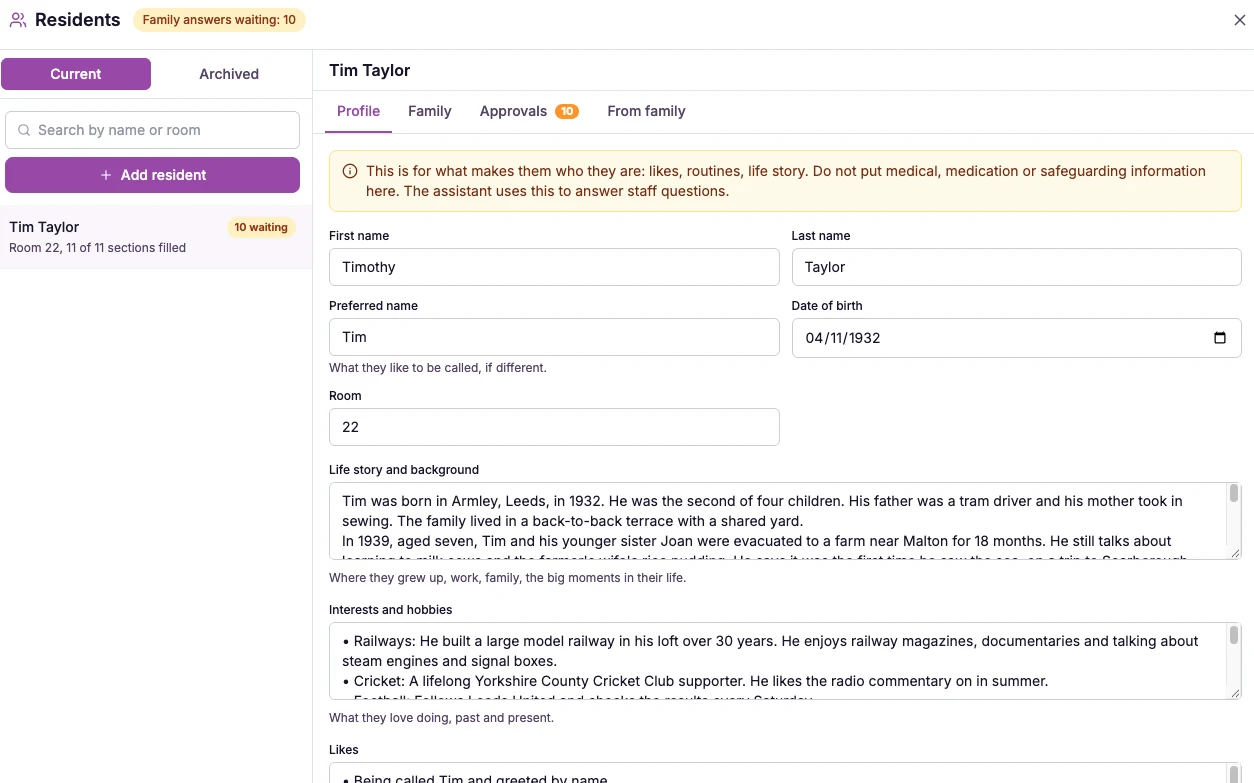
What resident profiles are.
A resident profile is a short, living record of who someone is. Each profile has eleven sections: life story and background, interests and hobbies, likes, dislikes, food and drink they enjoy, daily routine, what helps when they are upset or anxious, how they like to communicate, important people and pets, faith and traditions, and anything else.
It is about the person, not their care record. Medical, medication and safeguarding information stays in the care plan, and the screen reminds you of that every time you write.
Profiles are managed from the Residents button at the top of the Knowledge Base, and each current resident appears in their own group above your manual entries. Resident profiles are on the Professional and Enterprise plans.
Resident profiles keep those details in one place. You write the profile, family and friends add what only they know, and you approve every answer. Then any member of staff can ask a question about a resident in the hub, the same way they ask about a policy, and get an answer from what you have recorded.
Care homes and nursing homes that want new and temporary staff to know each resident quickly, and want families to be part of the picture.
They disappear from the hub and the assistant straight away, family links are cancelled, and the profile is archived. It is kept for seven years from archiving, which you can extend but not shorten, then deleted by an admin with archive access. Every view, download and deletion is logged.
Each home decides how to use profiles in line with its own data protection approach, including telling residents or those acting for them that a profile exists.
The difference it makes day to day
- New starters, bank staff and agency workers learn what the regular team already knows.
- Staff get a straight answer to a question about a resident in seconds, and the chat says so when something has not been recorded.
- Residents are greeted, served and settled the way they like, not the way a rota happens to run.
- Family and friends feel involved, because they can help without needing a login.
- Nothing reaches staff until you have read it and approved it.
- When someone dies or moves on, their profile is taken out of use at once and archived properly.
How resident profiles work.
You start by writing the profile for each resident, the same way you would fill in any record. After that, the people who know them best can add to it, you stay in control of what is kept, and your team can ask about it straight away.
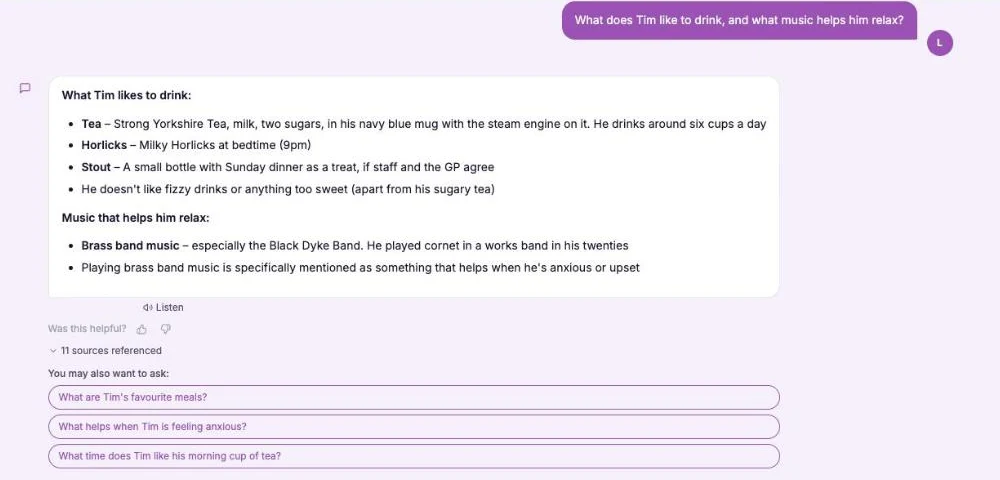
The screens below show an imaginary resident, Tim Taylor.
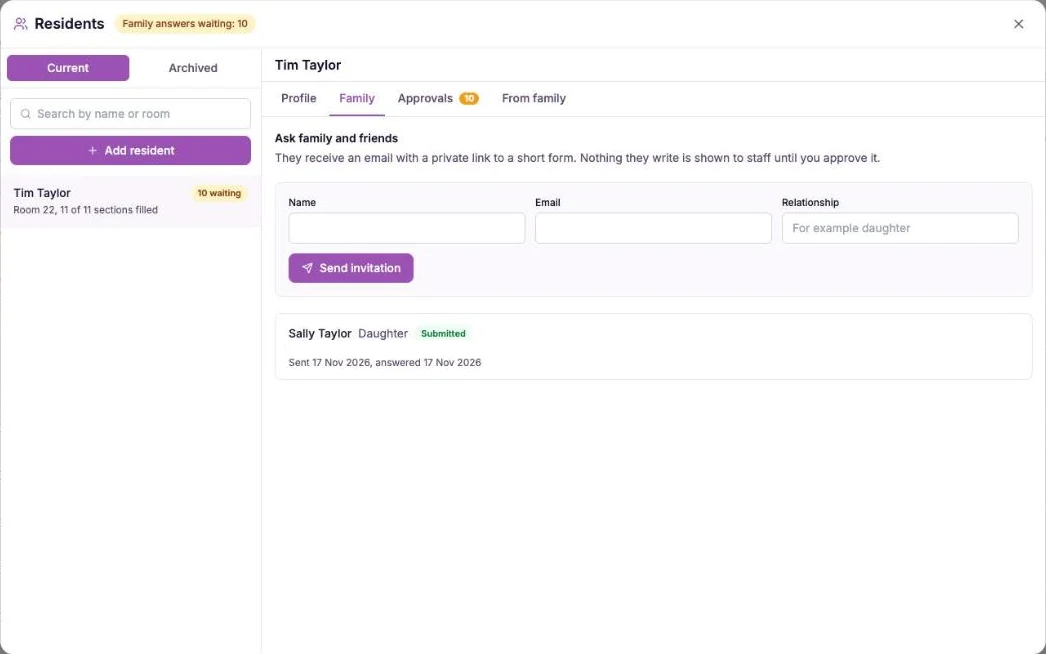
Invite family and friends
Open the resident, go to the Family tab, and enter a name, an email address and how they know the person. They receive an email with a private link to a short, friendly form with one gentle question for each section. There is no account to create and no password. Each link is just for that person, works for 14 days, and you can resend or cancel it at any time.
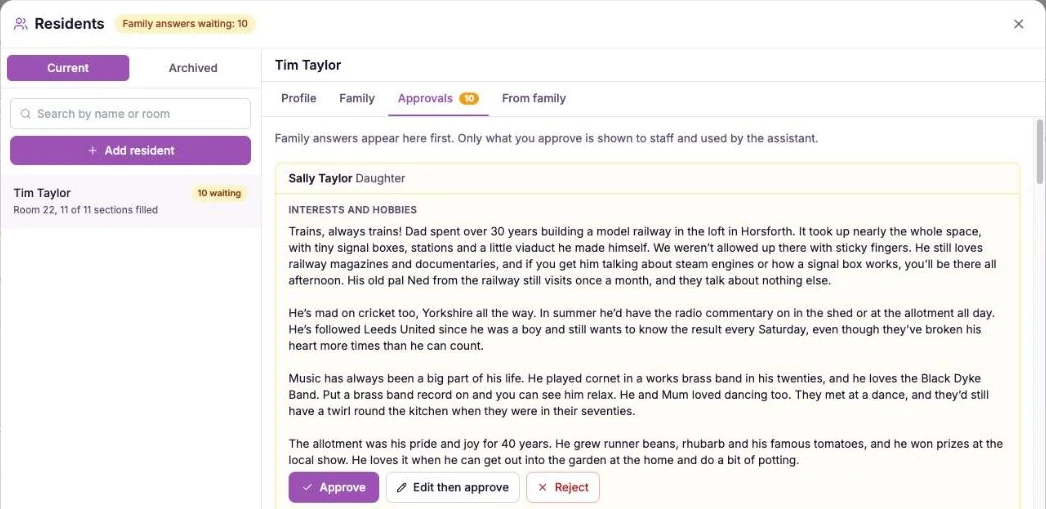
Approve each answer
Whatever a family member writes waits for you on the Approvals tab. Read each answer, then approve it, edit it and approve it, or reject it. Staff and the assistant never see an answer until you have approved it. Approved answers join the profile with the person's name and relationship after them, so staff can see who said it.
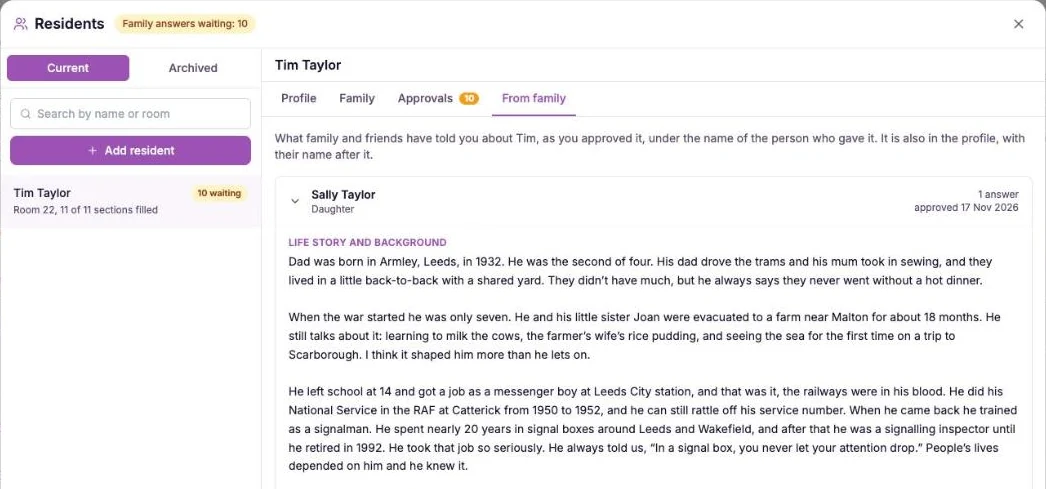
Check what has been added
The From family tab lists each person who answered as a drawer. Open one to see what they told you, when it was approved and who approved it. If you edited an answer first, you can still see what the person originally wrote.
Once a home has profiles, staff get a This is me topic in the Chat Hub. They ask a question about any resident, such as what they like to drink or what helps when they are anxious, and the chat answers using only the profiles you have written and approved, with the sources shown. They can also ask across everyone, for example who enjoys music. If something has not been recorded, the chat says so rather than guessing.
- Eleven sections that capture the person, not the care record.
- Family and friends contribute through a private link, with no login.
- Every family answer needs your approval before staff can see it.
- Staff ask a question about a resident in the hub and get an answer from the approved profile.
- Archived when someone dies or moves on, and kept for seven years from archiving.
- Professional and Enterprise plans.
Why this works.
Knowing a resident well is what turns care from a task list into something personal. But that knowledge is usually held by a few long-serving staff and a few visiting relatives. When they are off shift, or a new carer arrives, it is simply not there.
Resident profiles work because they make that knowledge easy to collect, safe to share and quick to use. The family can contribute without a login, you decide what is kept, and the person who needs it at two in the morning can simply ask.
A short form from a private link takes about five minutes and asks the kind of questions people are glad to be asked.
Every answer is read and approved by you before it is shared, so nothing unsuitable or out of date reaches staff.
Staff ask in plain words and get an answer from the profile, at any hour, so what the regular team knows is available to everyone.
Frequently asked
Which plans include resident profiles?
Resident profiles are available on the Professional and Enterprise plans.
Is this the same as a care plan?
No. A profile is about who the person is: their life, likes, routines and what comforts them. It should not contain medical, medication or safeguarding information, which belongs in the care plan.
Do family members need an account?
No. They get an email with a private link to a short form. There is no login and no password. The link works for 14 days and is just for that person.
Can staff see what family write straight away?
No. Every family answer waits on the Approvals tab until an admin approves it. You can approve it as written, edit it first, or reject it.
How do staff use the profiles?
Staff open the This is me topic in the Chat Hub and ask a question about a resident, the same way they ask about a policy. The answer comes only from the profiles your home has written and approved, the sources are shown, and if something is not recorded the chat says so.
Can the chat give medical advice about a resident?
No. It answers only from the profile, which is about who the person is. For anything clinical it points staff to the care plan and to the nurse or senior on duty.
What happens when a resident dies or moves on?
You mark them as passed away or moved on. They disappear from the hub and the assistant straight away, family links are cancelled, and the profile is archived. Admins with archive access then confirm the archive, can download a copy and are reminded when the retention date arrives.
How long are archived profiles kept?
For seven years from the day they were archived. You can extend that date but not shorten it. Deleting a profile before the date needs a reason, and every view, download and deletion of an archived profile is logged.
Who is responsible for data protection?
Each home is responsible for using the feature in line with its own data protection approach, including telling residents or those acting for them that a profile exists and covering it in your privacy notice.
Explore more features
More of what the CareStream compliance platform does for UK care providers.
Help every carer know the person, not just the plan.
See how resident profiles let families add what only they know, with you approving every word, and put it in your team's hands.




