Suggestions numbered & highlighted in the policy
There is a familiar frustration in reviewing suggested changes: you get a list of recommendations in one place and the policy document in another, and you spend your time flicking between the two, trying to work out where on the page each suggestion actually applies. By the time you have found the right spot, you have lost the thread of what you were changing.
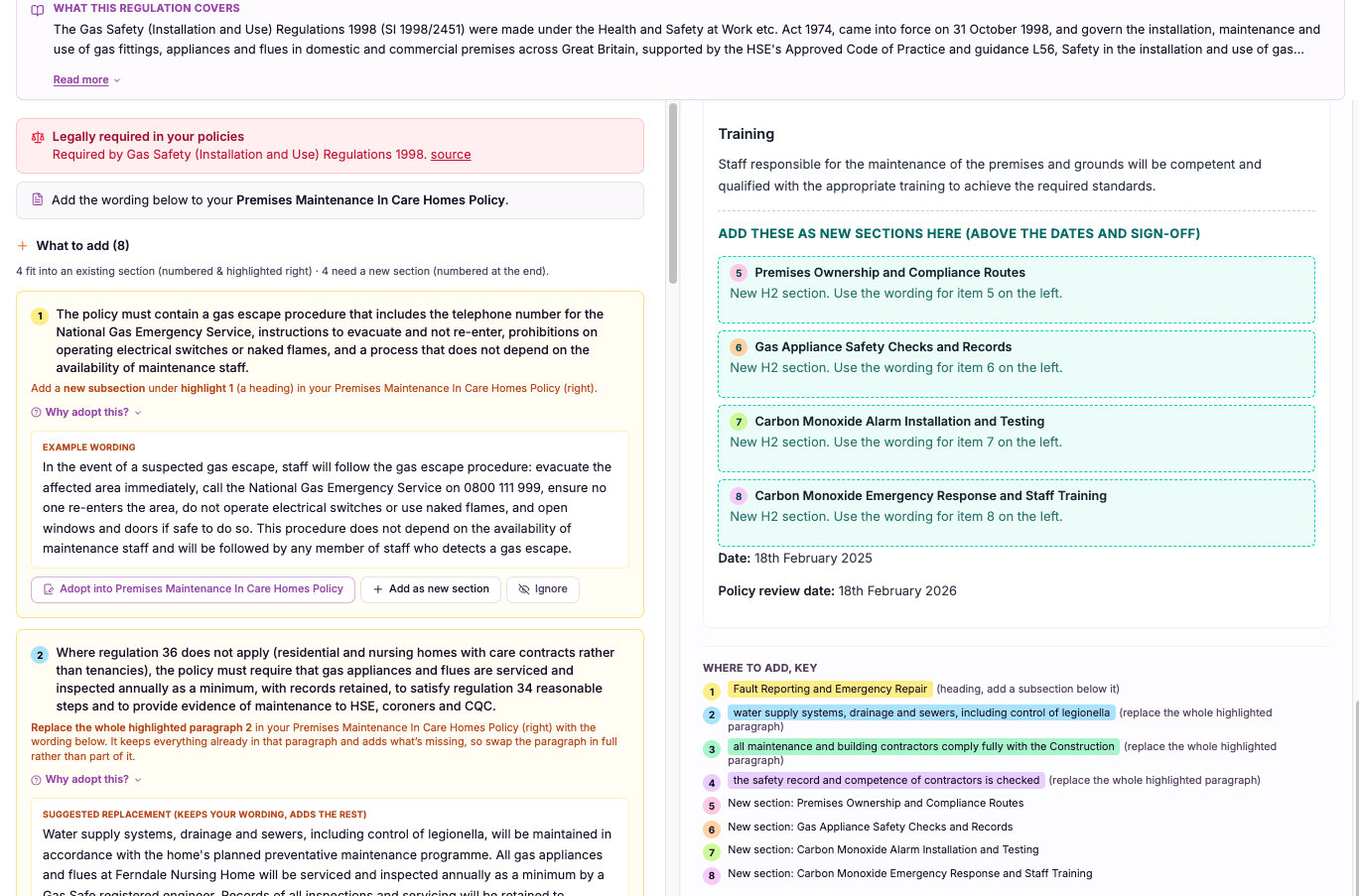
Suggestions shown where they belong, on the page.
A separate list of recommendations forces you to hold two things in your head at once: the suggestion and the location it refers to. For a long policy, matching them up is slow and error-prone, and it is easy to apply a change to the wrong paragraph or miss one entirely.
CareStream instead numbers each suggested change and highlights it inline, in the policy document itself, at the exact point it applies. This matters because reviewing policies and procedures should be about deciding on the change, not hunting for where it goes. Seeing suggestion number three highlighted on the precise line it affects makes the review faster, clearer and far less prone to mistakes.
CareStream removes that back-and-forth. Suggested changes are numbered and highlighted inline within the policy document itself, so a reviewer can see exactly where each numbered suggestion belongs. You read your policy and the recommendations in the same view, with every suggestion sitting precisely where it applies rather than in a separate list you have to cross-reference.
Registered managers and quality leads who review and update policies across any care service and want to see suggestions in context rather than as a detached list.
Because every suggestion is numbered and marked in place, you can review and evidence your policy changes methodically, with nothing missed or misplaced.
The difference it makes day to day
- You see exactly where each suggestion applies, highlighted on the line it affects.
- The flicking between a separate list and the document disappears entirely.
- Each suggestion is numbered, so nothing gets lost or applied twice.
- Reviewing a policy becomes faster because context and change sit together.
- You are far less likely to apply a change to the wrong paragraph.
- Colleagues can follow your review because every suggestion has a clear number and place.
How numbered, highlighted suggestions work.
Rather than compiling recommendations into a list that lives away from your document, CareStream places them where they belong. Each suggested change is tied to the exact point in the policy it relates to.
The platform then numbers each suggestion and highlights it inline, so when you open the policy you see the document and its recommendations together, with every suggestion marked in its rightful place.
Suggestion generated
The analysis produces a suggested change for a specific point in your policy.
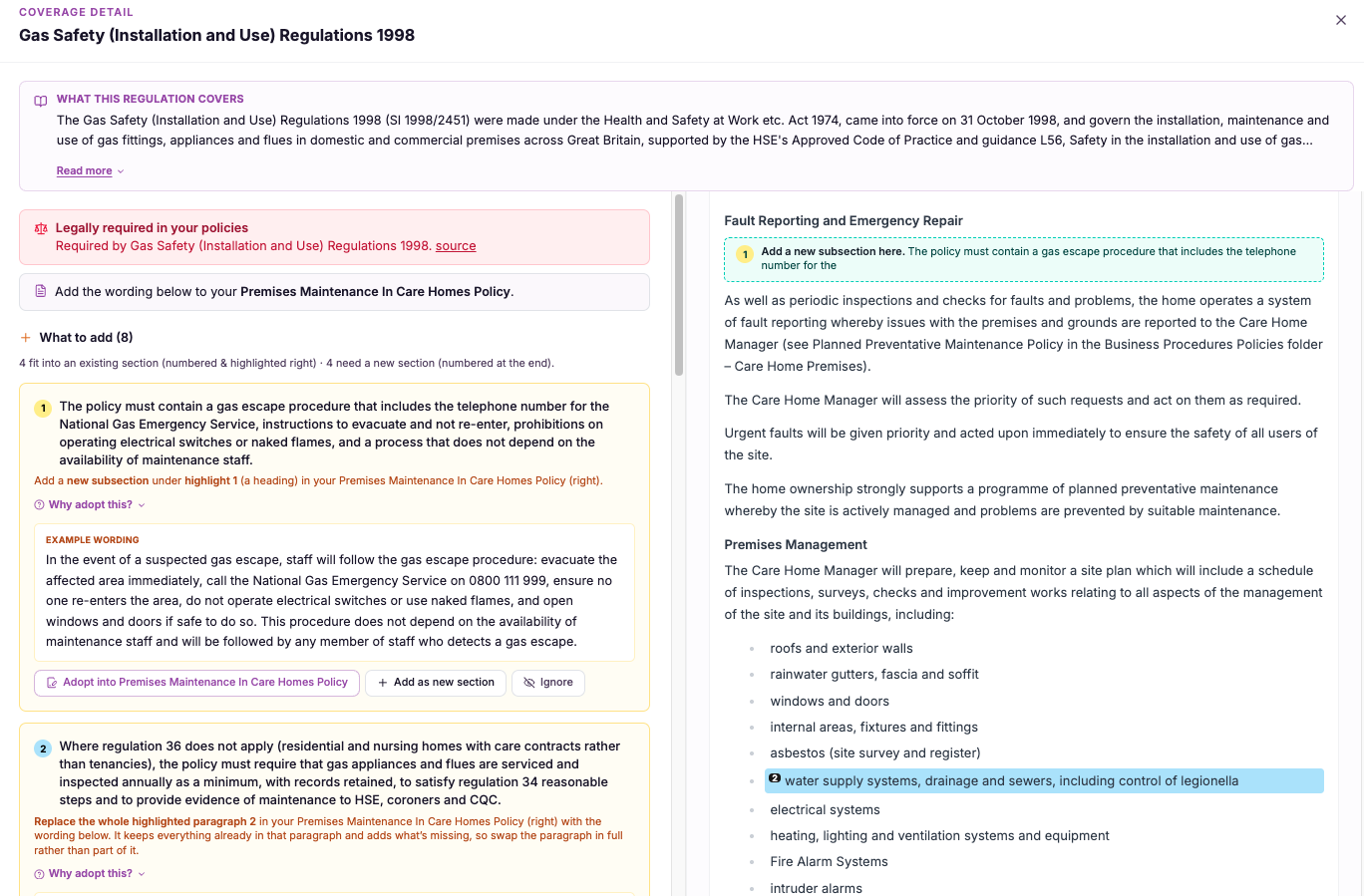
Anchored in place
Each suggestion is tied to the exact location in the document where it applies.
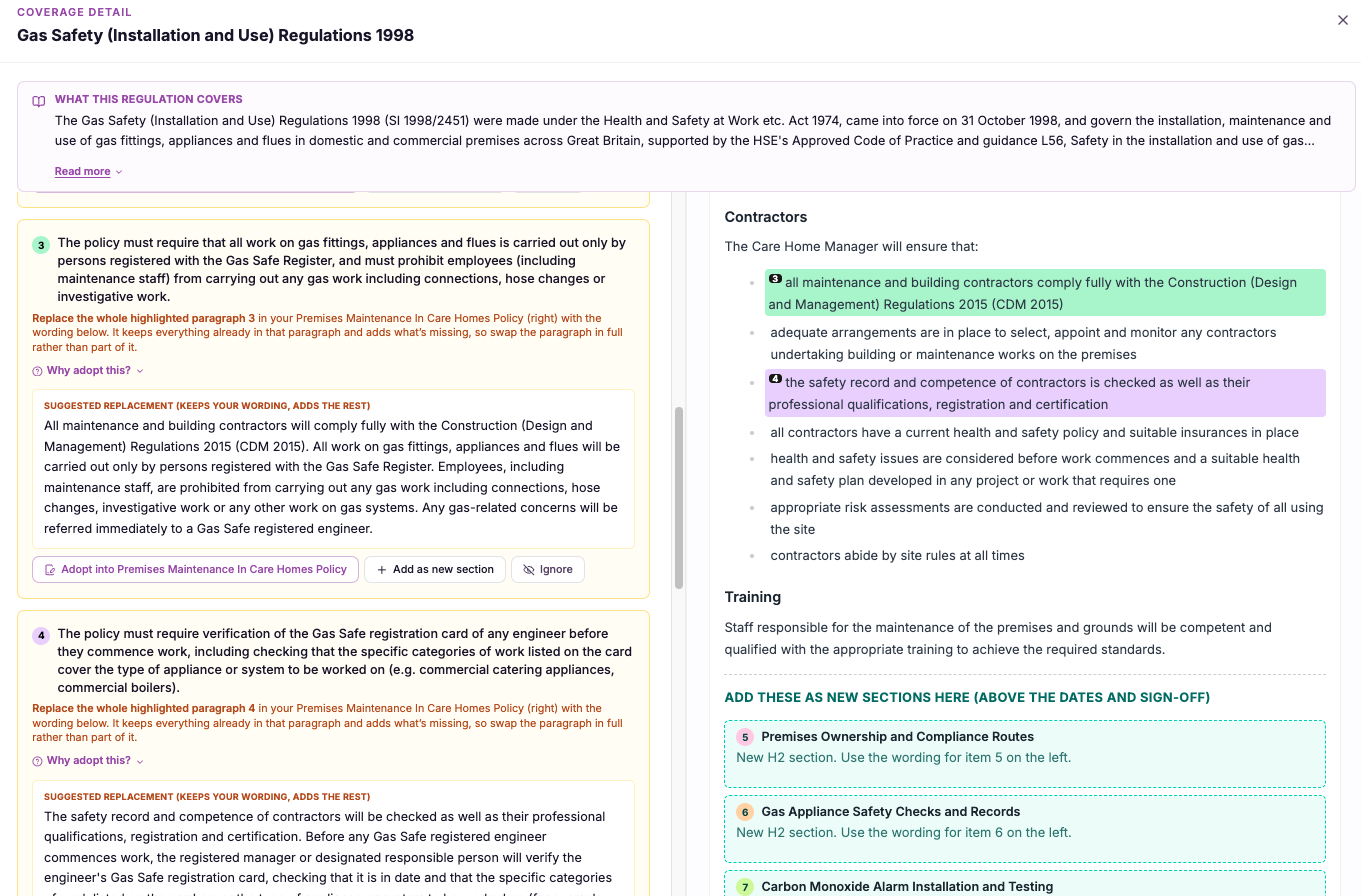
Numbered clearly
Every suggestion is given a number so it can be referred to and tracked without confusion.
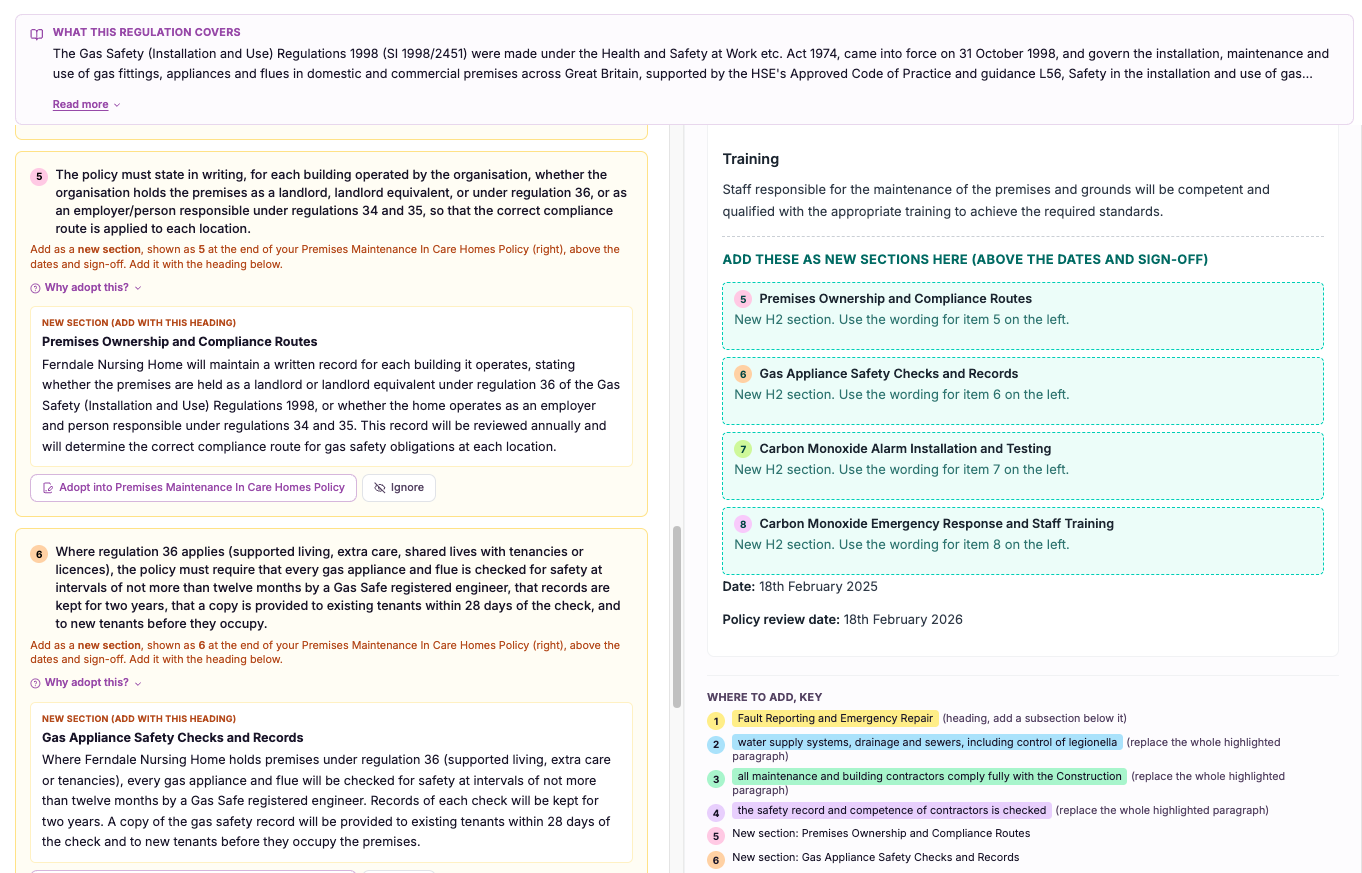
The suggestion is marked within the policy text itself, right where the change belongs.
You read the policy and its numbered suggestions in a single view, with no cross-referencing.
You work through each numbered highlight in turn, applying or dismissing it in place.
- Suggested changes are highlighted inline within the policy document itself
- Each suggestion is numbered so it can be tracked and referred to clearly
- Removes the need to cross-reference a separate list against the document
- Shows the exact point in the policy each suggestion applies to
- Makes reviewing policies faster and less error-prone
A suggestion is only useful when you can find where it goes.
The best recommendation in the world is wasted effort if the reviewer cannot quickly see where it applies. A detached list turns review into a matching exercise, and matching is where changes get missed, duplicated or dropped into the wrong place.
By numbering suggestions and highlighting them inline, CareStream keeps the change and its location together. The review becomes a straightforward walk through the document, and every suggestion is impossible to lose because it is sitting exactly where it belongs.
Every suggestion is highlighted on the line it affects, so you never have to guess where it applies.
Clear numbering lets you track and refer to each suggestion without any risk of confusion.
The document and its recommendations share one view, ending the flick between a list and the page.
Because changes sit where they belong, you are far less likely to miss one or apply it to the wrong spot.
Frequently asked
Do I get the suggestions as a separate list or inside the policy itself?
Inside the policy itself. A separate list forces you to constantly match each recommendation against the document to work out where it applies, which is slow and easy to get wrong on a long policy. CareStream avoids that by placing suggestions where they belong. Each suggested change is highlighted inline, at the exact point in the policy it relates to, and given a number. So when you open the document you see your policy and its recommendations together, with every suggestion marked in place rather than sitting in a detached list you have to cross-reference.
Why are the suggestions numbered?
Numbering gives each suggestion a clear, stable reference so it can be tracked and discussed without confusion. When you are working through several changes in a policy, being able to say "suggestion three" and know exactly which one that is keeps the review orderly and makes it easy to check that nothing has been missed. It also helps when more than one person is involved. A colleague reviewing your work can follow precisely which suggestions you acted on and which you left, because each one has a number and a highlighted place in the document. That shared reference point makes collaborative policy review much smoother.
Will this make reviewing my policies quicker?
Yes, noticeably. The slowest part of reviewing suggested changes is usually not deciding on them but finding where each one goes. Flicking between a list and the document, then hunting for the right paragraph, eats up time and attention on every single suggestion. By highlighting each numbered suggestion inline, CareStream removes that step entirely. You read the policy and see the recommendation exactly where it applies, so your effort goes into the decision rather than the search. For a busy registered manager, that turns policy review from an afternoon's chore into a focused, fast pass through the document.
Could I apply a change to the wrong part of the policy?
That risk drops sharply with inline highlighting. When suggestions live in a separate list, it is genuinely easy to apply a change to the wrong paragraph, or to a similar-looking section elsewhere in the document, because you are matching by memory rather than by position. Because CareStream anchors each numbered suggestion to the exact point it applies to and highlights it there, you can see precisely which line is affected. You are acting on a marked spot rather than reconstructing a location from a description, which makes misplaced or duplicated changes far less likely.
Explore more features
More of what the CareStream compliance platform does for UK care providers.
See every suggestion right where it belongs.
Book a demo and watch CareStream number and highlight each suggestion inline, so reviewing your policies takes minutes, not guesswork.





