Adopt a gap fix into your policy (tracked changes)
When CareStream spots a gap in one of your policies and suggests a fix, the natural worry is what exactly that fix will change once you accept it. Nobody wants a suggested improvement to quietly rewrite a document they are responsible for. That is why an accepted gap fix is never applied silently.
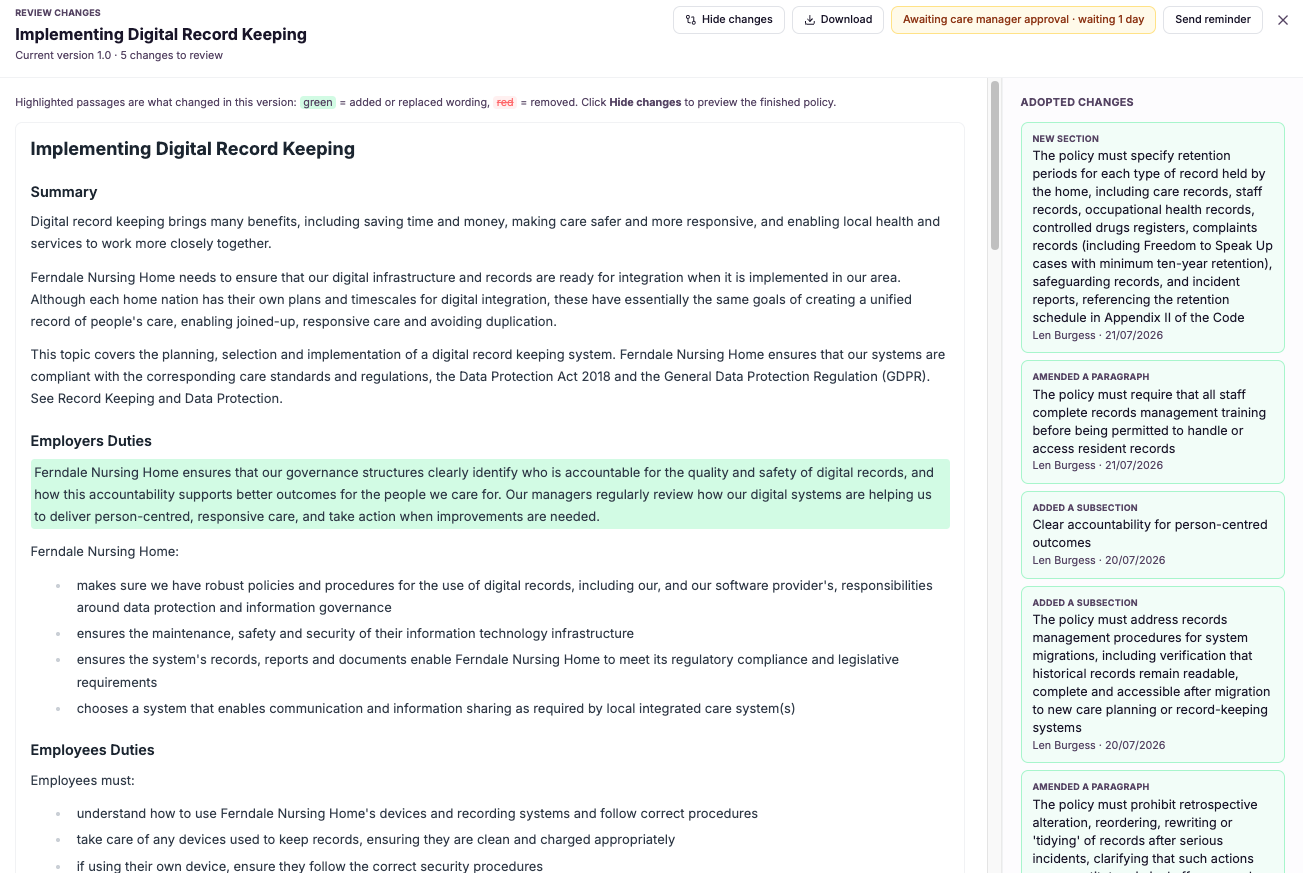
Accepted fixes shown as tracked changes.
Adopting a gap fix as tracked changes means that when you accept one of CareStream's suggestions, the platform applies it into your policy in a marked-up form. Every insertion and alteration is highlighted against the existing text, so you can read the proposed wording exactly where it will sit rather than as a suggestion floating on its own.
This matters because policies and procedures in health and social care carry real weight. A change to a safeguarding or medication policy has to be understood before it is accepted, not after. By showing the fix as tracked changes, CareStream gives policy owners the same clarity and control they would expect from reviewing an edit in a familiar document, so nothing enters the live version without being seen first.
Instead, CareStream inserts the change into your policy as tracked changes, exactly like the tracked changes you already know from working in a document. You see precisely what was added or altered, in context, before it becomes the live version, so you stay fully in control of every word of your care home policies and nursing home policies.
Registered managers, quality leads and anyone responsible for owning and maintaining policies and procedures in a care service.
You can show that improvements to your policies were reviewed and understood before going live, not applied blindly to a compliance document.
The difference it makes day to day
- You see exactly what an AI gap fix inserts or alters before it becomes live.
- Every proposed change appears in context, in the actual place it will sit within the policy.
- Nothing is applied silently, so you never lose track of what your policy now says.
- Reviewing a suggested fix feels as familiar as tracked changes in a document.
- You keep full authorship of your care home and nursing home policies at every step.
- You can move a well-understood improvement into your policy with confidence, not guesswork.
How tracked changes work.
A gap fix begins as a suggestion CareStream raises against a specific policy. Accepting it does not overwrite anything; it turns the suggestion into a set of tracked changes laid over your current wording.
Because the changes are marked up rather than merged in, you can read the before and after side by side, understand the impact, and only then decide whether it should become the live version of the policy.
A gap fix is suggested
CareStream identifies a gap in a policy and proposes wording to close it, tied to the exact section it affects.
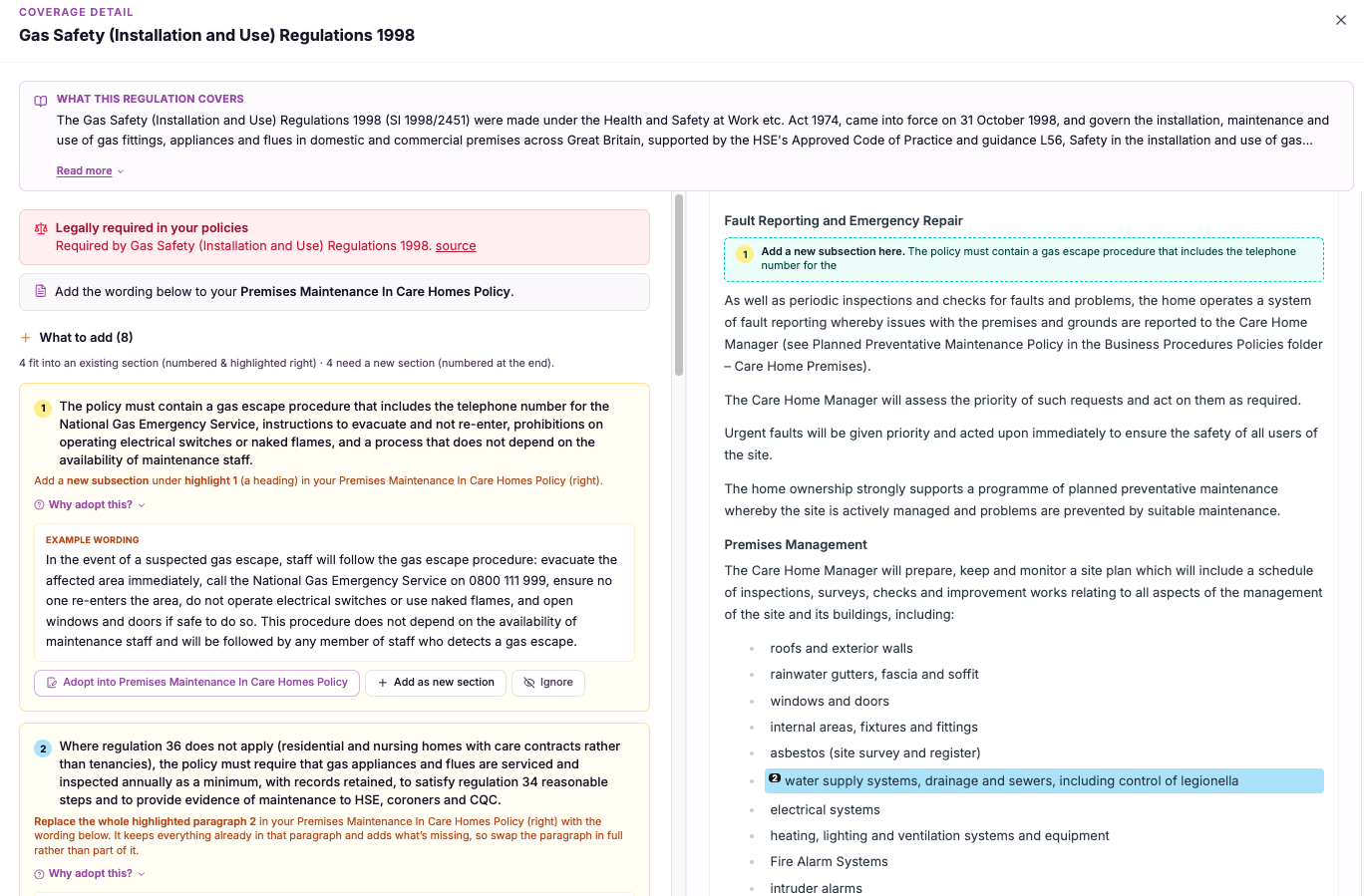
You accept the fix
When you accept, CareStream applies the suggested wording into the policy as tracked changes rather than a silent edit.
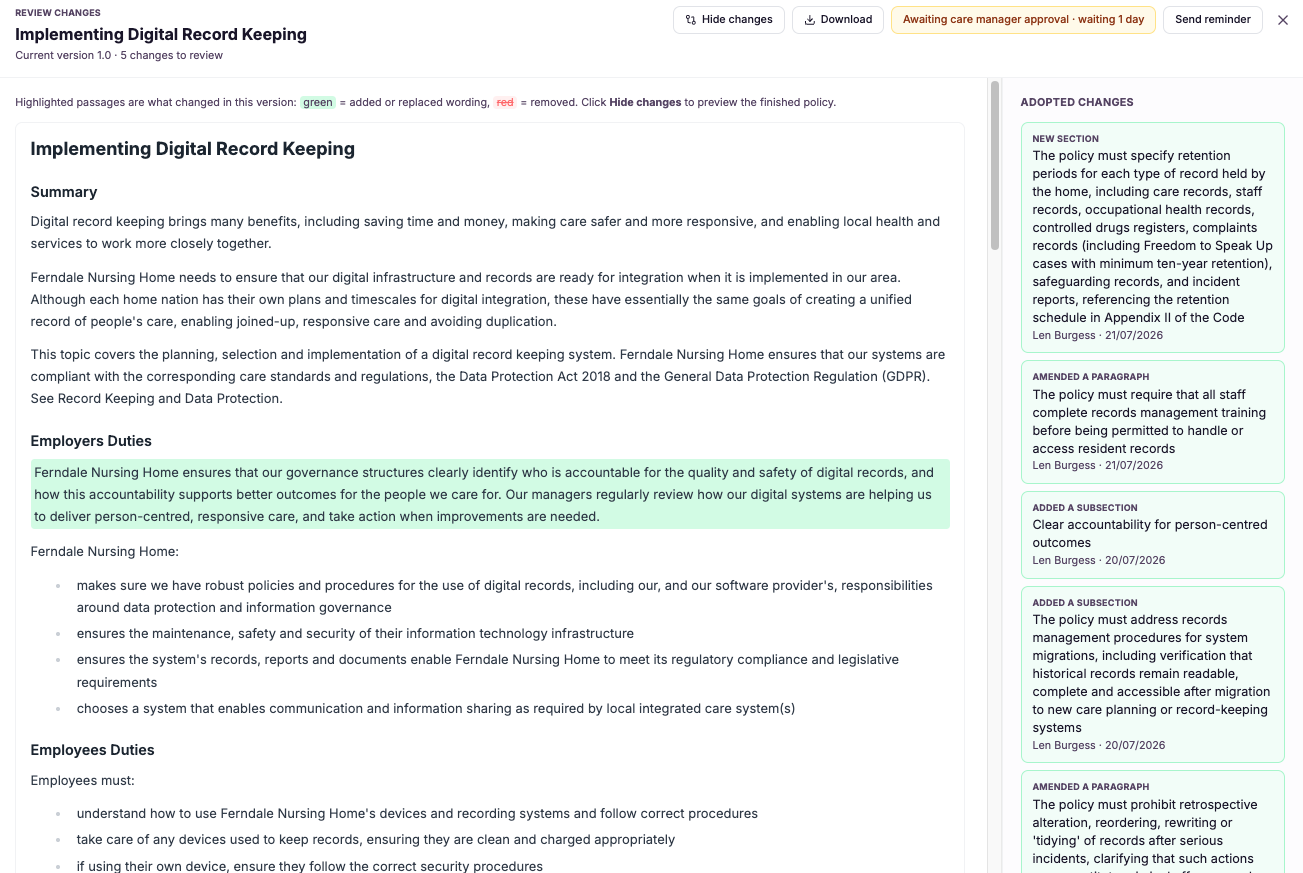
Changes are marked up
Every insertion and alteration is highlighted against your existing text so nothing is hidden.
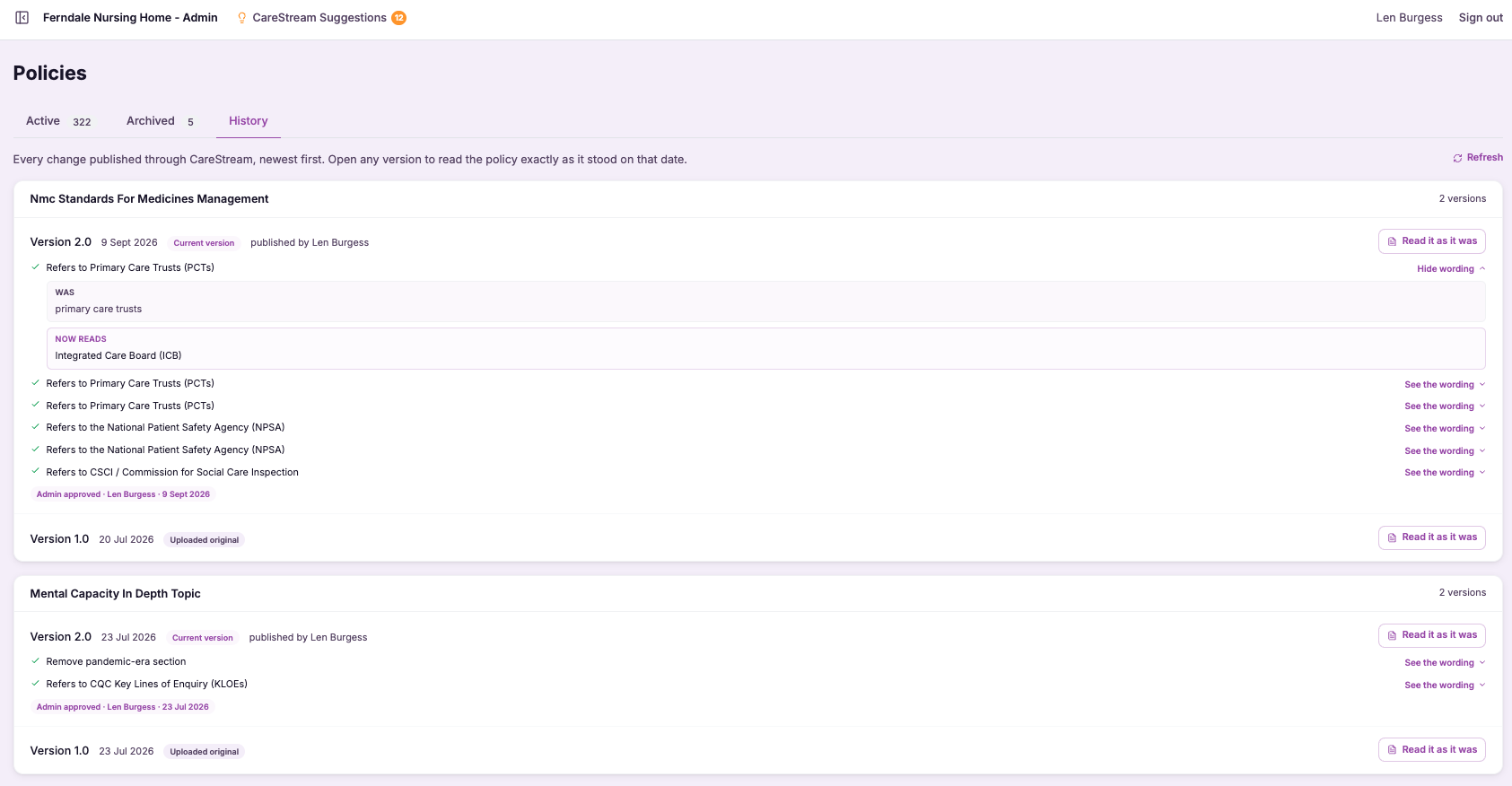
You read the change exactly where it will sit in the policy, seeing the before and after clearly.
You confirm the tracked change to move it forward, or refine the wording so it fits your service precisely.
Only once the tracked change is accepted does it form part of the current, live policy that staff work to.
- Accepted gap fixes are applied as tracked changes, never silent edits.
- Insertions and alterations are highlighted against your existing policy text.
- You review the change in context before it becomes the live version.
- The experience mirrors familiar tracked changes in a document.
- Policy owners keep full control and authorship of every change.
Improvement without losing control.
The value of an AI gap fix is only realised if you trust what it does to your document. Trust comes from seeing the change, not from being told a change was made somewhere in a policy you are accountable for.
By presenting every accepted fix as tracked changes, CareStream keeps the speed of AI suggestion while preserving the transparency and authorship that responsible policy management demands.
Every inserted or altered word is highlighted so nothing changes without you seeing it.
You review the fix in the exact place it will live, not as an abstract suggestion.
It works just like tracked changes in a document you already know how to review.
A fix only becomes live once you have understood and accepted the tracked change.
Frequently asked
What does adopting a gap fix as tracked changes actually mean?
When CareStream suggests a fix to close a gap in one of your policies and you accept it, the platform does not rewrite the document behind your back. It applies the suggested wording as tracked changes, highlighting every insertion and alteration against your existing text. This works exactly like the tracked changes you know from editing a document. You can see the before and after in context, understand precisely what the fix does, and confirm it only when you are satisfied. The change becomes part of the live policy only after that point.
Will a fix ever change my policy without me seeing it?
No. That is the whole purpose of showing accepted fixes as tracked changes rather than silent edits. Nothing is merged into the live version of a policy until you have reviewed the marked-up change and confirmed it. This keeps policy owners firmly in control of policies and procedures in health and social care. Because a change to something like a safeguarding or medication policy carries real weight, CareStream makes sure you understand every inserted or altered word before it takes effect.
Can I adjust the wording of a suggested fix?
Yes. Seeing a fix as tracked changes means you can treat it as a starting point rather than a fixed instruction. If the suggested wording is close but not quite right for your service, you can refine it so it fits your home precisely before it becomes live. This matters because every service has its own context, and a good policy reflects how your care is genuinely delivered. Tracked changes give you the room to shape the improvement, keeping the speed of an AI suggestion while preserving your authorship of the final text.
How is this different from the review and approval step?
Tracked changes are about visibility of the change itself: what an accepted gap fix inserts or alters, shown clearly in context within the policy. It answers the question of what is changing. The review and approval step is about who signs the change off before it goes live. The two work together, so you first see exactly what the tracked change does, and then it moves through the controlled adoption path where a responsible person approves it as the current, live policy.
Explore more features
More of what the CareStream compliance platform does for UK care providers.
See every change before it goes live.
See how CareStream applies accepted gap fixes as tracked changes so you know exactly what your policy says at all times.





