
Staff recognition ideas that carers can actually see. Not a thank you they never hear.
Most staff recognition ideas rely on a manager noticing. On a busy rota, that does not always happen. CareStream's staff incentives give each carer a private view of their own points, set by you for finished, evidenced training in the Staff Hub. It sits beside, not instead of, a word in person.
14 day free trial · Set up in a day · UK data residency
The work was seen by the people in the building. Just not by the carer.
A scenario we see in many care settings.
A carer has spent three months covering extra shifts. She finished her refresher training between handovers, calmed a distressed resident in the early hours and never missed a medication round. Her manager is grateful and says so now and then, in a corridor, in passing. But the manager is stretched across two units, the thanks is hard to find in a busy week, and nothing the carer does lands anywhere she can see it. Looking for staff recognition ideas that fit a real rota is where many managers end up. Here is how that month goes.

A carer finishes her refresher module on her phone in her break.
She settles a resident who was upset and the family notice.
The manager is grateful and mentions it in passing.
The manager is covering two units and the thanks never gets repeated.
Nothing the carer finished is anywhere she can see it.
She wonders whether anyone noticed any of it.
They mean to do something, but have no simple way to start.
“Do you feel valued here?” The honest answer is a shrug.
Nobody did anything wrong. The care was good and the intention was kind. What is missing is something a carer can see for herself. Here is how CareStream fills that gap, and where it stops.
An example scenario, not a named service.
A thank you only counts if the carer hears it
Recognition that depends on a manager being in the right place at the right time will always be patchy.
Thanks gets lost on a busy rota
Managers split their time across units, shifts and paperwork. Night staff and part time carers can go weeks without a word, through no one's fault.
Good work is hard to point at
Much of what carers do is quiet. A finished module or a recorded sign off is something you can point to, and something the carer can see for herself.
A scheme nobody can see becomes a rumour
If the rules are vague, people suspect favourites. Clear rules, clear targets and a private points view keep it fair.
A visible reward for finished training.
This is the staff incentives feature of CareStream, in the order a manager and a carer meet it. It is part of the Professional and Enterprise plans. You can read the thinking behind it in rewarding training without a leaderboard.
You set up a monthly campaign with clear staff rewards
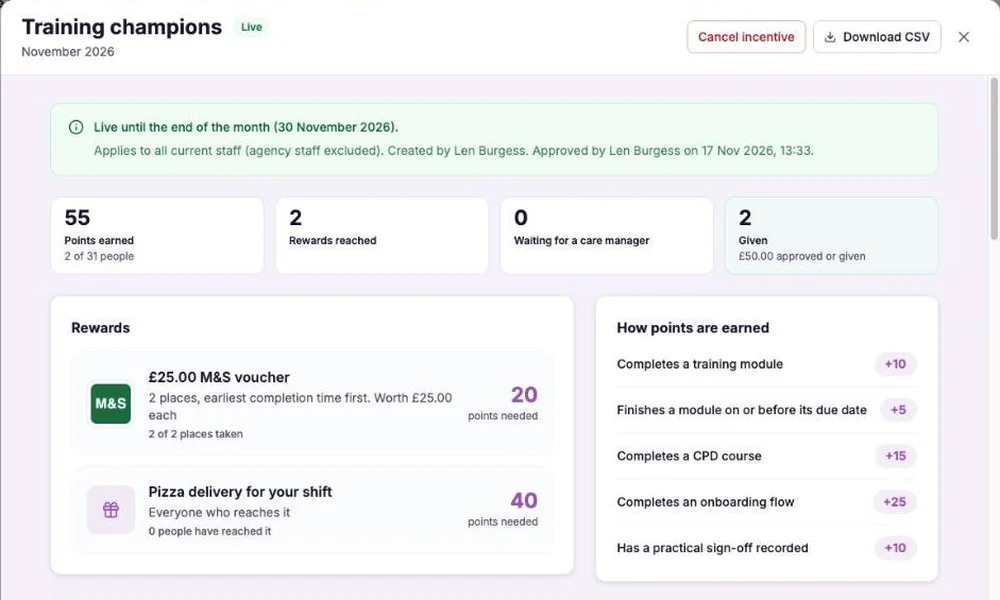
- Pick a calendar month, choose how many points each kind of finished training earns and add the rewards, such as a voucher or an extra break
- Take in everyone, or choose the people who can take part. Agency staff are left out
- A care manager or registered manager approves it before it goes live, and CareStream never buys vouchers or moves money
Example screen. Your points, rewards and targets are your own.
The carer sees their own points in the Staff Hub
- My incentives shows their own points, a points history and their progress to each reward
- Only the carer can see their own points. There is no leaderboard and nobody sees anyone else's total
- Status messages tell them where they are, from points to go, through approved, to given
Example screen. Only the carer sees their own figures.
Points follow finished, evidenced training
- A module with questions earns points only when the pass mark is reached, and a module that needs an observed practical earns nothing until a manager signs it off
- This is why the points mean something: they follow evidence, not speed or popularity
- Allocate modules in the Training screen, with an optional due date, so there is something to earn
Illustration based on the Training screen. Example questions.
You see who is on target, and people who miss out are thanked
- Emails go to each participant one at a time, so nobody sees another person's address or points
- A points summary goes out at most once a day, and a results email at the end of the month
- People who miss a limited reward get a thank you message and an Open My Training button, pointing them back to their training
Example screen. Figures are illustrative only.
The questions managers ask, and how CareStream answers them
Read this as a conversation. These are the questions we hear most.
We already thank people. Why would we need a system?
You would not be replacing the thanks. A word from a manager still matters most. This adds something a carer can see between conversations: their own points for training they have finished, and a reward at the end of the month.
What does a carer actually see?
In the Staff Hub, a My incentives screen. It shows their own points, a history of how they earned them and how close they are to each reward. A small tracker also sits at the top of the hub. Only that carer can see their own points.
What earns points?
Five things, and you choose the points: completing a training module, finishing it on or before its due date, completing a CPD course, completing an onboarding flow and having a practical sign off recorded. You can cap the points a person earns in a month.
Can a carer game it by clicking through?
Not easily. A module with questions earns points only once the pass mark is reached, and a module that needs an observed practical earns nothing until a manager signs it off. A failed assessment earns no points.
Who decides whether a reward is given?
A care manager or registered manager. They approve the campaign before it starts and approve each reward claim, then you mark it as given. An admin cannot approve it. CareStream records and reports, and does not buy vouchers or handle money.
What about the people who miss out?
They get a thank you message that points back to their training, with a button that opens it. That matters for limited places, where the first to reach the target gets the reward.
Do we need a particular plan?
Staff incentives are on the Professional and Enterprise plans. Starter and Free do not include them. See the pricing page for what each plan includes.
Can we try it?
Yes. There is a 14 day free trial on the paid plans, and you can create a free account to look around. If you would like to see staff incentives first, book a demo.
A visible reward for training, not a measure of who is a good carer
It rewards finished training, not being a good carer
Points come from five events: modules, on time bonuses, CPD courses, onboarding and practical sign offs. Kindness, initiative and a calm night are not scored, and a manager noticing them in person still matters.
No team awards and no spot awards
Campaigns are monthly and individual. You cannot give a surprise award on the day or run a team campaign, so keep your own way of marking those moments.
It does not promise a happier team
We make no claim that this improves retention or morale. It makes some training effort visible and fair. Treat it as one tool in how you value your people.
Training built from your own policies
Everything on this page is part of the product. Here is where to read more.
Training built from your own policies
Ad hoc training from your policies, checked by questions and followed up in the Staff Hub.
See the featureTraining that earns its keep
The modules, CPD courses and annual training that points are earned from.
See annual trainingFree CPD certified courses
CPD certified courses that carers can finish and earn points for.
See the coursesGuides on this subject
Care Home Staff Incentive Scheme: Rewarding Training Without a Leaderboard
A monthly incentive can lift training completion, or it can sour a team. A worked example shows the rules that keep a scheme fair, capped and honest...
Read article
Micro Learning for Care Staff: What Works on a 12-Hour Shift
Your training room is empty because your staff are on shift. That is not a scheduling failure. It is the reality of running a 24/7 care service, and...
Read articleRecognition and CareStream, answered
About recognition
What are some practical staff recognition ideas for a care home?
Say thank you in person and be specific about what you saw. Pass on praise from families. Mention good work at handover. Give a small reward for finishing training. Staff incentives in CareStream cover the last one, and do not replace the others.
Is recognition part of what CQC looks at?
Regulation 18 requires that staff receive the support, training, professional development, supervision and appraisal they need to do their jobs, as set out in Regulation 18 of the 2014 regulations. It does not mention rewards, so a reward scheme is your choice and not a requirement.
What is an employee incentive scheme?
It is a planned way to reward staff for something you want more of. In CareStream it is a monthly campaign where individual carers earn points for finished, evidenced training and reach targets for rewards you choose.
Can staff rewards be unfair if only some people can win?
They can feel that way, so keep the rules simple and public. In CareStream the targets are clear, limited places go to whoever reached the target first, and people who miss out are thanked and pointed back to training.
About the feature
Does a carer see how other staff are doing?
No. They see only their own points, history and progress. Nobody sees anyone else's total, and there is no leaderboard.
Can I give a spot award or a team award?
No. Campaigns run for a calendar month and for individuals. A spot award on the day is still best done in person.
Do agency staff take part?
No. Agency staff are left out of incentives. You choose between everyone else, or a chosen list of people.
Does CareStream give out the reward?
No. CareStream records the points and who has reached each reward. A care manager approves it, and you give it yourself. CareStream never buys vouchers or moves money.
A practical way to recognise good work in a care team
Recognition works when it is specific, quick and fair. A reward scheme is only one part of that, and it works best next to a manager who still notices people.
Keep recognition specific and close to the moment
The best recognition is named, timely and about something real. “Thank you for staying calm with Mrs Ahmed this morning” lands in a way that “great work this month” does not. A scheme can add a visible record, but it cannot replace the sentence.
Staff rewards that depend only on measurable events, such as finished training, are fair because everyone can see the rule. Those that depend on one manager's impression can feel arbitrary, however well meant. Use both, and be clear which is which.
A simple routine for the month
- Decide what you want to reward and keep it to finished, evidenced training.
- Tell the whole team the rules before the month starts.
- Say thank you in person for the things points cannot see, and name them.
- Look at who is on target mid month and make sure those without modules allocated have something to do.
Where training and support meet
Recognition sits alongside the support a carer receives. The CQC guidance on Regulation 18 sets out that staff should be supported to take part in training and receive appropriate supervision and appraisal. A reward for finishing training is one small way to make that effort visible. It does not replace any of it.
For the manager. Keep your thank yous specific and personal. Use points for what points can honestly show: training that was finished and checked.




